Published-release documentation · release compatibility
Selection and Highlighting
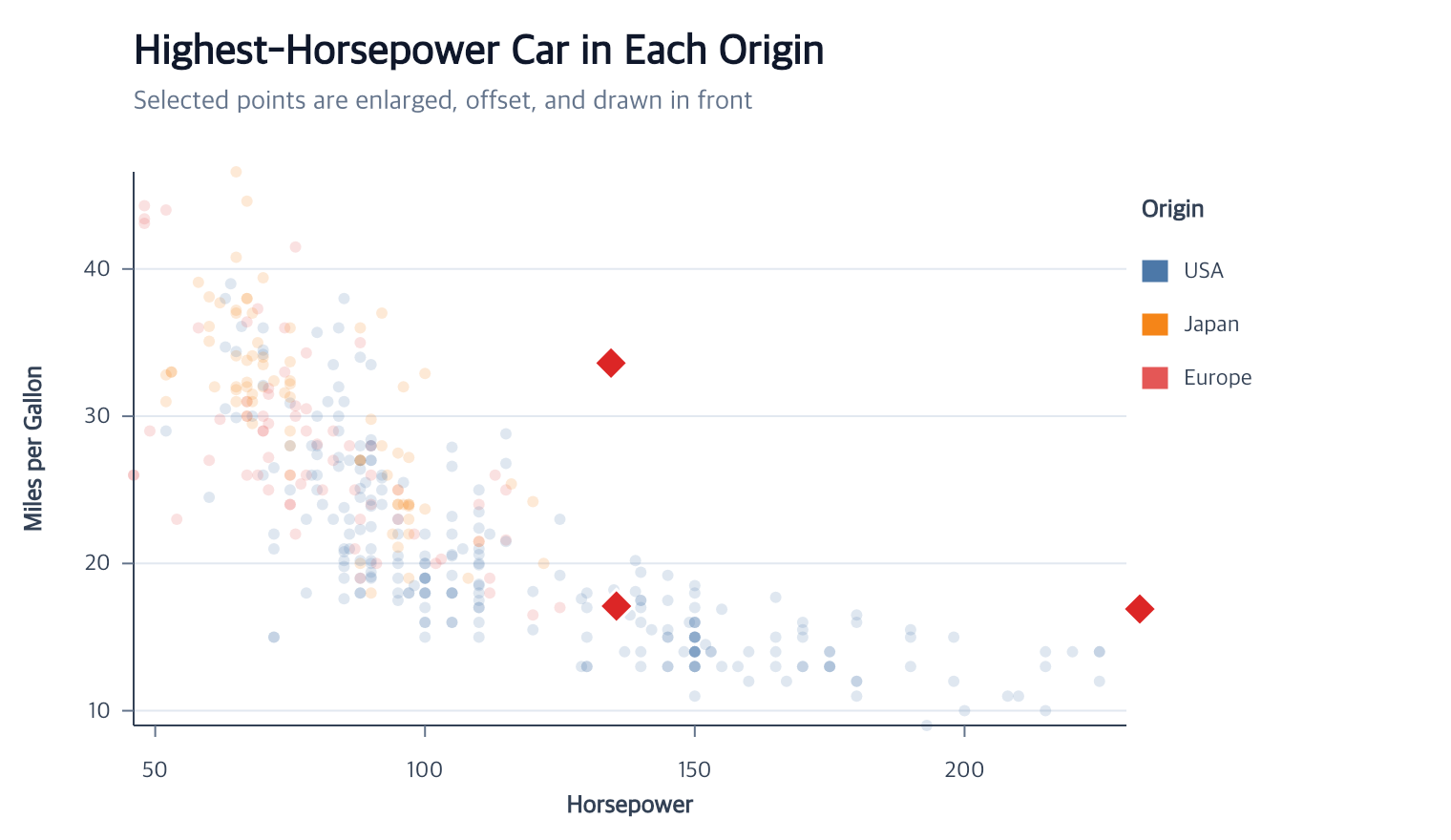
Mark selection and highlighting
selectMarks is the advanced reusable-selection action. Selection by itself
does not alter semanticSpec or graphicSpec:
Contextual fragment. Use an ES module with the imports, data, and prepared resource state described in this section. Caller-provided receivers:
program. Resource selectors used here:target: "points". Resolve these names from setup in this fragment or section; alternatives branch from the same base.
const selected = program.selectMarks({
  id: "highestByOrigin",
  target: "points",
  field: "Horsepower",
  op: "max",
  groupBy: "Origin"
});
Choose exactly one value source:
| Source | Reads | Typical use |
|---|---|---|
field |
One data value that is unique for the final item | Origin of a complete line series |
channel |
Resolved semantic value before scale mapping | Upper bar endpoint y2 |
property |
Concrete scalar from graphicSpec |
Rendered rectangle height |
| Operator | Required operands | Defaults and result |
|---|---|---|
eq, neq, gt, gte, lt, lte |
value |
Strict comparison without coercion |
oneOf |
values array |
Strict set membership |
range |
min, max, optional inclusive |
Both endpoints included by default |
min, max |
optional count, groupBy, ties |
count: 1, ties: "first" |
Operators are strict
eq | neq | gt | gte | lt | lte, set membership with
{ op: "oneOf", values }, range selection with
{ op: "range", min, max, inclusive? }, or ranked selection with
{ op: "min" | "max", count?, groupBy?, ties? }. count defaults to 1,
ties to "first", and inclusive to true. Values are semantic data
values without coercion. The default grain: "item" selects one point symbol,
one final bar segment/rectangle, one gradient-plot category strip, one
line/area series path, one arc sector, or one rule line.
Stacked bars additionally accept grain: "stack" to treat all segments in one
bin or category as a single item. A multi-row path field or channel must have
one unique value at series grain.
Bar channel and graphical property names intentionally mean different things.
For a vertical bar, semantic y is the lower/start endpoint and semantic y2
is the upper/end endpoint. Concrete property y is the top pixel and concrete
property height is its pixel length. For example, select the tallest complete
histogram stack semantically with:
Contextual fragment. Use an ES module with the imports, data, and prepared resource state described in this section. Caller-provided receivers:
program. Resource selectors used here:target: "bars". Resolve these names from setup in this fragment or section; alternatives branch from the same base.
program.selectMarks({
  target: "bars",
  grain: "stack",
  channel: "y2",
  op: "max"
});
Use { property: "height", op: "max" } only when the intended comparison is
the currently rendered pixel height.
highlightMarks is the concise chart-authoring facade. It can create the
selection inline or reuse one:
Contextual fragment. Use an ES module with the imports, data, and prepared resource state described in this section. Caller-provided receivers:
program,selected. Resource selectors used here:selection: "highestByOrigin". Resolve these names from setup in this fragment or section; alternatives branch from the same base.
const highlighted = program.highlightMarks({
  select: {
    field: "Horsepower",
    op: "max",
    groupBy: "Origin"
  },
  color: "#dc2626",
  shape: "diamond",
  size: 5.5,
  offset: { x: 7, y: -7 },
  dimOthers: { opacity: 0.18 }
});

const reused = selected.highlightMarks({
  selection: "highestByOrigin",
  color: "#dc2626"
});
Current highlighting supports point, bar, rect, line, area, arc, rule, and Tick marks. Points
support fill, shape, size, outline, and logical offset. Bars support fill and
outline. Areas and arc sectors support fill, optional outline, opacity, and path
offset. Lines, rules, and Ticks support stroke, width, named or numeric strokeDash,
and logical offset. Each mark rejects options it cannot represent. dimOthers
defaults to false;
true uses opacity 0.25. bringToFront defaults to true and keeps every
graphic attached to one selected semantic item together.
| Mark | Selected-item options | Rejected selected-item options |
|---|---|---|
| Point | color/fill, opacity, stroke, strokeWidth, shape, size, offset |
strokeDash |
| Bar | color/fill, opacity, stroke, strokeWidth |
shape, size, offset, strokeDash |
| Rect | color/fill, opacity, stroke, strokeWidth, offset |
shape, size, strokeDash |
| Line | color/stroke, opacity, strokeWidth, strokeDash, offset |
fill, shape, size |
| Area | color/fill, opacity, stroke, strokeWidth, offset |
shape, size, strokeDash |
| Arc | color/fill, opacity, stroke, strokeWidth, offset |
shape, size, strokeDash |
| Rule | color/stroke, opacity, strokeWidth, strokeDash, offset |
fill, shape, size |
| Tick | color/stroke, opacity, strokeWidth, strokeDash, offset |
fill, shape, size |
All calls reject unknown options, ambiguous targets, incompatible grain, and
invalid values before creating selection or highlight state. strokeWidth
requires a matching stroke for point, bar, area, and arc highlight recipes.
select and selection are mutually exclusive. Empty selectMarks,
highlightMarks, and filterMarks results are valid. An empty mark filter
preserves the preceding domains and clears retained mark, label, and highlight
graphics until the filter is replaced, composed, or removed.
Contextual fragment. Use an ES module with the imports, data, and prepared resource state described in this section. Caller-provided receivers:
program. Resource selectors used here:target: "trends". Resolve these names from setup in this fragment or section; alternatives branch from the same base.
program.highlightMarks({
  target: "trends",
  select: { field: "Origin", op: "eq", value: "Japan" },
  stroke: "#dc2626",
  strokeWidth: 5,
  strokeDash: "dashed",
  dimOthers: { opacity: 0.16 }
});
When that selection exactly matches complete categories in the mark’s legend, legend symbols reflect the selected and dimmed appearance. Legend labels stay fully readable. Partial or unrelated selections do not alter the legend.
Selection and highlight intent is immutable and is reapplied after owning mark
rematerialization, including Canvas changes and filtered data cardinality.
Reapplying highlightMarks for the same selection replaces that appearance
assignment.
Editing and removing stored intent
Replace a stored selector while keeping its ID and mark target:
Contextual fragment. Use an ES module with the imports, data, and prepared resource state described in this section. Caller-provided receivers:
highlighted. Resource selectors used here:selection: "highestByOrigin". Resolve these names from setup in this fragment or section; alternatives branch from the same base.
const revised = highlighted.editMarkSelection({
  selection: "highestByOrigin",
  field: "Horsepower",
  op: "min",
  groupBy: "Origin"
});
The supplied selector is complete, not a partial merge. If the selection has a highlight, the mark and matching categorical legend are rebuilt from their ordinary baseline before the existing style is applied to the new keys.
Remove only the graphical assignment while retaining reusable selection intent, or release both through the selection action:
Contextual fragment. Use an ES module with the imports, data, and prepared resource state described in this section. Caller-provided receivers:
revised. Resource selectors used here:selection: "highestByOrigin". Resolve these names from setup in this fragment or section; alternatives branch from the same base.
const selectedOnly = revised.removeMarkHighlight({
  selection: "highestByOrigin"
});
const released = revised.removeMarkSelection({
  selection: "highestByOrigin"
});
removeMarkSelection removes a dependent highlight first. Direct removal of a
missing highlight or selection is an error. Omitted selection uses the current
selection, then one unique stored selection; ambiguity requires an explicit ID.
Changing the target or ID is a remove-then-selectMarks operation.
For a gradient plot, opacity, stroke, or offset-only highlights preserve the
existing structured density paint. Supplying color or fill deliberately
replaces that paint on the selected strip. Use filterData before
createGradientPlot; filterMarks does not partially filter this composite
body and center-rule resource.
See the complete mark-selection tutorial for the approved point, stacked-bar, and line-series examples.
Related
Appearance overview · Mark-selection tutorial · Data filtering
Documentation provenance
293 actions · sha256:e755591a2e5f5e2b494867583876e28020a478c5220b77bdc6ad469a6224891d