Published-release documentation · release compatibility
Legends
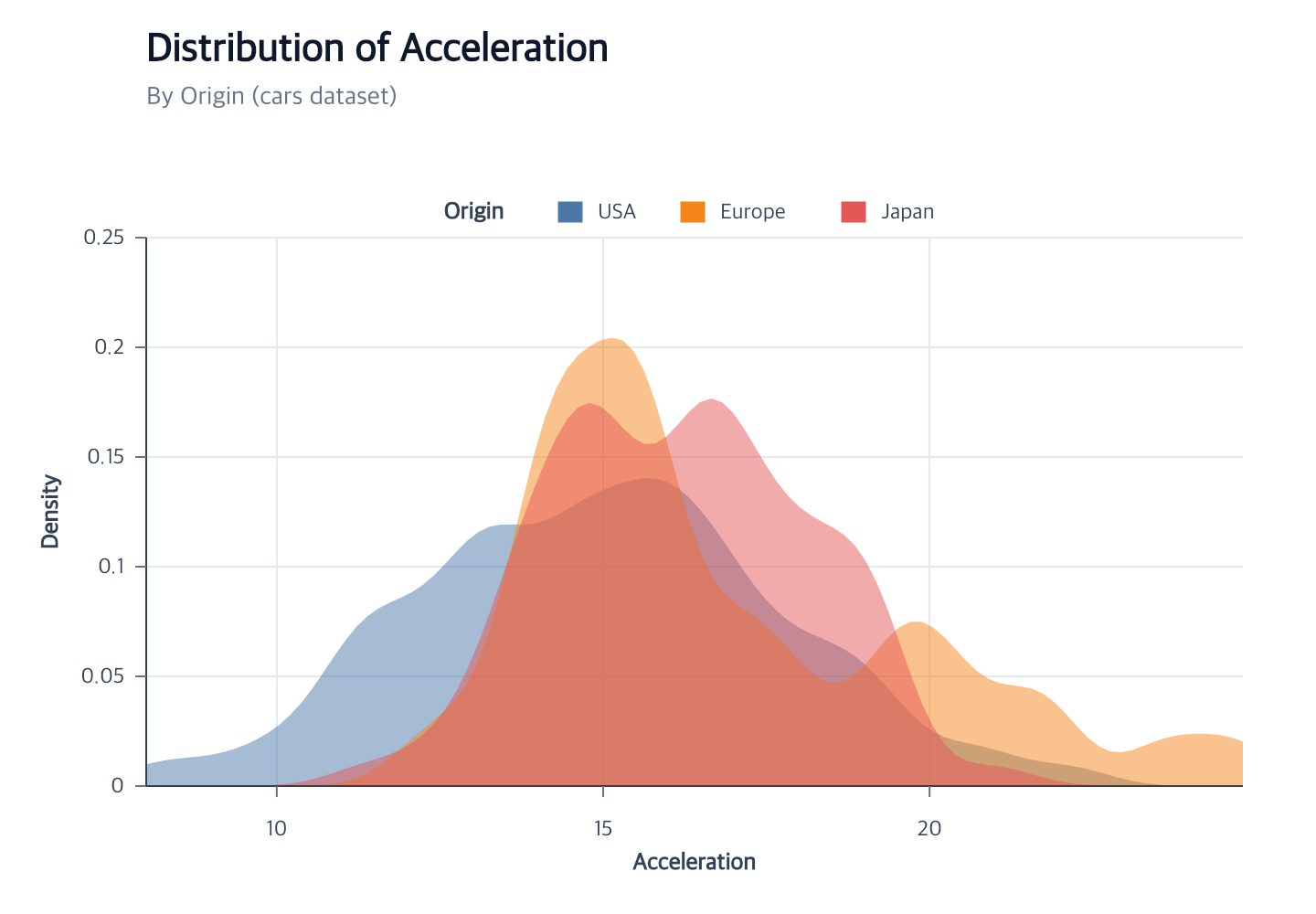
encoding + scaleGuide meaning
→
symbol recipeCategorical, gradient, or composite
→
rect · line · textConcrete guide graphics
At a glance
| Action | Shortest call | Inference/defaults | Result |
|---|---|---|---|
createLegend |
createLegend() |
Current/unique compatible mark; right position | Categorical, size, stroke-width, gradient, interval, or opacity guide; sampled channels and gradient ticks accept exact values |
editLegend |
editLegend({ position: "left" }) |
Unique existing legend; omitted properties retained | Rematerialized content, layout, and appearance |
editLegendBlock |
editLegendBlock({ target: "points", channel: "size", title: "Magnitude" }) |
Explicit mark and represented channel | Only the selected logical block is rematerialized |
| Focused edits | editLegendLabels({ fontSize: 11 }) |
Same target inference as editLegend |
One legend component rematerialized |
removeLegend |
removeLegend({ channels: ["size"] }) |
Existing legend owner; omitted channels remove all | Selected complete blocks removed |
Legends are inferred from final mark encodings and materialized as concrete graphics. Start with the family that matches the encoded channel and use the editing page when changing an existing guide.
Right and left legends start at the top of the actual plot, excluding the chart title.
The complete legend includes its visible title, symbols, labels, and optional border.
Multiple blocks share one stack whose top aligns with the plot; blocks retain their spacing.
Shared facet legends align with the top of the translated child plots.
When offset is omitted, the native gap follows the actual occupied axis guides on the same edge, including left and right. An explicit offset remains anchored to the plot.
Polar theta and radial labels and titles also reserve space outside the plot. Their measured bounds update the default legend clearance after font edits, Canvas resizing, and snapshot restoration. Top, bottom, and in-plot corner positions keep their own alignment rules.
Editing one block
Use the optional singular channel on editLegend or a focused editor to select one existing block:
Contextual fragment. Use an ES module with the imports, data, and prepared resource state described in this section. Caller-provided receivers:
program. Resolve these names from setup in this fragment or section; alternatives branch from the same base.
// Fragment: program already owns color and opacity legends for one point mark.
program.editLegendLabels({ channel: "opacity", fontSize: 10 });
This changes only the selected block. It preserves sibling typography and sample values. Specify target
when more than one mark owns legends. Singular channel cannot accompany plural channels, which replaces
whole-target content, or whole-group blockLayout/at controls.
Supported legend families
| Legend family | Supported marks | Channels |
|---|---|---|
| Categorical color/shape/dash | point, line, area, bar, rect, arc, text | ordinal color; point shape; line strokeDash; compatible composites follow family constraints |
| Categorical stroke | point, line, area, bar, rect, arc, rule, tick | ordinal stroke; final-item or series identities |
| Continuous color gradient | point, aggregate bar, rect, text, tick | sequential color; gradient swatch, no symbol recipe |
| Continuous stroke gradient | point, line, area, bar, rect, arc, rule, tick | sequential stroke; separate gradient, no symbol recipe |
| Discretized color interval | point, aggregate bar, rect, tick | quantize/quantile/threshold color; rectangle swatches |
| Discretized stroke interval | point, line, area, bar, rect, arc, rule, tick | quantize/quantile/threshold stroke; outline-colored interval symbols |
| Size | point | size; continuous numeric samples or every discrete interval; point glyph symbol |
| Opacity | point, line, bar | quantitative opacity samples; representative point symbol even for line consumers; Rule opacity has no legend |
| Stroke width | line, rule | quantitative strokeWidth samples; line symbol |
Focused legend families
Errors and limitations
Continuous color legends support point, aggregate-bar, and rect marks. Continuous
stroke legends support every stroke-capable mark at its documented item/series grain. Field
Opacity legends support Point and Line; discretized color legends support Point, aggregate Bar, and Rect. Interactive legends are unsupported.
Combined point-series and size legends support every edge. Continuous size
blocks sample the domain; discrete size blocks show every interval.
Side positions stack the blocks; horizontal positions place them in rows. A left block must
fit outside any left y-axis guides; omitted offsets reserve this clearance automatically.
Stroke-width legends support all four edges and plot corners through createLegend and
editLegendLayout. Use layout: "edge", offset, itemGap, and horizontal
align, direction, columns, and titlePosition controls. Title, count,
label/title styles, and border are editable. Side positions require vertical
direction, center alignment, one column, and a top title. Symbol recipes,
gradient, and order are unsupported; edit quantitative mapping through editScale.
Continuous size, opacity, stroke-width, color-symbol and color/stroke-gradient legends accept values for exact
ascending samples. Exact values must fit the effective domain and cannot be
combined with count; use editLegend({ values: "auto" }) to return to the
remembered automatic sample count. Automatic samples retain exact domain endpoints, so rounding cannot extrapolate opacity beyond its range. For a gradient tick selection, use
editLegend({ channel: "color", values: [40, 60, 80] }) on an existing matching
scale. Use editLegendBlock() for sampled blocks, order, title, labels, spacing,
and supported symbol appearance when a target has multiple blocks.
Right-side layout requires sufficient right margin; bottom layout requires
sufficient bottom margin; top layout requires enough top margin for its title,
item grid, offset, and optional border. A fixed outer Canvas reports a layout error when there is insufficient space. Use
createCanvas({ plot: { width, height } }) to retain exact plot dimensions while
measured guide overflow grows the outer margins. Symbol layers are never dropped.
Space rows by content
Create the complete legend first, then refine its spacing. This fragment requires an existing item-based legend:
Contextual fragment. Use an ES module with the imports, data, and prepared resource state described in this section. Caller-provided receivers:
program. Resolve these names from setup in this fragment or section; alternatives branch from the same base.
program.editLegendLayout({ rowPadding: 7, titlePadding: 20 });
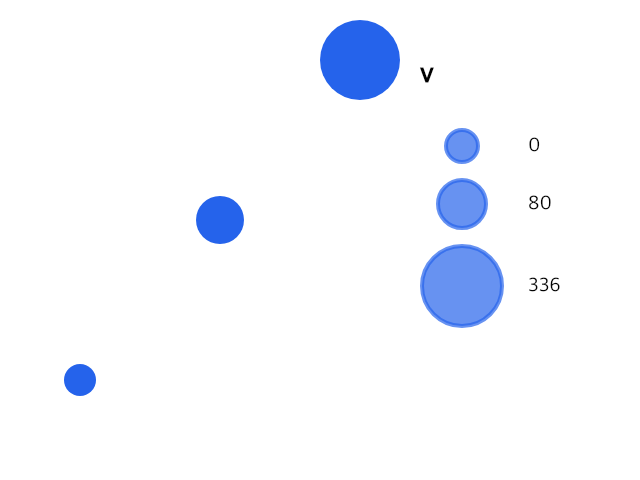
rowPadding is the empty vertical distance between adjacent rows’ occupied
sample and label bounds. It accounts for each row’s own symbol size and stroke;
a text-only overflow row reserves only its label. Multi-column grids measure
the union of each row. itemGap continues to control horizontal spacing and
supplies the original vertical pitch when rowPadding is omitted.
titlePadding independently sets the occupied title-to-body distance: vertical
for top or bottom titles, horizontal for an inline left title. Hidden titles
reserve no distance. Text bounds use the library’s deterministic font-size and
hard-line-break measurement, rather than browser-specific glyph ink.
Both values accept finite non-negative logical pixels, including zero.
editLegend and editLegendLayout accept "auto" to remove either policy;
omitting a value preserves it. Creation accepts numbers only. The original
layout is unchanged when neither policy is supplied. Gradient strips accept
titlePadding only; reset rowPadding before switching an item legend to a
gradient. Both options require layout: "edge", rather than "legacy-bottom".
See editing legends for block selection.
Put a compact categorical legend inside the plot
Use a corner position such as "top-left" and
overflow: { maxItems: 29 } in createLegend or editLegend. The first 29
categories keep their original symbols; a text-only summary reports the remaining
count. border: { background: "white" } provides an opaque panel behind the
legend. The limit changes the displayed guide only, preserving every data row
and color assignment. See the exact legend contract
for supported anchors and layout restrictions.
Title alignment.
Use titleStyle: {align: "left"} to align a top title inside the measured
legend content block. The same style accepts "center" and "right" for
categorical, gradient, interval, size, opacity and stroke-width legends. This
text alignment is separate from the complete legend’s placement align.
Omitting it preserves the native layout’s current default.
On an existing legend, editLegendTitle({align: "right"}) changes only that
choice. editLegendTitle({align: "auto"}) restores the native default; the
whole edit equivalent is editLegend({titleStyle: {align: "auto"}}). These
are fragments requiring an existing legend. A top-to-inline title transition
can reset the choice in the same whole edit; inline titlePosition: "left"
rejects an explicit title alignment. Border padding, group anchors, item
positions and spacing retain their existing rules.
Related
Guides · Series encodings · Canvas · Troubleshooting
When creating a separate size legend, an explicit position is honored even if a color or shape legend for the same mark uses another edge. Omit size position to inherit the categorical legend edge. Resizing retains that choice.
Documentation provenance
293 actions · sha256:e755591a2e5f5e2b494867583876e28020a478c5220b77bdc6ad469a6224891d