Published-release documentation · 281 actions; release compatibility · contract 5520b0fa9525
Facets and Field Repetition
Family overview · Exact action lookup
Repeat the current chart by a field
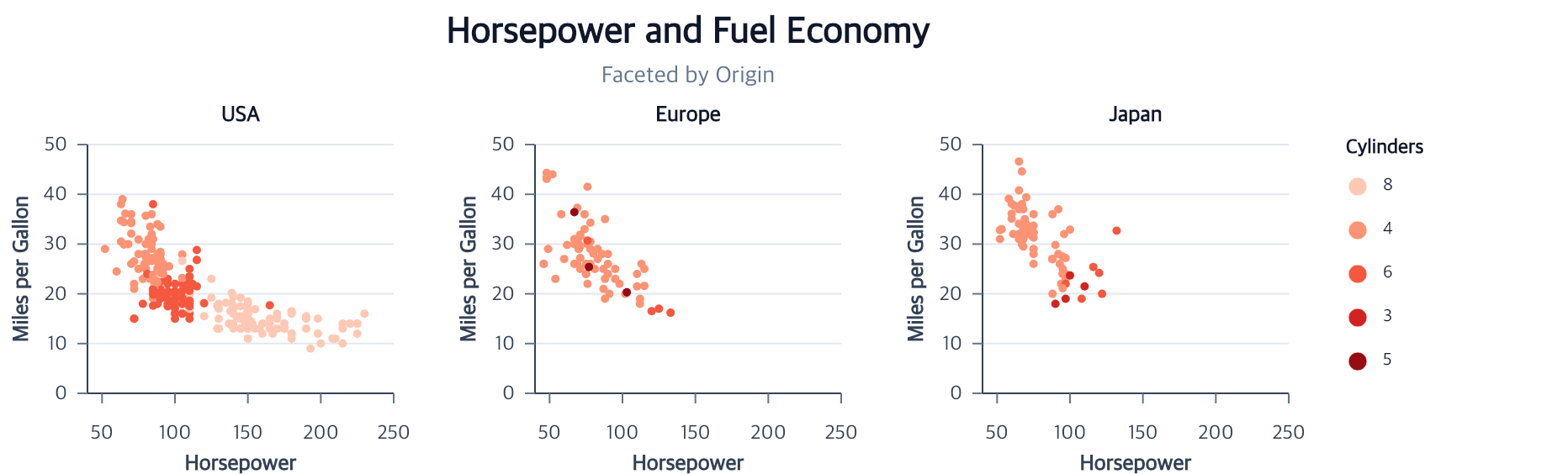
Call facet on one complete unit chart to repeat it for each observed field
value:
Contextual fragment. Use an ES module with the imports, data, and prepared resource state described in this section. Resolve these names from setup in this fragment or section; alternatives branch from the same base.
import { chart } from "ggaction";

const faceted = chart()
  .createCanvas({ width: 250, height: 230 })
  .createData({ values: cars })
  .createPointMark()
  .encodeX({ field: "Horsepower" })
  .encodeY({ field: "Miles_per_Gallon" })
  .encodePointRadius({ value: 2.5 })
  .encodeColor({ field: "Cylinders", fieldType: "ordinal" })
  .facet({
    field: "Origin",
    columns: 3,
    guides: { legend: "shared" }
  })
  .createTitle({ text: "Horsepower and Fuel Economy" });
The input rows in this runnable fragment must contain complete values for the encoded fields. See the repository example for the complete data preparation and guide options.
facet uses field values in source first-appearance order. It infers one
common row-preserving dataset ancestor, then filters and replays supported
derived data independently inside each cell. Omitted columns creates one row;
a positive value wraps cells row-major. A facet contains at most 100 children,
and source-row count multiplied by child count must not exceed the shared
10,000,000-unit work budget.
| Option | Default | Effect |
|---|---|---|
id |
"facet" |
Names the parent and deterministic child namespaces |
field |
required | Direct-source field whose values define cells |
data |
unique common ancestor | Selects the row-preserving partition dataset explicitly |
values |
source first-appearance order | Selects and orders a non-empty set of observed scalar values |
columns |
number of values | Sets the grid column count |
gap |
16 |
Sets horizontal and vertical cell spacing |
align |
"center" |
Aligns unequal cells inside grid tracks |
padding |
0 on every side |
Adds scalar or four-side parent padding |
scales |
every used role "shared" |
Sets "shared" or "independent" per x, y, xOffset, yOffset, theta, public r, color, stroke, size, shape, opacity, strokeDash, or all parallelDimensions |
guides.axes |
"each" |
"outer" keeps occupied-edge Cartesian x/y axes; Polar and Parallel axes remain local and reject "outer" |
guides.legend |
false |
"shared" promotes one compatible parent-owned categorical, gradient, discretized-color, size, or opacity legend |
Author the legend position on the unit chart before calling facet. Promotion
preserves an explicit left, right, top, or bottom edge and the
horizontal align used by top and bottom legends; there is no separate facet
legend-position option:
Contextual fragment. Use an ES module with the imports, data, and prepared resource state described in this section. Resolve these names from setup in this fragment or section; alternatives branch from the same base.
const source = chart()
  .createCanvas({
    width: 420,
    height: 300,
    margin: { top: 40, right: 40, bottom: 90, left: 60 }
  })
  .createData({ values: cars })
  .createPointMark()
  .encodeX({ field: "Horsepower" })
  .encodeY({ field: "Miles_per_Gallon" })
  .encodeColor({ field: "Cylinders", fieldType: "ordinal" })
  .createLegend({
    channels: ["color"],
    position: "bottom",
    direction: "horizontal",
    align: "center"
  });

const facetedWithBottomLegend = source.facet({
  field: "Origin",
  columns: 1,
  guides: { legend: "shared" }
});
For a promoted top or bottom legend, the parent reserves a horizontal lane and
keeps the child-grid width unchanged. Left and right legends reserve a vertical
lane instead. If the source has no concrete legend and facet infers the
legacy categorical shared legend, the default remains right. Subsequent
editCompositionLayout calls preserve the promoted edge and alignment.
Shared auto domains use the full faceted result; independent auto domains are resolved from each cell. An explicit semantic domain always wins. Regression, density, interval/error-band, and box-summary/outlier datasets are replayed after the cell filter, so each panel receives a fresh statistical result rather than a clipped copy of the full-chart result.
The Cartesian slice supports point, line, area, histogram, aggregate bar,
ranged bar, rule, regression, density, interval/error-band, and box-plot layers.
Polar Point, Line, direct Arc, Pie, Rose, and Radar charts and Parallel-coordinate
charts can also be faceted when their visible layers share one valid
row-preserving partition ancestor and one coordinate family. Public scale
policy r addresses the semantic radius role; radius is not an alias.
parallelDimensions applies one policy independently to every dimension scale,
so unrelated units are never merged into one domain. Shared domains do not
share pixel ranges: every Polar frame and Parallel dimension position is
resolved against its child Canvas.
These are fragments that require already-complete unit programs:
Contextual fragment. Use an ES module with the imports, data, and prepared resource state described in this section. Caller-provided receivers:
polarUnit,parallelUnit. Resolve these names from setup in this fragment or section; alternatives branch from the same base.
const radialPanels = polarUnit.facet({
  field: "region",
  scales: { theta: "shared", r: "independent" }
});

const parallelPanels = parallelUnit.facet({
  field: "region",
  scales: { parallelDimensions: "shared" }
});
A shared legend is accepted only when every represented child scale and legend recipe is concretely compatible; scale resolution alone does not make a guide shareable. Polar theta/radius axes and Parallel dimension axes remain inside each panel. Requesting outer axes for either family fails before a composition is returned.
Create a chart title after facet so the title is owned directly by the
parent. A title that already fits the unit Canvas is promoted for authoring
order compatibility rather than repeated in every cell.
The parent title aligns to the union of the child plot bounds, excluding cell margins and the shared legend. Each repeated header is likewise centered on its own child plot—not on the complete child Canvas—so asymmetric axis space does not visually offset panel titles.
Edit the repeated header style without addressing generated graphic IDs:
Contextual fragment. Use an ES module with the imports, data, and prepared resource state described in this section. Caller-provided receivers:
faceted. Resolve these names from setup in this fragment or section; alternatives branch from the same base.
const emphasized = faceted.editFacetHeaders({
  fontSize: 13,
  fontWeight: 700,
  color: "#0f172a",
  offset: 10
});
Facet-header weights follow the shared Canvas font-weight policy.
An unqualified edit updates the common header style and keeps the existing one-header-per-cell layout. A row or column role switches to separate strips:
Contextual fragment. Use an ES module with the imports, data, and prepared resource state described in this section. Resolve these names from setup in this fragment or section; alternatives branch from the same base.
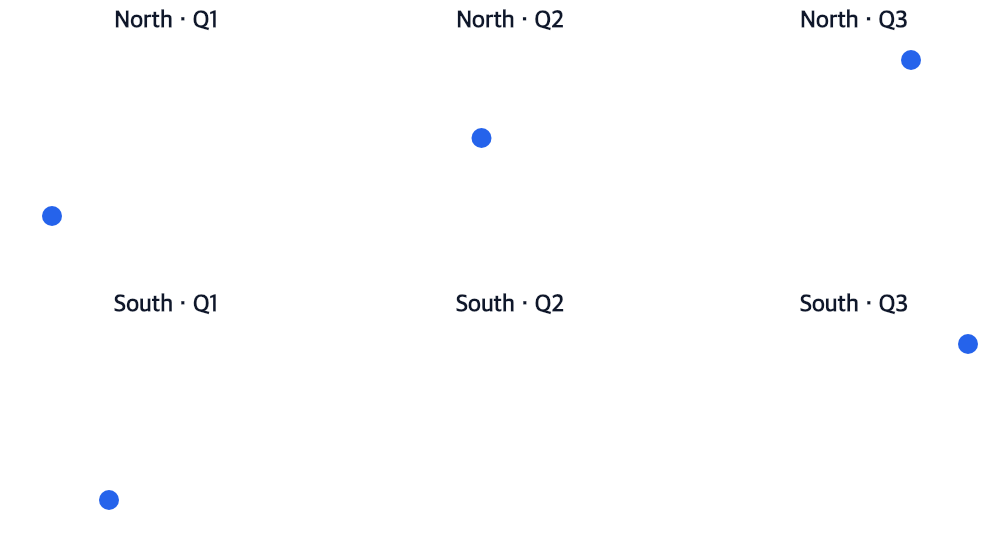
const labeledMatrix = matrix
  .editFacetHeaders({
    labelMap: [{ value: "Q1", label: "First quarter" }]
  })
  .editFacetHeaders({
    role: "row",
    side: "left",
    align: "center",
    labelMap: [{ value: "North", label: "Northern region" }]
  })
  .editFacetHeaders({
    role: "column",
    side: "bottom",
    align: "start"
  });
Row-column grids create one header for each occupied column, followed by one
for each occupied row. One-field facets and repeatCharts support the column
role and retain one header per cell. Row sides are left or right; column
sides are top or bottom. Role settings override the common style and map.
labelMap: "auto" on a role returns to the common map, while an unqualified
reset returns to the normal visible formatter. Typed raw values remain the
partition identity. Duplicate display text and "" are allowed; an empty
mapped header keeps its stable item position and reserves no strip space.
Header strips are measured before child placement. Changes to fonts, labels, sides, composition layout, titles, or shared legends therefore rebuild the required parent space without moving or rewriting child program identity.
Build a row and column facet grid
Use facetGrid when two source fields define the comparison:
Contextual fragment. Use an ES module with the imports, data, and prepared resource state described in this section. Caller-provided receivers:
unit. Resolve these names from setup in this fragment or section; alternatives branch from the same base.
const matrix = unit.facetGrid({
  id: "matrix",
  rows: { field: "region", values: ["North", "South"] },
  columns: { field: "period", values: ["Q1", "Q2", "Q3"] },
  combinations: "full",
  gap: 12
});
Omitted row or column values use source first-appearance order. "observed"
creates children only for pairs present in the source while retaining each
pair’s actual grid coordinates. "full" creates the Cartesian
product. A missing pair remains a named Canvas with its semantic layers,
coordinate, canonical empty graphics, and header, so neighboring cells never
shift into its position. Shared domains are inferred from populated cells and
allow the empty child to materialize local axes or grids. An independent
automatic domain with no final values is an error; an explicit domain is valid.
The child limit is 100 after applying the combination policy. The same
10,000,000-unit partition-work limit used by facet applies. facetGrid
supports the same Cartesian, Polar, and Parallel chart families, scale policies,
axis restrictions, and compatible shared legends as facet.
See the runnable grid example for a 2 × 3 full grid with one missing source pair.
Repeat a positional encoding across fields

repeatCharts compares several fields without copying the complete unit recipe:
Contextual fragment. Use an ES module with the imports, data, and prepared resource state described in this section. Caller-provided receivers:
unit. Resource selectors used here:target: "product". Resolve these names from setup in this fragment or section; alternatives branch from the same base.
const metrics = unit.repeatCharts({
  id: "metrics",
  target: "product",
  channel: "x",
  fields: ["speed", "quality", "cost"],
  columns: 3,
  guides: { legend: "shared" }
});
The action accepts x or y on one direct Cartesian mark, theta or public
r on eligible Polar Point/Line/direct Arc/Rose roles, and one
{ parallelDimension: field } on Parallel coordinates. The Parallel form
replaces exactly one dimension and preserves its position, field type, explicit
title, sibling dimensions, row key, and missing-value policy. target may be
omitted only when exactly one primary mark is eligible. Attached labels and
statistical-reference dependents owned by that target replay with it. Child IDs
and headers follow the ordered field list.
This fragment requires a complete Parallel-coordinate unit:
Contextual fragment. Use an ES module with the imports, data, and prepared resource state described in this section. Caller-provided receivers:
parallelUnit. Resolve these names from setup in this fragment or section; alternatives branch from the same base.
const comparisons = parallelUnit.repeatCharts({
  channel: { parallelDimension: "horsepower" },
  fields: ["horsepower", "weight", "displacement"]
});
The repeated role defaults to independent domains; requesting it as shared produces the union domain. Other used roles default to shared, and one compatible non-repeated legend may be promoted to the parent.
Every repeated field can describe a different quantity, so outer-axis promotion is rejected. Pie and Radar raw theta/r repetition, composite roles, derived target datasets, and unrelated sibling layers also fail atomically. See the runnable repeat example.