Published-release documentation · 281 actions; release compatibility · contract 5520b0fa9525
Attached Mark Labels
Family overview · Exact action lookup
createMarkLabels(options?)
Create final-item labels in one call, then use the lower text actions to refine them:
Contextual fragment. Use an ES module with the imports, data, and prepared resource state described in this section. Resource selectors used here:
target: "piePlot-labels". Resolve these names from setup in this fragment or section; alternatives branch from the same base.
import { chart } from "ggaction";

const labeled = chart()
  .createCanvas({ width: 480, height: 360, margin: 50 })
  .createData({ values: [{ category: "A", value: 2 }, { category: "B", value: 6 }] })
  .createPiePlot({ category: "category", value: "value", aggregate: "sum", guides: false })
  .createMarkLabels({ content: "share", format: ".0%", fontSize: 20 });
// Labels: 25%, 75%; the created layer is "piePlot-labels".
const refined = labeled.editTextMark({ target: "piePlot-labels", fontWeight: "bold" });
The current compatible mark, then one unique compatible mark, supplies the source.
Use source to choose explicitly. The default ID is <source>-labels; additional
label layers on the same source require explicit IDs. Each label uses the source’s
final visual item, so aggregated marks do not get duplicate labels for input rows.
Omitting field, value, and content selects content: "value" for a supported
Bar or Arc. Use content: "category" or "share" for other semantic content, field
for raw/common fields, or value for a constant. These choices are exclusive.
Point, Line, Rule, and Rect labels require a field or constant. A Line source
creates one label at the final coordinate of each series and reads explicit fields
from that final ordered row. Format defaults to
"auto"; shares need an explicit percent format to display percentages.
Text is centered horizontally and vertically at the existing source anchor. Use
baseline: "bottom", dy: -4 to place labels above an endpoint, or other ordinary
text style options. Use placement when the offset should follow a mark boundary,
sign, stack segment, or Polar frame. layout: {} enables collision avoidance, and a layout object
accepts layoutLabels options except target. Omission or false preserves source
anchors without collision layout. An incomplete explicit source is supported when
layout is disabled; call layoutLabels after completing it.
The result is an ordinary text layer: edit it with encodeText, editTextMark,
layoutLabels, or removeLabelLayout. Source changes replay the labels. Remove one
attached label with removeMarkLabels({ target: "piePlot-labels" }), or remove every
label on a source with removeMarkLabels({ source: "piePlot" }). Removing the source
with removeMark still removes all labels it owns.
To label a subset, pass an inline MarkSelector with select, or a reusable stored
selection ID with selection:
Contextual fragment. Use an ES module with the imports, data, and prepared resource state described in this section. Resource selectors used here:
source: "bars". Resolve these names from setup in this fragment or section; alternatives branch from the same base.
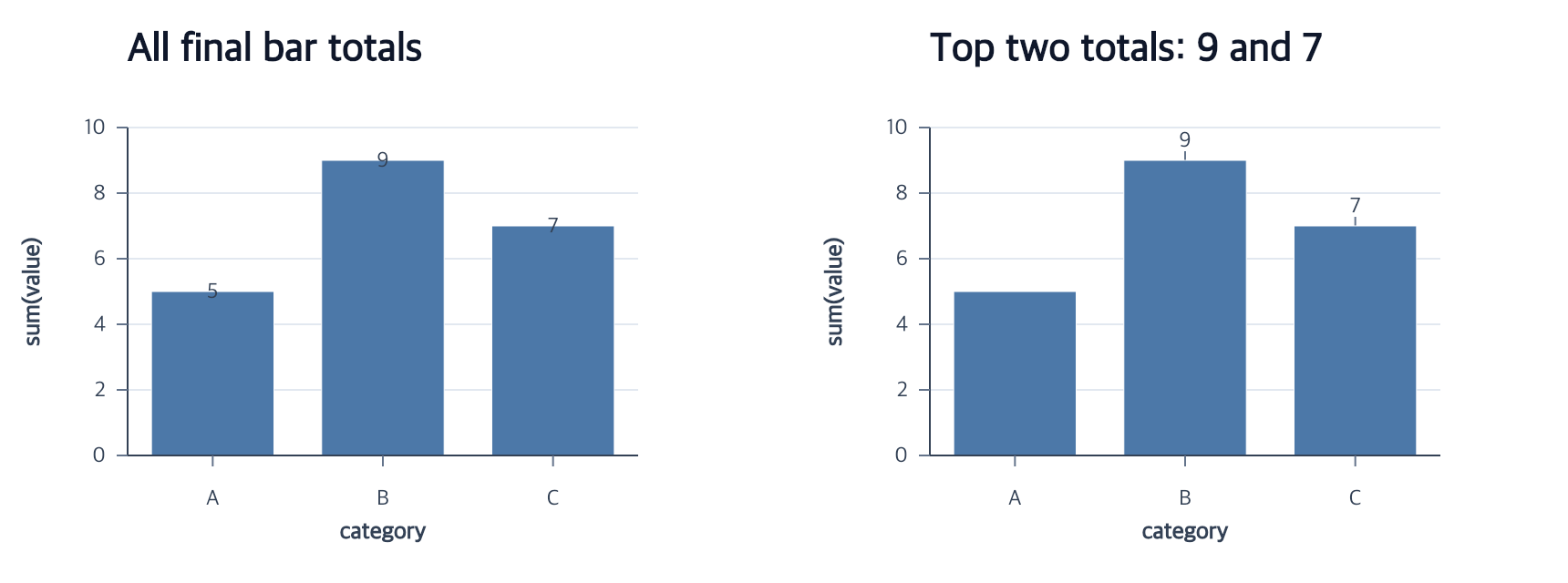
const selectedLabels = chart()
  .createCanvas()
  .createData({ values: [
    { category: "A", value: 1 },
    { category: "B", value: 5 },
    { category: "C", value: 3 }
  ] })
  .createBarPlot({
    id: "bars",
    x: "category",
    y: { field: "value", aggregate: "sum" },
    guides: false
  })
  .createMarkLabels({
    source: "bars",
    field: "value",
    select: { field: "value", op: "max", count: 2 }
  });
// Labels: 5, 3. All three bars remain.
The selector evaluates the source’s current final items after mark filtering.
Rank selection uses the existing count, groupBy, and ties rules, then keeps
labels in source item order. A selector that matches nothing creates a valid empty
label collection. select and selection are exclusive; a named selection must
target the same source mark. Stored label state contains the selector request, not
resolved row numbers or item indices. Semantic values are resolved over the complete
final source before membership filtering. For example, selecting the largest pie
slice preserves its share of the complete pie instead of renormalizing the one
visible label to 100%.
editMarkLabelSelection(options)
Replace the complete membership request for an existing attached label layer:
Contextual fragment. Use an ES module with the imports, data, and prepared resource state described in this section. Caller-provided receivers:
labeled. Resource selectors used here:target: "piePlot-labels";selection: "focus". Resolve these names from setup in this fragment or section; alternatives branch from the same base.
const inline = labeled.editMarkLabelSelection({
  target: "piePlot-labels",
  select: { field: "value", op: "max", count: 3 }
});
const named = inline.editMarkLabelSelection({
  target: "piePlot-labels",
  selection: "focus"
});
const all = named.editMarkLabelSelection({
  target: "piePlot-labels",
  all: true
});
Exactly one of select, selection, or all:true is required, and target is
always explicit. Editing a named selection automatically reevaluates dependent
labels. Removing that selection is rejected while a label refers to it; switch the
label to all:true or an inline selector, or remove the label first. Source edits,
mark filters, category ordering, Canvas changes, and themes reevaluate membership
without turning resolved item indices into persistent state.
editMarkLabelPlacement(options)
Attach the label position to the meaning of the source geometry:
Contextual fragment. Use an ES module with the imports, data, and prepared resource state described in this section. Caller-provided receivers:
labeled. Resource selectors used here:target: "piePlot-labels". Resolve these names from setup in this fragment or section; alternatives branch from the same base.
const outside = labeled.editMarkLabelPlacement({
  target: "piePlot-labels",
  placement: {
    anchor: "outsideEnd",
    gap: 4,
    overflow: "outside",
    leader: { stroke: "#64748b", strokeWidth: 1 }
  }
});

const restored = outside.editMarkLabelPlacement({
  target: "piePlot-labels",
  placement: "auto"
});
The same placement object is accepted by createMarkLabels. anchor is one of
center, insideStart, insideEnd, outsideStart, or outsideEnd. gap
defaults to 4 logical pixels and measures from the mark boundary to the nearest
edge of the measured text box. overflow defaults to hide; use outside for
one fallback beyond the corresponding boundary or allow to keep an inside
label that does not fit. leader defaults to false.
Bar start/end positions follow each final segment, including negative, stacked,
ranged, and reversed bars. Arc start/end positions mean the inner and outer
radius on the sector midpoint ray. An outsideStart label that would pass through
the Polar center is hidden unless overflow: "allow" is explicit. A directed Rect
interval supports the same anchors. Cartesian Point supports center; Polar Point also supports
outsideEnd. Line keeps its existing series-endpoint label behavior and rejects
this placement object. Rule labels reject it as well.
Text size, source data and encodings, scale reversal, Canvas size, Polar frame,
selection membership, and collision layout all recompute the final position.
Hidden labels have no leader. A placement leader and a layoutLabels leader are
exclusive, while placement leaders can follow collision movement when the
collision layout itself has no leader. placement: "auto" removes only this
semantic override and restores the legacy source anchor.
removeMarkLabels(options)
Use exactly one explicit selector:
Contextual fragment. Use an ES module with the imports, data, and prepared resource state described in this section. Caller-provided receivers:
labeled. Resource selectors used here:target: "piePlot-labels";source: "piePlot". Resolve these names from setup in this fragment or section; alternatives branch from the same base.
const oneRemoved = labeled.removeMarkLabels({ target: "piePlot-labels" });
const allRemoved = labeled.removeMarkLabels({ source: "piePlot" });
target must identify source-owned Text; independent Text and createAnnotation
results use removeMark. source removes all attached label layers owned by that
Point, Line, Bar, Rule, Rect, or Arc mark while preserving the source itself. Calling
the source form when that source has no labels succeeds without changing chart
resources.
Removal also clears the selected labels’ layout settings, generated leader lines, and label-target selection/highlight state. Source-target interaction remains. If another retained resource refers to a requested label, the complete operation fails before any label is removed. Later source encoding/style, scale, Canvas, and theme edits do not recreate removed labels.