Published-release documentation · release compatibility
Titles
At a glance
| Action | Shortest call | Inference/defaults | Result |
|---|---|---|---|
createTitle |
createTitle({ text: "Title" }) |
Top, plot-left alignment, default styles | Semantic text and concrete title graphics |
editTitle |
editTitle({ position: "bottom" }) |
Preserves omitted text, layout, wrapping, and style | Rematerialized title graphics |
removeTitle |
removeTitle() |
Existing chart title | Title and subtitle resource removed |
createTitle(options)
Creates one chart title and an optional subtitle on any Canvas edge.
Facet parents support the same four edges. Their inferred Canvas reserves an outer lane for the title and subtitle, outside retained axes, headers and shared legends. Alignment follows the union of the child plots; left and right titles rotate with their subtitle. Editing the title or facet layout recomputes that lane.
Contextual fragment. Use an ES module with the imports, data, and prepared resource state described in this section. Caller-provided receivers:
program. Resolve these names from setup in this fragment or section; alternatives branch from the same base.
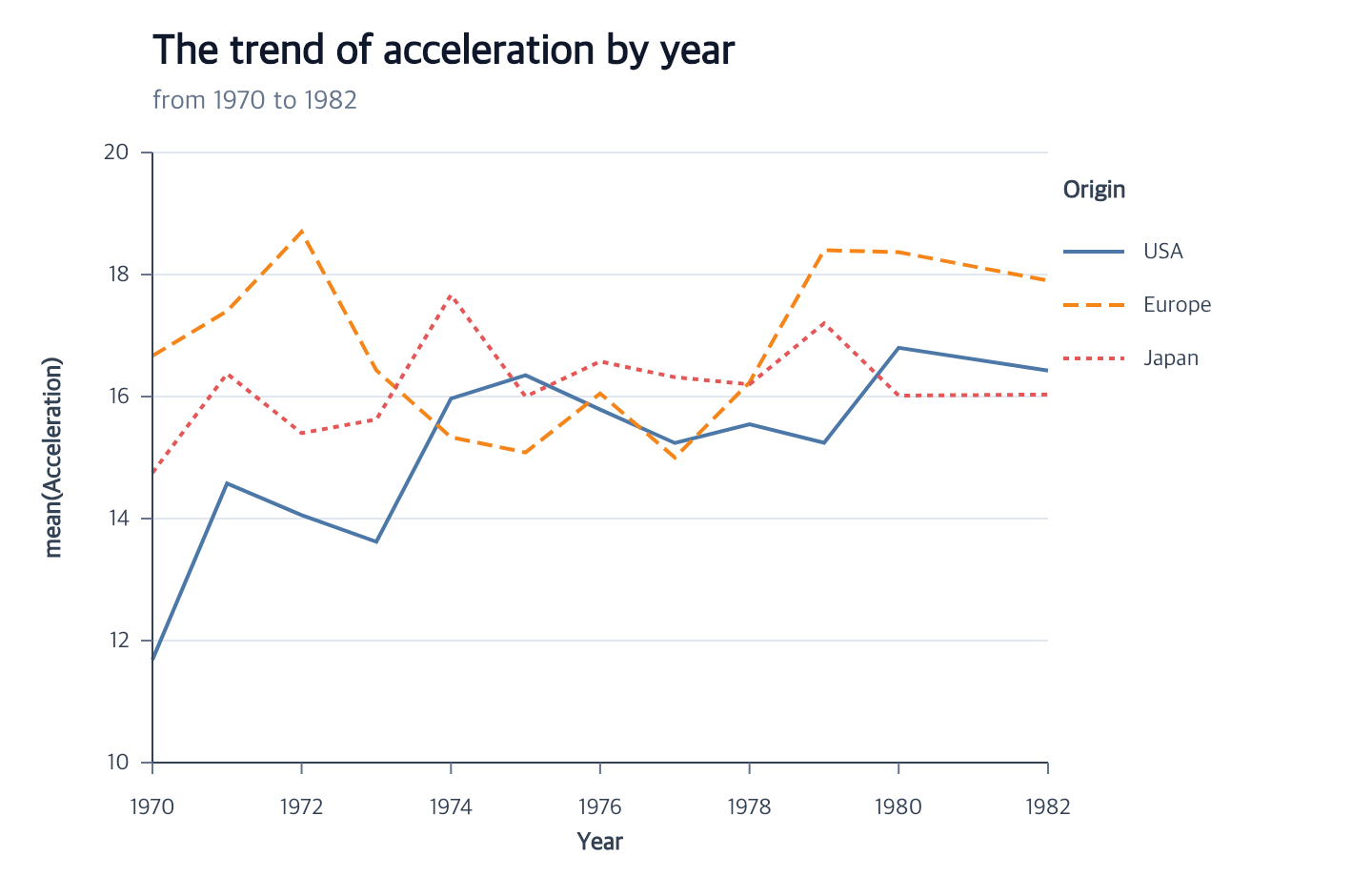
program.createTitle({
  text: "The trend of acceleration by year",
  subtitle: "from 1970 to 1982"
});
| Option | Type | Default |
|---|---|---|
text |
non-empty string | required |
subtitle |
non-empty string | omitted |
position |
"top", "bottom", "left", or "right" |
"top" |
align |
"left", "center", or "right" |
"left" |
offset |
finite number | 0 |
gap |
non-negative number | 8 |
maxWidth |
positive number | omitted; no wrapping |
wrap |
"word" or "character" |
"word" when maxWidth is set |
lineHeight |
positive number | each font size × 1.2 |
subtitleLineHeight |
finite number ≥ subtitle font size | shared lineHeight, or subtitle font size × 1.2 |
titleStyle |
text style object | default title style |
subtitleStyle |
text style object | default subtitle style |
Both style objects accept color, fontSize, fontFamily, fontWeight, and
fontStyle: "normal" | "italic" (normal by default). Title and subtitle styles
are independent; for italic credits, pass subtitleStyle: { fontStyle: "italic" }.
Style edits preserve omitted fields. Measured wrapping distinguishes normal and italic fonts.
Numeric weights follow the shared Canvas font-weight policy.
The defaults are:
Contextual fragment. Use an ES module with the imports, data, and prepared resource state described in this section. Resolve these names from setup in this fragment or section; alternatives branch from the same base.
{
  titleStyle: {
    color: "#0f172a",
    fontSize: 22,
    fontFamily: "sans-serif",
    fontWeight: 600
  },
  subtitleStyle: {
    color: "#64748b",
    fontSize: 14,
    fontFamily: "sans-serif",
    fontWeight: "normal"
  }
}
Position, alignment, and wrapping
Alignment uses the plot bounds rather than the full Canvas: left aligns with the plot’s left edge, center with its midpoint, and right with its right edge. For a facet, the alignment span is the union of the translated child plot bounds. Child margins, axis labels and titles, facet padding, and shared legends do not pull the title away from the visual center of the plots. For a left or right title, the same values mean the top, center, and bottom of the plot edge. Left titles rotate counter-clockwise and right titles rotate clockwise; top and bottom titles remain horizontal.
Set maxWidth to wrap text before edge rotation. Word wrapping prefers
whitespace and falls back to Unicode-safe character wrapping for an oversized
word. Character wrapping always splits on Unicode code-point boundaries. The
library uses deterministic text metrics so the same program produces the same
line breaks in browsers and Node. Renderers draw the concrete lines already in
graphicSpec; they do not wrap text again. Title and subtitle strings accept
explicit newline characters. Each hard line wraps independently when maxWidth
is set. Leading, interior, and trailing blank lines reserve vertical spacing
without creating empty painted text. Each title or subtitle must contain at
least one non-empty hard line. Font-family and color values remain single-line
strings.
Set subtitleLineHeight to control only the subtitle’s line spacing. For example,
subtitleStyle: { fontSize: 8 }, subtitleLineHeight: 10 keeps a larger heading
unchanged while spacing credit lines by 10 logical pixels. This option supports
explicit line breaks without maxWidth, and overrides shared lineHeight only
for the subtitle. Omitted edits retain it, including while subtitle: false
hides the subtitle. Its value must cover the stored subtitle font size even
while hidden; increasing that font size requires a compatible spacing in the
same edit. Removing the complete title removes the setting as well.
The requested margin must contain the actual title block. A title must also avoid guides reserved on the same edge. Creation fails instead of expanding the Canvas, changing margins, or moving the title automatically.
editTitle(options)
Partially edits the existing title. At least one option is required.
Contextual fragment. Use an ES module with the imports, data, and prepared resource state described in this section. Caller-provided receivers:
program. Resolve these names from setup in this fragment or section; alternatives branch from the same base.
const edited = program.editTitle({
  position: "bottom",
  align: "center",
  maxWidth: 280,
  titleStyle: { fontSize: 20 }
});
Omitted properties remain unchanged, and style objects merge only the supplied
leaves. text and string subtitle replace semantic text. Use
subtitle: false to remove the subtitle; a later string recreates it.
Wrapping and layout changes rebuild the concrete text lines without changing
unrelated chart state.
removeTitle()
Remove the complete chart title resource, including subtitle text, concrete graphics, and stored layout settings:
Contextual fragment. Use an ES module with the imports, data, and prepared resource state described in this section. Caller-provided receivers:
program. Resolve these names from setup in this fragment or section; alternatives branch from the same base.
const untitled = program.removeTitle();
The action accepts no options and requires an existing title.
Stored result
The title and subtitle strings are stored in semanticSpec. Alignment,
spacing, wrapping configuration, and text appearance are graphical state.
Resolved line breaks, coordinates, and rotations are concrete text graphics.
Canvas size and margin changes explicitly rematerialize their positions.
Errors and limitations
The library supports one title and one optional subtitle. wrap and
lineHeight require maxWidth; explicit lineHeight must cover every visible
font size. Missing margin space and same-edge guide collisions are errors.
The collision check includes Cartesian axis components and every legend family,
including borders and combined categorical/size groups. Creating the title first
or last follows the same rule. Canvas and scale updates check the final positions
of dependent guides; rejected changes leave the earlier program unchanged.
Shift a title along its edge
Use alongOffset in createTitle or editTitle to move the complete title/subtitle block along its selected edge. The signed finite logical-pixel value defaults to zero: positive moves top/bottom titles right and left/right titles down. It is independent of the existing outward offset. On facet parents, the horizontal shift uses the translated child-plot union and remains through facet layout, guide, and scale edits. Facet title and subtitle text must fit the composed Canvas. The shift remains through Canvas edits, and all occupied-bounds and guide-collision checks still apply. Set it to zero to restore the normal alignment anchor.
Related
Canvas · Guides · Semantic and graphical state
Documentation provenance
293 actions · sha256:e755591a2e5f5e2b494867583876e28020a478c5220b77bdc6ad469a6224891d