Published-release documentation · 281 actions; release compatibility · contract 5520b0fa9525
Select and place final-item labels
Label only the largest final aggregates, place labels outside bar ends, and apply bounded collision layout.
Prerequisites
Use the Getting Started browser module setup, install the full
ggaction entry, and provide <canvas id="chart"></canvas>. This complete example
includes its data and imports. These APIs require ggaction 0.0.15 or later;
check the documentation version for release compatibility.
Decision sequence: bar facade → final-item selection and placement → collision policy.
Complete program
import { chart, hconcat } from "ggaction";
import { render } from "ggaction";

export function createSelectedLabelsWorkflow() {
  const before = chart()
    .createCanvas({ width: 420, height: 320, margin: 70 })
    .createData({ values: [
      { category: "A", value: 2 }, { category: "A", value: 3 },
      { category: "B", value: 9 }, { category: "C", value: 7 }
    ] })
    .createBarPlot({ id: "bars", x: "category", y: { field: "value", aggregate: "sum" } })
    .createMarkLabels({ id: "totals", source: "bars", field: "value" });
  const after = before
    .editMarkLabelSelection({ target: "totals", select: { field: "value", op: "max", count: 2 } })
    .editMarkLabelPlacement({ target: "totals", placement: {
      anchor: "outsideEnd", gap: 5, overflow: "outside", leader: { stroke: "#64748b" }
    } })
    .layoutLabels({ target: "totals", axis: "y", maxDisplacement: 24,
      padding: 3, bounds: "canvas", leader: false });
  return hconcat({ programs: [
    before.createTitle({ text: "All final bar totals" }),
    after.createTitle({ text: "Top two totals: 9 and 7" })
  ], gap: 20 });
}

const program = createSelectedLabelsWorkflow();
render(program, document.querySelector("#chart").getContext("2d"));
Expected result
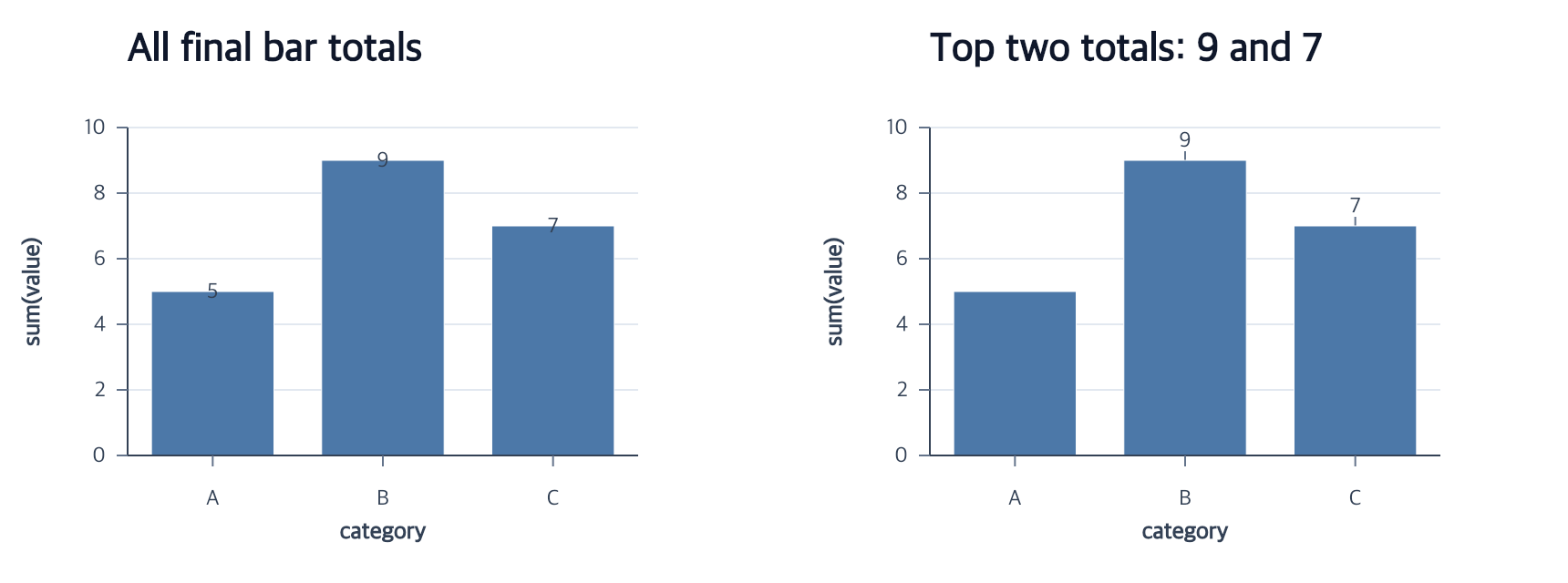
Source category A contains two observations, 2 and 3, but its final bar and label represent 5. The left labels are 5, 9, and 7. The right labels are 9 and 7 in source-item order; all three bars remain.
Boundaries and failure behavior
Selectors operate on final items after aggregation and filtering. Placement follows each bar boundary, including reversed scales and negative bars. Placement leaders and collision-layout leaders are exclusive, so layout uses leader: false here. Bounded collision layout may retain warnings if no allowed arrangement fits; it does not resize the canvas or promise zero overlap.
Related
Authoring conventions · Data policies · Complete action reference