Published-release documentation · release compatibility
Error Bars
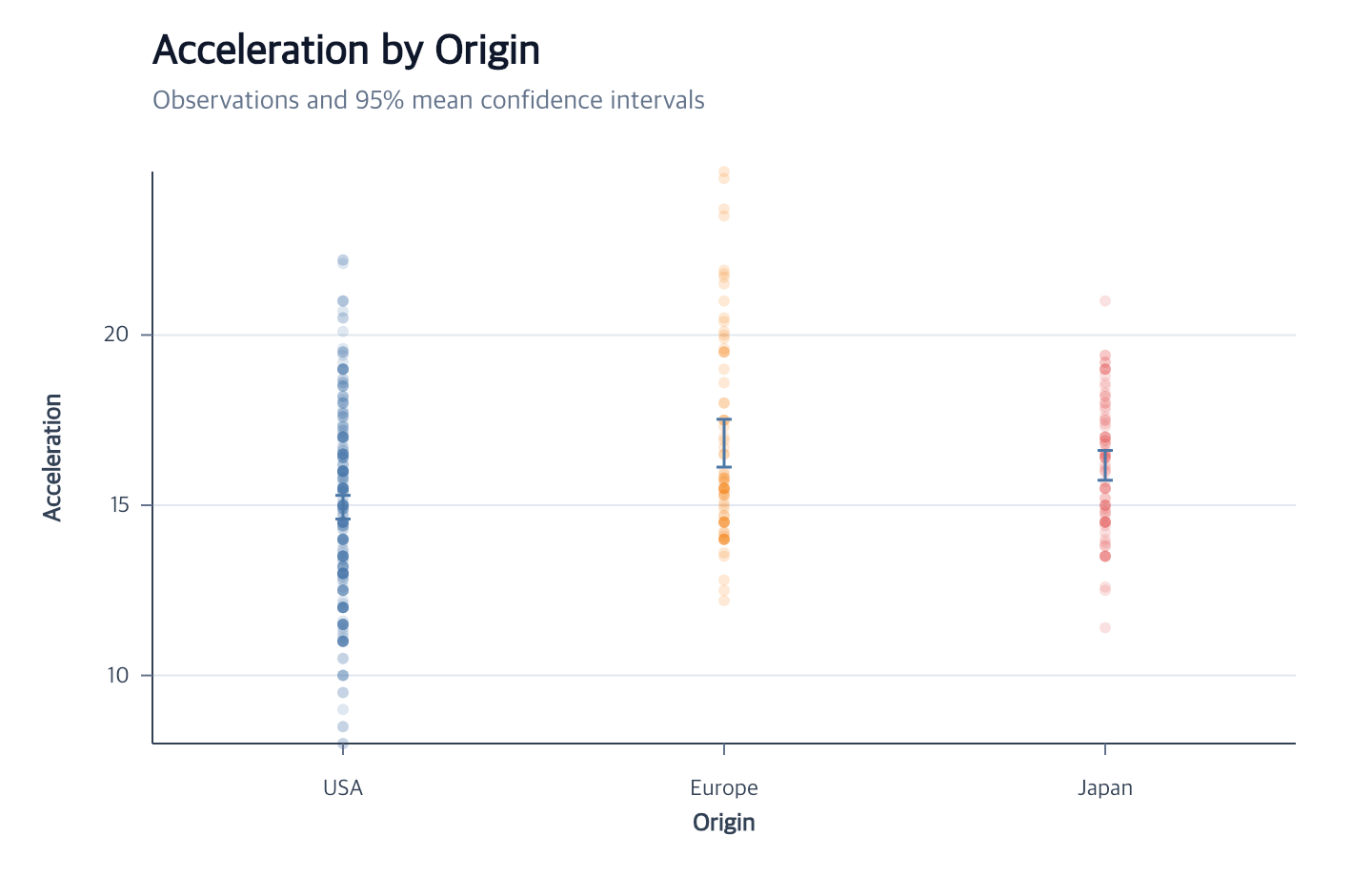
createErrorBar() materializes vertical or horizontal intervals from either
grouped statistics or existing center/lower/upper fields. It can infer its
inputs from an already encoded layer or accept both channel roles directly.
At a glance
| Action | Shortest call | Result |
|---|---|---|
createErrorBar |
createErrorBar() after one eligible encoded layer |
Mean 95% confidence intervals sharing that layer’s data, coordinate, and scales |
editErrorBar |
editErrorBar({ opacity: 0.6 }) |
Stable main rule and owned caps revised together |
createErrorBar(options?)
Contextual fragment. Use an ES module with the imports, data, and prepared resource state described in this section. Resolve these names from setup in this fragment or section; alternatives branch from the same base.
const intervals = chart()
  .createCanvas()
  .createData({ values })
  .createErrorBar({
    x: { field: "group", fieldType: "nominal" },
    y: { field: "value" }
  });
createErrorBar({
  id?: string;
  target?: string;
  data?: string;
  x?: PositionChannel | StatisticalIntervalChannel | ExplicitIntervalChannel;
  y?: PositionChannel | StatisticalIntervalChannel | ExplicitIntervalChannel;
  xOffset?: OffsetChannel;
  yOffset?: OffsetChannel;
  groupBy?: string;
  coordinate?: string;
  caps?: boolean;
  capSize?: number;
  stroke?: string;
  strokeWidth?: number;
  strokeDash?: "solid" | "dashed" | "dotted" | "dashdot" | readonly number[];
  opacity?: number;
  lineCap?: "butt" | "round" | "square";
  lineJoin?: "miter" | "round" | "bevel";
  miterLimit?: number;
} = {})
The channel types are:
type PositionChannel = {
  field?: string;
  fieldType?: "quantitative" | "nominal" | "ordinal" | "temporal";
  scale?: ScaleOptions;
};

type StatisticalIntervalChannel = {
  field?: string;
  center?: "mean" | "median";
  extent?: "stderr" | "stdev" | "ci" | "iqr";
  method?: "normal" | "student-t";
  level?: number;
  scale?: ScaleOptions;
};

type ExplicitIntervalChannel = {
  center: string;
  lower: string;
  upper: string;
  scale?: ScaleOptions;
};

type OffsetChannel = {
  field?: string;
  fieldType?: "nominal" | "ordinal";
  scale?: OffsetScaleOptions;
  paddingInner?: number;
  paddingOuter?: number;
};
Exactly one channel is positional and the other is quantitative. Putting the
interval on y creates vertical rules; putting it on x creates horizontal rules.
No orientation flag is required. Statistical mean defaults to a two-sided
0.95 Student-t confidence interval. Median is supported only with
extent: "iqr"; method and level are valid only for extent: "ci".
The independent position field is always part of statistical grouping.
groupBy can add one more grouping field. Group order follows first appearance
in the source data. Groups without enough valid quantitative values are omitted.
Grouped point-and-whisker positions
Use encodeXOffset or encodeYOffset when more than one estimate belongs to a
category. An error bar inferred from that point layer reuses the offset field,
scale, domain order, and padding automatically:
Contextual fragment. Use an ES module with the imports, data, and prepared resource state described in this section. Resource selectors used here:
target: "estimates". Resolve these names from setup in this fragment or section; alternatives branch from the same base.
const grouped = chart()
  .createCanvas()
  .createData({ values: rows })
  .createPointMark({ id: "estimates" })
  .encodeX({ field: "metric", fieldType: "ordinal" })
  .encodeY({ field: "value" })
  .encodeXOffset({
    field: "model",
    paddingInner: 0.2,
    paddingOuter: 0.1
  })
  .createErrorBar({ target: "estimates" });
Statistical mode groups by both metric and model, so each model receives a
separate interval. The source point, main interval rule, and both fixed-width
caps use the same sub-slot center. That alignment is recomputed after Canvas,
parent-position-scale, offset-scale, or data changes.
For a direct facade without a source layer, pass the matching offset explicitly:
Contextual fragment. Use an ES module with the imports, data, and prepared resource state described in this section. Caller-provided receivers:
program. Resolve these names from setup in this fragment or section; alternatives branch from the same base.
program.createErrorBar({
  x: { field: "metric", fieldType: "nominal" },
  y: { center: "estimate", lower: "lower", upper: "upper" },
  xOffset: { field: "model", paddingInner: 0.2 }
});
Vertical intervals accept only xOffset; horizontal intervals accept only
yOffset. The independent position must be nominal or ordinal. Numeric and
temporal positions do not have category slots and therefore reject offsets.
Quantitative independent positions
Use an explicit interval definition when observations sit on a numeric x or y
position. The lower and upper fields identify the interval axis, so the
other quantitative channel remains the independent position:
Contextual fragment. Use an ES module with the imports, data, and prepared resource state described in this section. Resolve these names from setup in this fragment or section; alternatives branch from the same base.
const learningCurve = chart()
  .createCanvas()
  .createData({ values: rows })
  .createErrorBar({
    x: {
      field: "trainingCharts",
      fieldType: "quantitative",
      scale: { id: "x", zero: false }
    },
    y: {
      center: "estimate",
      lower: "lower",
      upper: "upper",
      scale: { id: "y", zero: false }
    }
  });

const logLearningCurve = learningCurve.editScale({
  id: "x",
  type: "log",
  base: 2
});
The main rule and both caps share the same position scale and stay aligned after supported scale edits. If both channels are quantitative and neither one contains interval options, supply an explicit interval definition to remove the ambiguity.
Horizontal intervals
Contextual fragment. Use an ES module with the imports, data, and prepared resource state described in this section. Resolve these names from setup in this fragment or section; alternatives branch from the same base.
const horizontal = chart()
  .createCanvas()
  .createData({ values })
  .createErrorBar({
    x: { field: "measurement" },
    y: { field: "group", fieldType: "nominal" }
  });
This stores y/x/x2 encodings and creates vertical fixed-pixel caps.
Existing interval fields
Contextual fragment. Use an ES module with the imports, data, and prepared resource state described in this section. Resolve these names from setup in this fragment or section; alternatives branch from the same base.
const explicit = chart()
  .createCanvas()
  .createData({ values: intervalRows })
  .createErrorBar({
    x: { field: "group", fieldType: "nominal" },
    y: {
      center: "meanValue",
      lower: "lowerValue",
      upper: "upperValue"
    },
    caps: false
  })
  .createGuides();
Explicit mode does not derive another dataset and does not accept groupBy,
field, extent, or level on the interval channel. The center field becomes
the interval-axis title unless a later guide action supplies another title.
Inference from an encoded layer
Contextual fragment. Use an ES module with the imports, data, and prepared resource state described in this section. Resolve these names from setup in this fragment or section; alternatives branch from the same base.
const overlay = chart()
  .createCanvas()
  .createData({ values })
  .createPointMark()
  .encodeX({ field: "group", fieldType: "ordinal" })
  .encodeY({ field: "value" })
  .createErrorBar();
With omitted x and y, target selects an existing layer. Without target, the
action uses the current eligible layer, then one unique eligible layer. The
layer may use any compatible mark type; eligibility comes from its complete
field-based x/y encodings. Data, coordinate, x/y scale IDs, and a matching
categorical xOffset/yOffset assignment are reused.
Passing only an existing scale id also preserves that scale’s stored domain,
range, nice, and zero policy; interval defaults are used only for new scales.
A semantic group encoding is inferred as statistical grouping. Color remains
appearance and does not silently change the statistic. Ambiguous eligible
layers fail instead of selecting one arbitrarily.
Defaults and graphical result
| Behavior | Default |
|---|---|
| ID | "errorBar" when available |
| Center and extent | mean, confidence interval |
| Confidence method | "student-t" |
| Confidence level | 0.95 |
| Coordinate | inferred, otherwise "main" Cartesian |
| Main rule and caps | #4c78a8, width 1.5, solid, opacity 1 |
| Cap width | 8 logical Canvas pixels |
Caps preserve their logical-pixel width when the Canvas or positional scales
change. createGuides() infers the independent field title and a statistical
interval-axis title such as mean(value).
Set caps: false to omit cap layers. capSize must be positive and affects
enabled caps only. strokeWidth is non-negative, opacity is between 0 and
1, and strokeDash accepts a named style or an explicit non-negative dash
array. The same appearance is assigned to the main rule and both caps.
Cap/join/miter values use the shared
Mark Style
contract and replay across all generated Rule children.
Contextual fragment. Use an ES module with the imports, data, and prepared resource state described in this section. Caller-provided receivers:
intervals. Resource selectors used here:data: "data". Resolve these names from setup in this fragment or section; alternatives branch from the same base.
const styled = intervals.createErrorBar({
  id: "styledErrorBar",
  data: "data",
  x: { field: "group", fieldType: "nominal", scale: { id: "styledX" } },
  y: { field: "value", scale: { id: "styledY" } },
  capSize: 16,
  stroke: "#d9485f",
  strokeWidth: 3,
  strokeDash: [8, 4],
  opacity: 0.8
});
Editing error bars
Use the stable error-bar owner instead of editing generated cap layers:
Contextual fragment. Use an ES module with the imports, data, and prepared resource state described in this section. Caller-provided receivers:
intervals. Resolve these names from setup in this fragment or section; alternatives branch from the same base.
const edited = intervals.editErrorBar({
  x: { field: "group", fieldType: "nominal" },
  y: { field: "value", center: "median", extent: "iqr" },
  statistics: { center: "median", extent: "iqr" },
  caps: true,
  capSize: 16,
  stroke: "#d9485f",
  strokeWidth: 3,
  strokeDash: [8, 4],
  opacity: 0.8
});
The options are target, data, x, y, xOffset, yOffset, groupBy,
caps, capSize, stroke, strokeWidth, strokeDash, opacity, lineCap,
lineJoin, miterLimit, and
statistics. Omitted values retain their current setting.
Omit target when the current or unique error bar is unambiguous.
data, x, and y replace the source and channel roles atomically. They may
switch vertical and horizontal orientation or convert statistical intervals to
explicit { center, lower, upper } fields and back. Statistical revisions use a
new immutable derived dataset; the stable main-rule and cap IDs are preserved.
xOffset or yOffset belongs to the independent categorical axis and may be
removed with false. A preserved offset follows that axis across an orientation
change. groupBy: false removes explicit grouping when valid.
statistics is a partial { center?, extent?, method?, level? } patch for statistical
owners. It creates one immutable interval revision and rebinds the main rule
and enabled caps. Median and IQR must be selected together; level is valid
only for confidence intervals. Explicit center/lower/upper owners reject a
statistics edit instead of converting modes.
The same merge rules apply when changing channel roles in the same call.
Switching away from confidence intervals discards inherited method and level;
explicitly supplying either for another extent is an error.
caps: false removes both owned cap resources. A later caps: true recreates
them from the owner’s stored data, fields, coordinate, position/offset scales,
and offset padding. The main
interval retains its current dataset unless data, channel roles, or statistics change.
Attached mark labels are rebound to the new interval revision, and stored
selections and highlights replay after rematerialization. The complete request
is validated before the wrapped rematerialization runs.
Errors and current limitations
The action rejects missing data, incompatible or ambiguous source layers, ambiguous channel roles, incomplete or non-quantitative explicit fields, invalid statistics or appearance values, and occupied generated IDs. Failed calls leave the earlier immutable program unchanged.
Center symbols, per-row cap sizes, and field-driven rule widths are not part of the current edit action.
Related
Error-bar tutorial · Interval data · Rule marks · Guides
Documentation provenance
293 actions · sha256:e755591a2e5f5e2b494867583876e28020a478c5220b77bdc6ad469a6224891d