Published-release documentation · release compatibility
Point Marks
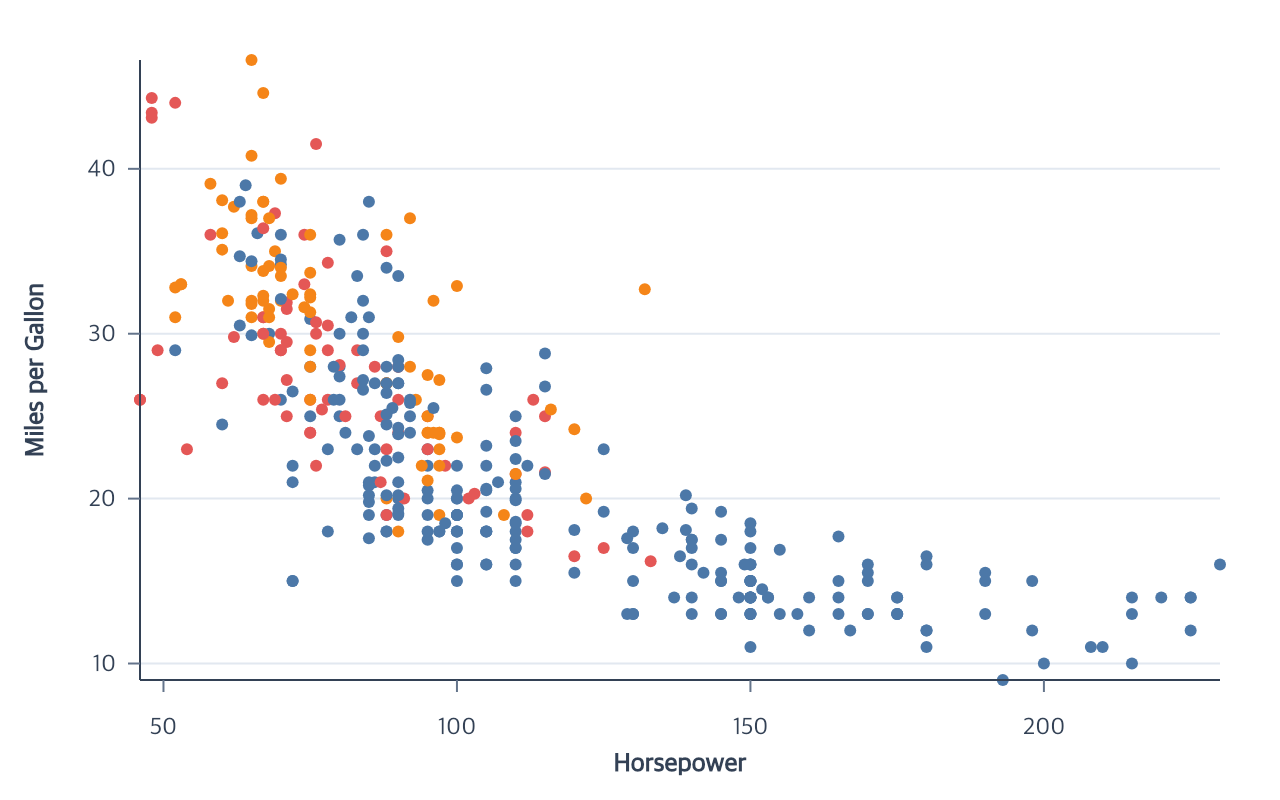
Point marks represent individual observations or derived items. Their semantic
type is point; circle, square, diamond, and other symbols are graphical
realizations of that meaning.
createPointMark({ id?, data?, missing?, shape?, fill?, opacity?, stroke?, strokeWidth?, lineCap?, lineJoin?, miterLimit? } = {})
This heading shows common options. For the full callable contract and all branches, see createPointMark and the exact declarations.
| Option | Type | Default or inference |
|---|---|---|
id |
valid user-defined ID | first point mark uses "point" |
data |
existing dataset ID | current dataset |
shape |
supported constant shape | "circle" |
fill |
non-empty color string | theme color; conflicts with encodeColor |
opacity |
number from 0 to 1 |
1 |
stroke |
non-empty color string | no outline |
strokeWidth |
non-negative number | 1 when stroke is supplied; otherwise 0 |
lineCap |
"butt", "round", or "square" |
"butt" |
lineJoin |
"miter", "round", or "bevel" |
"miter" |
miterLimit |
positive finite number | 10 |
Executable complete. Import chart from ggaction and supply the cars, rows, intervalRows, or values fixture described by this section. Each chain owns its Canvas.
const program = chart().createCanvas()
  .createData({ values: cars })
  .createPointMark({ opacity: 0.48, stroke: "white", strokeWidth: 1.25 })
  .encodeX({ field: "Horsepower" })
  .encodeY({ field: "Miles_per_Gallon" });
The initial collection reserves one item per selected data row; items receive visible positions when compatible position encodings exist. When a point is layered after one compatible source, omitted data, coordinate, x, and y encodings are inherited and persisted. Ambiguous sources require an explicit target or resource ID.
A point layer supports at most 50,000 selected data rows, including rows
subsequently skipped by the missing-value policy. Creation, data revisions,
property-array edits, facets, and editable snapshots use the same inclusive
boundary. A 50,001-row point layer fails atomically with the structured
resource-limit diagnostic Point mark item count. No sampling or layer
splitting occurs. Ordinary extension graphics retain their 10,000-item limit;
path-command and work limits are independent.
Radius is an encoding-owned graphical value rather than a createPointMark
option. Until a constant or field-driven size is authored, materialization uses
a radius of 3 logical pixels without storing a synthetic semantic encoding.
Use encodePointRadius({ value }) for another constant radius or encodeSize
for a field-driven area mapping. removePointRadius() returns an explicitly
sized point mark to the theme radius without changing Polar position.
editPointMark({ target?, shape?, fill?, opacity?, stroke?, strokeWidth?, lineCap?, lineJoin?, miterLimit? })
This heading shows common options. For the full callable contract and all branches, see editPointMark and the exact declarations.
Contextual fragment. Use an ES module with the imports, data, and prepared resource state described in this section. Caller-provided receivers:
program. Resolve these names from setup in this fragment or section; alternatives branch from the same base.
const diamonds = program.editPointMark({
  shape: "diamond",
  fill: "#2563eb",
  opacity: 0.72,
  stroke: "#ffffff",
  strokeWidth: 0.6
});
target may be omitted for the current or only point mark. Supported shapes
are circle, square, diamond, four directional triangles, plus, cross,
star, hexagon, wye, wedge, and arrow, or an explicit simple polygon
described below. Named recipes preserve the same logical target area. wedge is a narrow upward triangle centered at its centroid; arrow is an upward
seven-vertex arrow anchored at its bounding-box center. Angle encodings rotate either clockwise around
that anchor. A constant shape conflicts with field-driven encodeShape, and constant
fill conflicts with a semantic color encoding.
Pass stroke: false to disable an existing outline. This removes its stored
width, rejects a simultaneous strokeWidth, and a later string stroke restores
the point default width 1.
The cap, join, and miter options follow the shared Mark Style contract. They are retained even though a circular glyph has no visible cap or corner, so a later shape or stroke replay does not discard authored style.
Explicit polygon shapes
Pass { polygon: [{ x, y }, ...], normalization? } wherever a point shape is
accepted: constant creation/editing, scatter point.shape, shape scale
range or unknown, and highlights. The same glyph geometry is used in legends.
Contextual fragment. Use an ES module with the imports, data, and prepared resource state described in this section. Caller-provided receivers:
program. Resolve these names from setup in this fragment or section; alternatives branch from the same base.
const triangle = {
  polygon: [{ x: -1.5, y: -1.5 }, { x: 1.5, y: -1.5 }, { x: 0, y: 1.5 }]
};
const customPoints = program.editPointMark({ shape: triangle });
The input origin (0, 0) remains the point anchor. Default normalization:
"area" scales vertices by sqrt(area / polygonArea) and preserves the requested
physical area. Choose normalization: "radius" to scale each coordinate by
sqrt(area / PI) instead. With encodePointRadius({ value: 2 }), one input unit
then equals two logical pixels; a square from −1 to 1 has side length 4.
In radius mode, encodeSize values describe reference-circle area, so different
polygons can have different physical areas for the same value. Angle rotates
clockwise about the authored origin in either mode.
A shape has 3–1,024 vertices after removing one repeated closing vertex.
Coordinates must be finite numbers with magnitude at most 1,000,000. Only
polygon and normalization are accepted on the shape, and only x and y on
each vertex. Concave shapes and either winding work; zero-area polygons,
zero-length or backtracking edges, crossing, overlap, and nonadjacent touching
are rejected. SVG strings, curves, and holes are unsupported. A point layer’s
custom polygons may generate at most 10,000,000 path commands, including each
closing command, independently of its point-count limit. Polygon highlight
replacement checks the resulting selected paths plus retained paths before
allocating the new geometry.
Directional shapes and area
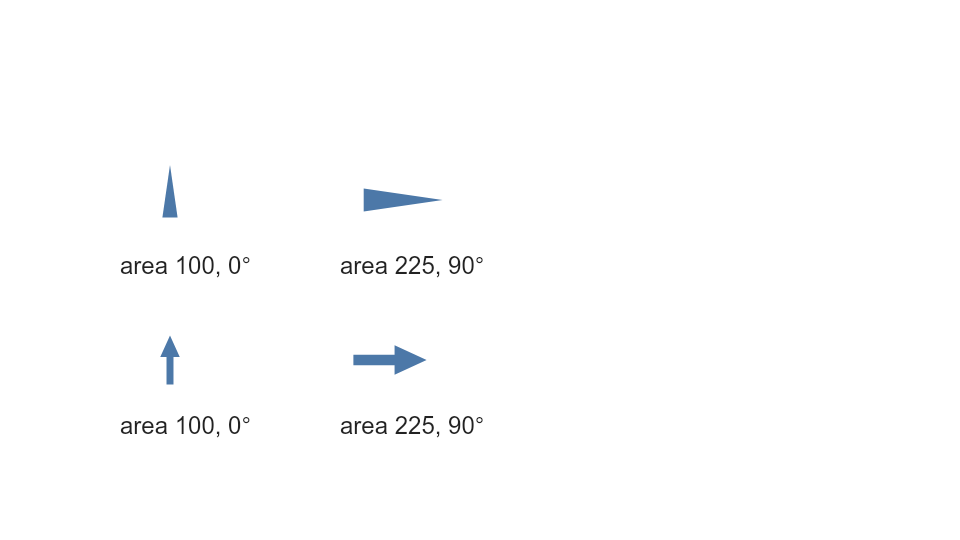
This complete example uses the same four source rows for shapes, areas, angles
and labels. Start with createScatterPlot, then use encodeShape, encodeSize
and encodeAngle to refine it. Areas 100 and 225 remain physical areas in logical
square pixels after rotation; the larger symbol has 1.5 times the linear scale.
The upper wedges rotate about their centroid and the lower arrows about the
center of their bounding box. An angle field contains degrees directly.
The example source linked above is the same program used by the standalone browser example and the exact primitive comparison.
jitterPoints({ target?, channel, maxOffset, seed?, key? })
Use bounded jitter to separate overlapping Cartesian points without changing their semantic x/y values:
Contextual fragment. Use an ES module with the imports, data, and prepared resource state described in this section. Caller-provided receivers:
program. Resolve these names from setup in this fragment or section; alternatives branch from the same base.
const separated = program.jitterPoints({
  channel: "x",
  maxOffset: { band: 0.168 },
  seed: "origin-strip",
  key: "Name"
});
| Option | Type | Default or inference |
|---|---|---|
target |
existing Cartesian point ID | current or only eligible point mark |
channel |
"x", "y", or "both" |
required |
maxOffset |
{ pixels: positiveNumber } or { band: number } |
required; exactly one form |
seed |
string or finite number | 0 |
key |
non-empty field name | source-row index identity |
band is greater than zero and at most 0.5, and requires a categorical
position scale. The final glyph remains inside both its category slot and plot
bounds. Pixel offsets work with quantitative or categorical positions. The
seed and item identity produce stable offsets; use a unique key when offsets
must remain attached to rows after data reordering.
Use channel: "both" to jitter X and Y in one call. Each axis gets an independent,
deterministic offset with the same maxOffset limit. Pixel offsets support mixed
position types; band offsets require categorical slots on both axes.
Calling jitterPoints again replaces the target policy and recomputes from the
semantic base position, so offsets never accumulate. Canvas, scale, data,
shape, radius, stroke, selection, highlight, and facet rematerialization retain
the assignment. Selectors that read channel still see semantic values, while
selectors that read concrete property values see final jittered geometry.
removeJitter({ target? } = {})
Contextual fragment. Use an ES module with the imports, data, and prepared resource state described in this section. Caller-provided receivers:
separated. Resolve these names from setup in this fragment or section; alternatives branch from the same base.
const restored = separated.removeJitter();
This removes the stored graphical assignment and restores positions directly mapped from the mark’s semantic encodings. Jitter is deterministic random separation, not collision-free packing or a beeswarm layout. Polar point jitter is not currently supported.
Continue with encodings
Errors and limitations
Point IDs must be unique, the dataset must exist, opacity must be between 0
and 1, and stroke width must be non-negative. At least one property is
required by editPointMark; strokeWidth requires an active constant or field-driven stroke.
Jitter requires a complete Cartesian x/y point
mark, a unique target, a valid offset form, and unique values for an explicit
identity key.
Documentation provenance
293 actions · sha256:e755591a2e5f5e2b494867583876e28020a478c5220b77bdc6ad469a6224891d