Published-release documentation · 281 actions; release compatibility · contract 5520b0fa9525
Local MCP for LLM Chart Authoring
The ggaction package includes a local, read-only MCP server that helps a
language model choose current actions and syntax-valid call templates without
preloading the complete documentation. It runs over standard input/output on the user’s
machine. It does not require a hosted server, account, or authentication.
The server does not execute chart code, render output, read request-selected files, make network requests, or collect telemetry.
Measured impact
A fixed 576-run evaluation compared public-documentation browsing with MCP-first authoring plus bounded fallback across Terra, Luna, and Nano. Each model-condition cell contains 48 observations from the same 24 tasks and two repetitions.
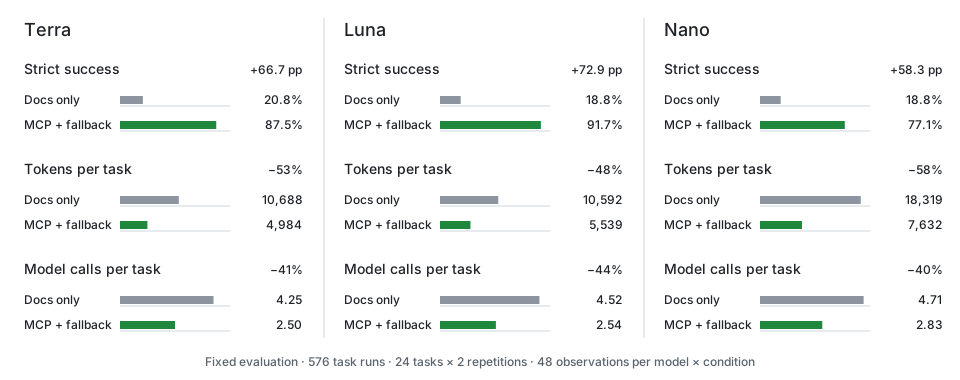
Across all three models, MCP with bounded fallback raised strict task success from 19.4% to 85.4%, reduced tokens per task from 13,200 to 6,052, and reduced model calls per task from 4.49 to 2.63. Provider failures remain failures in these totals rather than being removed after the run.
These results describe one fixed task set and its model and provider conditions; they are evidence for the authoring route, not a performance guarantee for every request. See the compact benchmark record for the reviewable aggregate data and the complete evaluation record for the condition definitions, paired comparisons, cost boundaries, provider failure analysis, and limitations.
Install and launch
Install ggaction in the project where the MCP client will run:
npm install ggaction @modelcontextprotocol/sdk
Launch the installed executable from that project:
npx --no-install ggaction-mcp
For an MCP client configuration, prefer the absolute path to the project-local
executable so the selected ggaction version is reproducible:
{
  "mcpServers": {
    "ggaction": {
      "command": "/absolute/path/to/project/node_modules/.bin/ggaction-mcp"
    }
  }
}
The exact configuration container varies by MCP client, but the command always starts the same local stdio process. Node.js 20 or later is required.
Packet v5 contract
Check schemaVersion === 5 before consuming a task packet. requiredOptions
contains unconditional requirements and requirements of the selected method
branch, not every option in a sample. For example, editXScale has no named
mandatory option (it still needs a meaningful edit); createImputedData with
method: "linear" requires sortBy, while groupBy remains optional. Read
exactCalls and appliedOptions for proposed values. Version 4 consumers must
update their schema and stop treating this list as the set of configured options.
Concrete point colors, axis label rotations with explicit units, and
logarithmic x/y scales can be combined with supported chart requests. Every
unparsed meaningful clause is retained in unmatchedRequirements; unresolved
requests are partial proposals and must not be presented as completed charts.
The deterministic parser may ask for an exact action or clearer wording for
phrases it does not recognize.
One-tool workflow
The server exposes exactly one model-visible tool:
search_ggaction({ query })
Send only the exact user request in one query, including chart or mark type, transforms, encodings, guides, layout, and output format when they matter. Do not append dataset contents, code scaffolding, or evaluator instructions:
scatter plot with a color legend at bottom as svg
The versioned result is a bounded JSON task packet with:
schemaVersionandpackageVersion— the packet shape and installed package contract that produced itmatchedConstraints— recognized parts of the requestactionPlan— actions and runtime operations in execution orderexactCalls— syntax-valid calls with current option names; template field names are not claims about the caller’s datasetappliedOptions— query text that was parsed into a concrete action or renderer optionplaceholderBindings— required rows, fields, host objects, child programs, text, or existing resources that the caller must supply or confirmunmatchedRequirements— request details retained because they could not be applied safelyauthoring— exact package imports,chart()initialization, reusable non-duplicated Canvas/data prerequisites, immutable reassignment steps with closed target and derived-data handoffs, and the selected renderer callunsupported— terminal requirements outside the current contractunresolved— conflicting or underspecified decisions, each with the exact bounded documentation resource needed to continuecandidates— at most three exact resource identities
The MCP response and the deterministic direct adapter use the same serialized task packet. A packet is never silently truncated; it fails if it exceeds its 6,144-byte hard ceiling.
authoring.prerequisites gives the exact signatures and calls for the common
Canvas and data setup that is not already present in actionPlan. Supply every
name listed in a prerequisite’s bindings array—currently the caller-owned
values array. If the request explicitly asks to create Canvas or data, the
corresponding call appears once in authoring.steps and is omitted from
authoring.prerequisites. Keep every returned
program = ... assignment because each action returns a new immutable
ChartProgram. Run authoring.steps in order after those prerequisites:
import { chart } from "ggaction";
import { renderToSVG } from "ggaction/svg";

let program = chart()
program = program.createCanvas({
  width: 800,
  height: 600,
  margin: { top: 140, right: 220, bottom: 120, left: 260 }
})
program = program.createData({ values })
program = program.createScatterPlot({
  x: { field: "x", fieldType: "quantitative" },
  y: { field: "y", fieldType: "quantitative" }
})
const output = renderToSVG(program)
In this example, values is a required caller binding and x and y are
reported field placeholders. Replace or confirm every
placeholderBindings entry before treating the template as a completed user
program. If unmatchedRequirements or unresolved is non-empty, do not claim
that the request is fully implemented.
The bounded parser does not interpret negation or exclusion clauses such as
no legend, without axes, or do not add regression. These requests return
request.negation in unresolved, retain the request in
unmatchedRequirements, and provide no authoring steps. Interpret the
restriction explicitly before selecting action options; chart defaults can
otherwise reintroduce an excluded feature. Quoted field names such as
color by "without" remain literal field names.
The resolver closes only deterministic runtime dependencies. It can add a
required mark owner for density or a named Horizon/polar chart family, pass a
derived dataset to its consumer, bind a unique compatible scale, or name a
stable mark target. It does not invent a missing chart, label positions,
legend channel, or composition children; those
remain explicit unresolved decisions.
Generic area chart requests leave chart.area.baseline unresolved because
the x/y scaffold does not choose a baseline. Generic strip plot requests use
a point-mark scaffold and leave chart.strip.placement unresolved until the
measure and category or constant placement are specified. Raw area mark and
tick mark requests remain lower-level mark operations.
Specific phrases such as radial bar chart and polar area chart take
precedence over their overlapping bar chart and area chart words. A
separately requested chart, as in radial bar chart and bar chart, remains a
separate requirement.
Unsupported output and a missing supported renderer are separate decisions.
For example, render JPEG reports terminal unsupported.jpg and open
renderer.format, but recommends only the bounded renderer-choice section.
The unsupported entry itself requires no documentation read. If the same
request already names SVG, PNG, PDF, or Browser Canvas, it reports only the
terminal unsupported.jpg decision.
Read-only resources
MCP resource discovery provides a small overview, bounded task recipes, and templates for one exact action card. These resources are for selective reads, not a replacement full-documentation preload.
Documentation fallback is stricter. A docs section is readable only when its
exact URI appears in an unresolved[].resources list from the latest
search_ggaction result. unsupported entries do not unlock documentation. A
later result without that URI removes access again. This keeps the default flow
compact:
complete request
  → search_ggaction
  → use the task packet when resolved
  → read only the recommended bounded section when unresolved
  → clarify and search again
The public machine-readable copies are the typed
actions.json collection and its
item and
collection schemas, the
intent-taxonomy.json resolver vocabulary with its
schema, the
mcp-resources.json bounded resource catalog with its
schema, and the
task-packet.schema.json result contract.
Each schema v3 action card keeps exposure separate from H0–H4 catalog role tags
and records direct child actions, lifecycle editors, entry-point support,
units, inference, and completion requirements. deferred completion identifies
owners such as Box and Gradient plots that still need compatible position roles
before geometry exists.
The complete LLM bundle also publishes a
manifest and
manifest schema. Use artifacts from
the same packageVersion; the local installed files remain authoritative for
an installed MCP process.
What the server does not provide
- Hosted or HTTP transport
- Authentication, accounts, or telemetry
- Chart execution or renderer tools
- Arbitrary filesystem, network, shell, or code access
- A generic tool that returns the complete documentation bundle
Use the complete action reference manually when a human needs the full contract. For normal model-assisted authoring, start with the one search call and add documentation only for explicit gaps.
Related
Getting Started · Chart Recipes · Rendering · Supported Features