Published-release documentation · release compatibility
Scale Options
Scales map semantic field or datum values into concrete positions and
appearance values. Encodings create compatible scales automatically; use
editScale when the inferred mapping needs a documented revision.
field + channelSemantic input
→
domain → rangeResolved scale
→
x · fill · dashConcrete graphics
At a glance
| Scale family | Default domain | Default range | Common controls |
|---|---|---|---|
| Continuous position | "auto" |
Plot bounds | type, nice, zero, clamp, reverse |
| Band/point position | First-appearance order | Plot bounds | padding and alignment |
| Ordinal appearance/offset | First-appearance order | Palette, patterns, or parent band | explicit domain/range |
| Categorical size | Source appearance order or explicit categories | Automatic areas [24, 196] across categories |
ordinal, reverse, unknown area |
| Continuous size | Numeric extent | Area [24, 196] |
linear, log, sqrt, pow, clamp, reverse |
| Discrete size | Type-specific samples or cuts | Explicit nondecreasing areas | quantize, quantile, threshold, reverse |
| Color/stroke/strokeDash | First-appearance order | Built-in palette/patterns | palette or explicit range |
| Sequential/discretized color or stroke | Type-specific numeric boundaries | viridis or explicit colors |
interpolate, clamp, reverse |
Encoding actions accept a nested scale object. Omitted properties use channel
defaults and stored program state.
For categorical color on a row-owned Cartesian line, unknown requires an explicit, nonempty
ordinal domain. Missing or null colors and valid categories outside that domain use the fallback paint;
raw rows, vertices, separate series, and explicit legend samples remain intact. This does not extend
to aggregate, binned, parallel, or polar lines. Removing the domain or fallback must remain compatible
with every consumer and its data; incompatible edits reject atomically.
The same restriction applies to the first position on an otherwise incomplete line.
Existing scales can be changed with editScale:
Contextual fragment. Use an ES module with the imports, data, and prepared resource state described in this section. Caller-provided receivers:
program. Resolve these names from setup in this fragment or section; alternatives branch from the same base.
const reversed = program.editScale({ id: "x", reverse: true });
Color scales can use the same top-level palette shorthand during creation and
editing. It is mutually exclusive with range:
Contextual fragment. Use an ES module with the imports, data, and prepared resource state described in this section. Caller-provided receivers:
program. Resolve these names from setup in this fragment or section; alternatives branch from the same base.
const recolored = program.editScale({ id: "color", palette: "set2" });
Full programs also expose channel-specific editors, so ordinary revisions do not require knowing the generated scale ID:
Contextual fragment. Use an ES module with the imports, data, and prepared resource state described in this section. Resource selectors used here:
target: "points". Resolve these names from setup in this fragment or section; alternatives branch from the same base.
program
  .editXScale({ domain: [0, 100], nice: true })
  .editYScale({ zero: false })
  .editColorScale({ palette: "set2" })
  .editStrokeScale({ target: "points", palette: "set1" })
  .editSizeScale({ range: [20, 200] });
The complete focused family and declared selectors are generated below.
| Focused editor | Selectors | Role and API layer |
|---|---|---|
editXScale |
id (optional), target (optional) |
H2 · user-facing |
editYScale |
id (optional), target (optional) |
H2 · user-facing |
editXOffsetScale |
target (required) |
H2 · user-facing |
editYOffsetScale |
target (required) |
H2 · user-facing |
editParallelScale |
target (required), dimension (required) |
H2 · user-facing |
editThetaScale |
id (optional), target (optional) |
H2 · user-facing |
editRScale |
id (optional), target (optional) |
H2 · user-facing |
editColorScale |
id (optional), target (optional) |
H2 · user-facing |
editStrokeScale |
target (required) |
H2 · user-facing |
editSizeScale |
id (optional), target (optional) |
H2 · user-facing |
editOpacityScale |
id (optional), target (optional) |
H2 · user-facing |
editShapeScale |
id (optional), target (optional) |
H2 · user-facing |
editStrokeWidthScale |
id (optional), target (optional) |
H2 · user-facing |
editStrokeDashScale |
id (optional), target (optional) |
H2 · user-facing |
Offset editors require target; they edit that mark’s nested offset scale.
editParallelScale requires both target and the exact dimension field.
editStrokeScale also requires target and does not accept a raw scale ID.
Other focused selectors follow the rules below.
editRScale means Polar radial position; point glyph radius remains a constant
appearance action.
Count-based linear domain rounding
Use nice: { count: 10 } on a linear position scale to choose automatic domain
rounding density. An observed range of 0–108 becomes 0–110. The count controls
rounding; it does not force the number of axis ticks. This is useful when facet
panels have independent ranges.
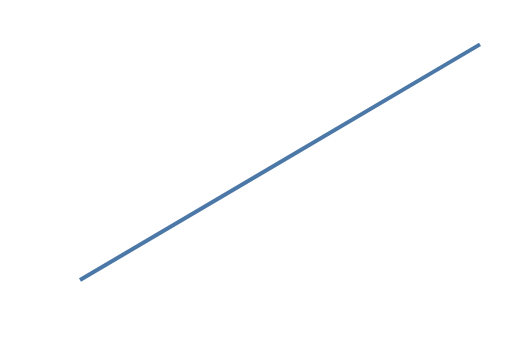
Contextual fragment. Use an ES module with the imports, data, and prepared resource state described in this section. Resolve these names from setup in this fragment or section; alternatives branch from the same base.
import { chart } from "ggaction";

const program = chart()
  .createCanvas({ plot: { width: 200, height: 120 }, margin: { left: 40, top: 20, right: 20, bottom: 30 } })
  .createData({ values: [{ x: 0, y: 0 }, { x: 0.5, y: 54 }, { x: 1, y: 108 }] })
  .createLinePlot({
    x: { field: "x", scale: { domain: [0, 1] } },
    y: { field: "y", scale: { zero: true, nice: { count: 10 } } },
    guides: false
  });
The object accepts only count, a positive safe integer. Existing omitted,
false, and true behavior is unchanged. An explicit domain takes precedence;
otherwise zero inclusion happens before rounding. The rule chooses outward
1–2–5 decade steps and preserves finite observed endpoints at numeric limits.
If a requested density has no stable outward grid, the observed domain remains
unchanged. A constant domain remains constant after zero inclusion.
For a binned position, the existing default bin boundaries and row membership
stay unchanged; count rounding extends only the final automatic display domain.
For example, boundaries [0, 54, 108] remain exact while the display domain becomes
[0, 110]. The separate createBinData.nice option remains boolean-only.
The count object is available through position encodings, chart facades,
editScale, and focused position-scale editors. It is rejected for temporal,
transformed, discrete, color, size, and measured-radius scales that disallow
this policy. Data revisions, compatible shared scales, independent facets and
program persistence preserve the chosen count. For independent panels, use
facet({ field: "group", scales: { y: "independent" } }) after declaring the chart.
Point size scale ranges are areas rather than radii. With fieldType: "nominal"
or "ordinal", size uses an ordinal scale. Automatic domains preserve first
appearance; explicit domains preserve their order and distinguish numbers from
numeric-looking strings. Automatic areas span 24 through 196, with a single
category assigned area 110. Explicit nonnegative area lists cycle across the
domain, matching other ordinal appearance mappings. Size legends show every
category with its original label and mapped area; numeric sampling (count,
values) and numeric label formats are unavailable for categorical size.
Continuous size mappings
support linear, log, sqrt, and pow; log defaults to base 10 and pow
requires a positive exponent. Discrete quantize, quantile, and threshold
mappings require explicit nondecreasing area ranges. Type-family changes require
an explicit destination domain, and entering a discrete family also requires a
new range. Use reverse to reverse area assignment while retaining domain and
legend-label order.
Most focused editors accept an optional id, target, or both. A supplied pair
must agree. Without selectors, ggaction first uses the current mark’s scale for
that channel, then a unique channel scale across the program. Multiple marks
sharing one scale remain unambiguous; multiple scale IDs require a selector.
The scale must actually be bound to the named channel, so a position scale named
color is rejected by editColorScale. Use generic editScale for unattached
named scales. Successful focused edits run through editScale, including shared
mark, axis, grid, and legend refresh.
editStrokeScale requires target and does not accept id. Color and stroke
use independent generated scale IDs. Authors may explicitly give them the same
scale ID when every consumer has a compatible field type and color-scale family;
focused stroke edits then refresh both sets of consumers.
Advanced authors can create a named unattached scale with the same complete type vocabulary:
Contextual fragment. Use an ES module with the imports, data, and prepared resource state described in this section. Resolve these names from setup in this fragment or section; alternatives branch from the same base.
const program = chart().createScale({
  id: "temperature",
  type: "sequential",
  domain: [0, 100],
  palette: { name: "viridis", count: 5 }
});
For sequential scales, count is the number of concrete gradient stops and
must be an integer of at least 2. The same descriptor is accepted as
range: { palette: { name: "viridis", count: 5 } }.
The accepted types are linear, log, pow, sqrt, symlog, time,
band, point, ordinal, sequential, quantize, quantile, and
threshold. A later encoding attachment validates whether the type, range,
and fallback are compatible with that channel and mark.
Before an ordinal scale has a consumer, editScale({ range: ... }) accepts the
same numeric pair, color array, dash patterns, or palette range object as
createScale. Attaching a consumer applies that channel’s range restrictions;
position scales continue to reject palette ranges.
Generic editScale allows id to be omitted when the current scale or the program’s only scale is
unambiguous. At least one editable option is required. Use "auto" to reset
domain or range; omission preserves the current value. Quantitative position
scales can change atomically between linear, log, pow, sqrt, and
symlog:
Contextual fragment. Use an ES module with the imports, data, and prepared resource state described in this section. Caller-provided receivers:
program. Resolve these names from setup in this fragment or section; alternatives branch from the same base.
const logarithmic = program.editScale({ id: "x", type: "log", base: 10 });
Categorical bar positions use band; categorical point and rule positions use
point. Both preserve first-appearance domain order. A band scale exposes a
non-zero slot width and accepts paddingInner, paddingOuter, and align.
A point scale exposes zero bandwidth and accepts padding and align.
Contextual fragment. Use an ES module with the imports, data, and prepared resource state described in this section. Caller-provided receivers:
program. Resolve these names from setup in this fragment or section; alternatives branch from the same base.
program.encodeX({
  field: "country",
  fieldType: "nominal",
  scale: { type: "band", paddingInner: 0.2, paddingOuter: 0.1 }
});
align is between 0 and 1; both padding families are non-negative and
paddingInner is less than 1. editScale rematerializes all connected marks
and guides. A band can be shared by bars and point centers, but changing it to
point is rejected while a bar requires its bandwidth.
removeScale({ id })
Use the Full-only removal action to delete an unattached named scale:
Contextual fragment. Use an ES module with the imports, data, and prepared resource state described in this section. Caller-provided receivers:
program. Resolve these names from setup in this fragment or section; alternatives branch from the same base.
const cleaned = program.removeScale({ id: "temporaryColor" });
The ID is required. Every mark encoding, offset, Parallel dimension, axis, grid, legend, and retained authoring recipe is checked before deletion. A live reference rejects with its owner and exact path. A current-scale pointer alone is cleared and does not block deletion. On success, the semantic definition and its resolved cache entry are removed together; existing graphics and layout are left exactly as authored. The action does not rewire consumers, infer a replacement, cascade, or operate across concat children.
Focused scale families
Errors and limitations
One scale cannot be shared across unrelated channels. Color and stroke are the supported appearance-sharing exception and still keep independent IDs by default. Explicit domains must contain every observed value required by ordinal consumers. A successful edit rematerializes connected marks and guides; a failed edit leaves the earlier immutable program unchanged.
Scale type transitions reject incompatible field types, channels, or mark grains before changing the immutable program. Quantitative Point, aggregate Bar, and Rect color can transition between sequential, log, symlog, and discretized scales. A compatible gradient or interval legend on any of the four edges changes family in the same action, retaining its edge, alignment and common text/layout settings. Custom family-specific settings require explicit removal and recreation; see color transitions.
Related
Position encodings · Series encodings · Semantic and graphical state · Troubleshooting
Count-based nice belongs to linear position scales. Opacity and stroke-width
encoding scales retain boolean nice; categorical dash fallbacks apply only to
Cartesian lines and rules, not Parallel or Polar facades.
Documentation provenance
293 actions · sha256:e755591a2e5f5e2b494867583876e28020a478c5220b77bdc6ad469a6224891d