Published-release documentation · release compatibility
Mark Selection and Highlighting Tutorial
Select final visual items by data field, semantic channel, or concrete graphic property, then filter, reuse, or highlight that selection. The repository contains a runnable browser example and the canonical programs used by the acceptance and PNG tests below.
Complete program
Follow Getting Started to create a browser module and
<canvas id="chart"></canvas>. Save the Cars data under public/cars.json:
curl --fail --location https://raw.githubusercontent.com/ggaction/ggaction/6422776b0a379c8c89809f41b434f366fbc1f143/data/cars.json --output public/cars.json
This complete point workflow matches the canonical program used for its image. The earlier snippets are alternatives for the matching point, bar, or line base.
import { chart, render } from "ggaction";

const response = await fetch("/cars.json");
if (!response.ok) throw new Error(`Failed to load data: ${response.status}`);
const cars = await response.json();

function validCars(cars) {
  return cars.filter(row =>
    Number.isFinite(row.Horsepower) &&
    Number.isFinite(row.Miles_per_Gallon) &&
    typeof row.Origin === "string" &&
    row.Origin.length > 0
  );
}

function createGroupedMaximumPointHighlight(cars) {
  const rows = validCars(cars);
  return chart()
    .createCanvas({
      width: 760,
      height: 440,
      margin: { top: 90, right: 170, bottom: 60, left: 70 }
    })
    .createData({ id: "cars", values: rows })
    .createPointMark({ id: "points" })
    .encodeX({ field: "Horsepower" })
    .encodeY({ field: "Miles_per_Gallon" })
    .encodeColor({ field: "Origin" })
    .encodeRadius({ value: 3 })
    .createGuides({
      axes: {
        x: { title: { text: "Horsepower" } },
        y: { title: { text: "Miles per Gallon" } }
      },
      legend: { channels: ["color"] }
    })
    .createTitle({
      text: "Highest-Horsepower Car in Each Origin",
      subtitle: "Selected points are enlarged, offset, and drawn in front"
    })
    .highlightMarks({
      target: "points",
      select: {
        field: "Horsepower",
        op: "max",
        groupBy: "Origin"
      },
      color: "#dc2626",
      opacity: 1,
      stroke: "#ffffff",
      strokeWidth: 1.5,
      shape: "diamond",
      size: 5.5,
      offset: { x: 7, y: -7 },
      dimOthers: { opacity: 0.18 },
      bringToFront: true
    });
}

const program = createGroupedMaximumPointHighlight(cars);
render(program, document.querySelector("#chart").getContext("2d"));
Highlight grouped maximum points
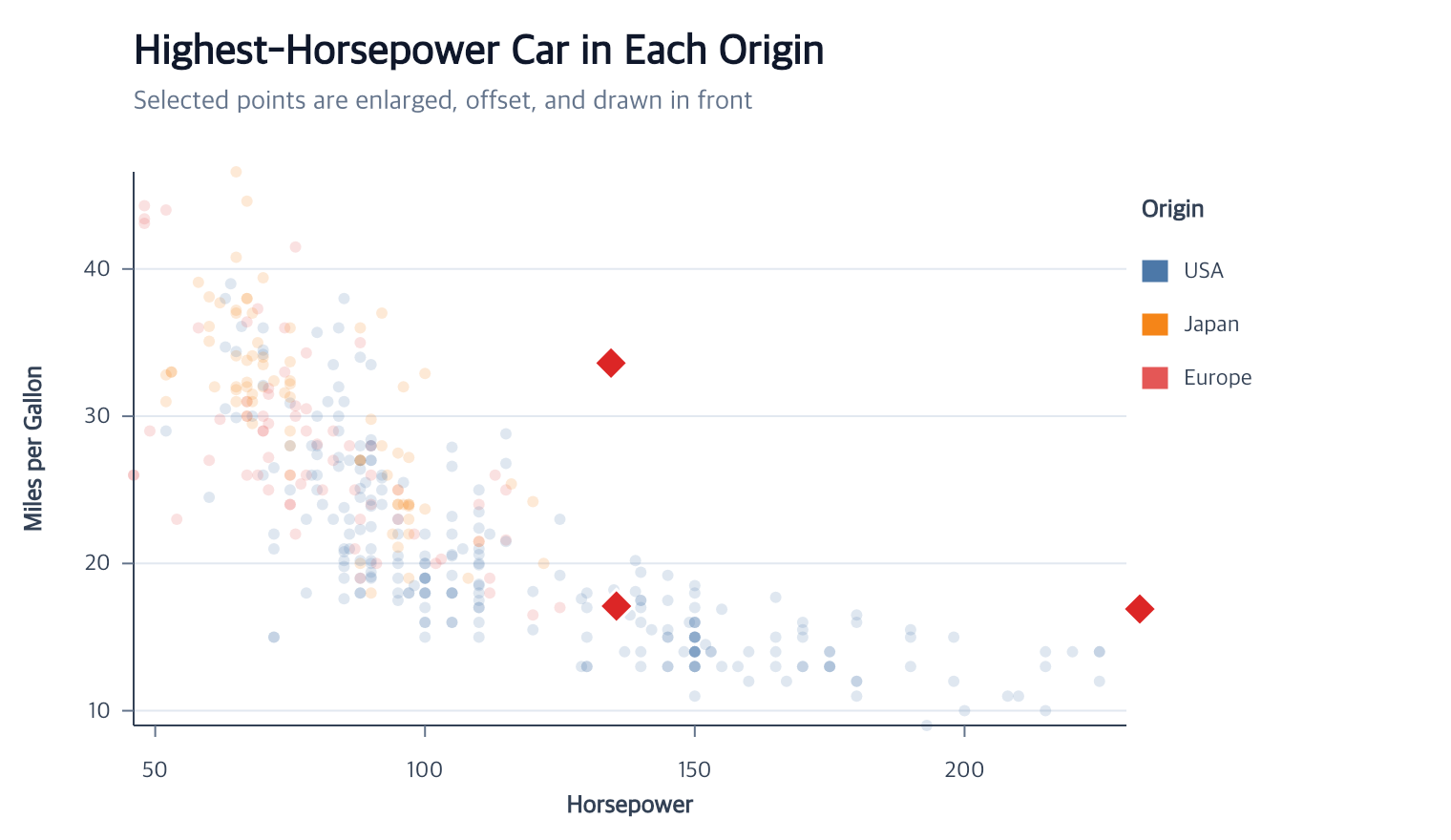
The selector runs at point-item grain. groupBy: "Origin" chooses one maximum
Horsepower row per Origin; styling happens only after the three semantic items
have been selected.
program.highlightMarks({
  target: "points",
  select: {
    field: "Horsepower",
    op: "max",
    groupBy: "Origin"
  },
  color: "#dc2626",
  shape: "diamond",
  size: 5.5,
  offset: { x: 7, y: -7 },
  dimOthers: { opacity: 0.18 }
});
size is an area multiplier and offset uses logical Canvas pixels. The
selected points are placed last by default, while their x/y semantic values
remain unchanged.
Select a complete histogram stack
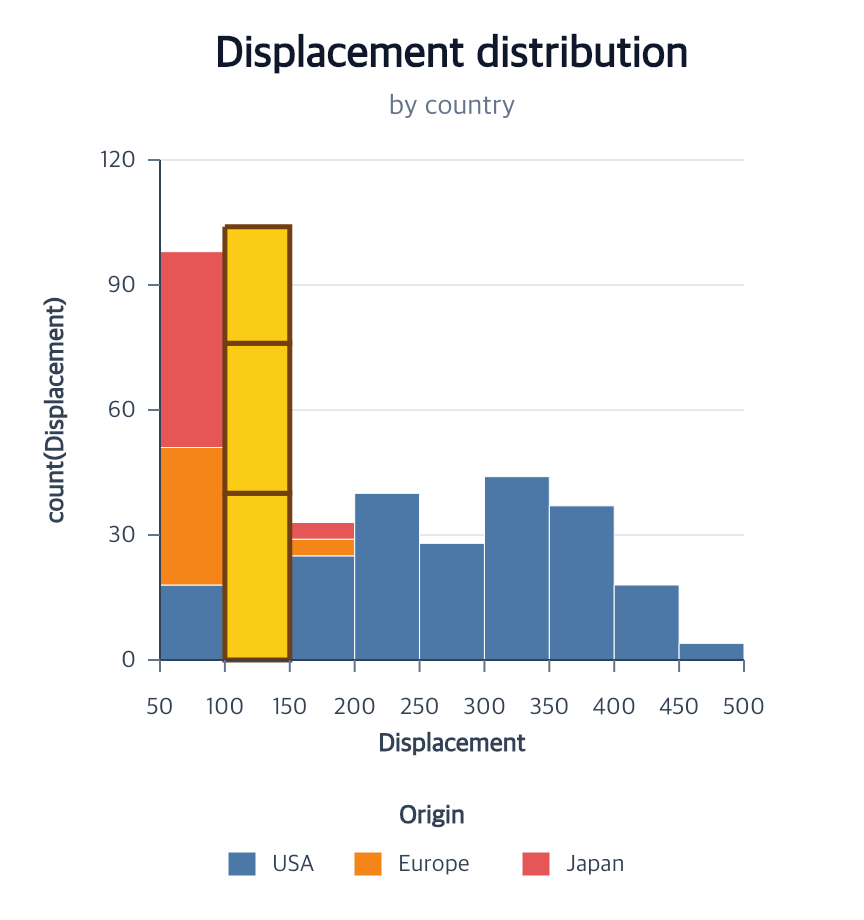
For bars, semantic endpoints and concrete dimensions are intentionally
separate. channel: "y2" compares the upper semantic endpoint. With
grain: "stack", every colored rectangle attached to the tallest bin is one
selected item.
program.highlightMarks({
  target: "bars",
  select: {
    grain: "stack",
    channel: "y2",
    op: "max"
  },
  fill: "#facc15",
  stroke: "#713f12",
  strokeWidth: 2.5
});
Use { property: "height", op: "max" } only when the intended comparison is
the rendered pixel height. The default item grain would select only the
topmost matching rectangle rather than the complete stack.
Highlight one line series
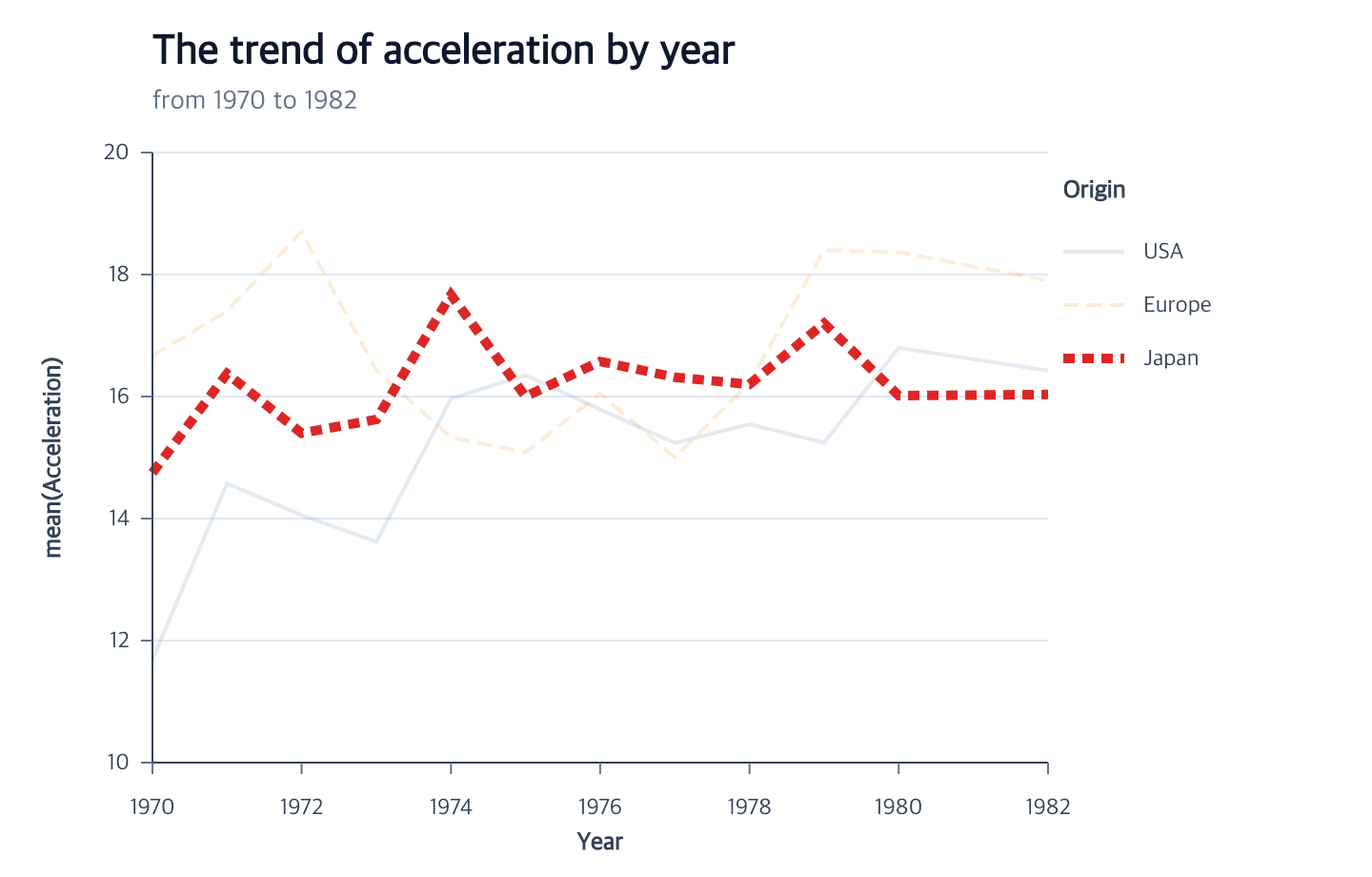
A multi-row line is one series item. The selected field must therefore have one unique value over the complete path.
program.highlightMarks({
  target: "trends",
  select: { field: "Origin", op: "eq", value: "Japan" },
  stroke: "#dc2626",
  strokeWidth: 5,
  strokeDash: "dashed",
  dimOthers: { opacity: 0.16 }
});
When the selector matches complete categories in the line’s categorical legend, legend symbols receive the same emphasis and dimming. Legend text remains fully readable.
Choose filtering, reusable selection, or highlighting
| Action | Stored result | Graphical result |
|---|---|---|
filterMarks |
Immutable member-row dataset and explicit mark rebind | Scales, mark, axes, grids, and legend rematerialize |
selectMarks |
Reusable normalized selector intent | None until another action uses the selection |
highlightMarks |
Selection plus mark-specific appearance assignment | Selected style, optional complement dimming, selected-last order |
Create a reusable selection when more than one later action should refer to the same items:
const selected = program.selectMarks({
  id: "japanSeries",
  target: "trends",
  field: "Origin",
  op: "eq",
  value: "Japan"
});

const highlighted = selected.highlightMarks({
  selection: "japanSeries",
  stroke: "#dc2626"
});
Selection intent is reevaluated after compatible Canvas, scale, encoding, and data-cardinality changes. It does not store stale item IDs.
Run and continue
- Serve the repository root and open
examples/mark-selection/. - Read the complete selector and appearance tables.
- Use
filterMarkswhen matching items should replace the target mark’s data. - Use
editBarMarkfor whole-bar appearance rather than selected items.
Documentation provenance
293 actions · sha256:e755591a2e5f5e2b494867583876e28020a478c5220b77bdc6ad469a6224891d