Published-release documentation · release compatibility
Guides
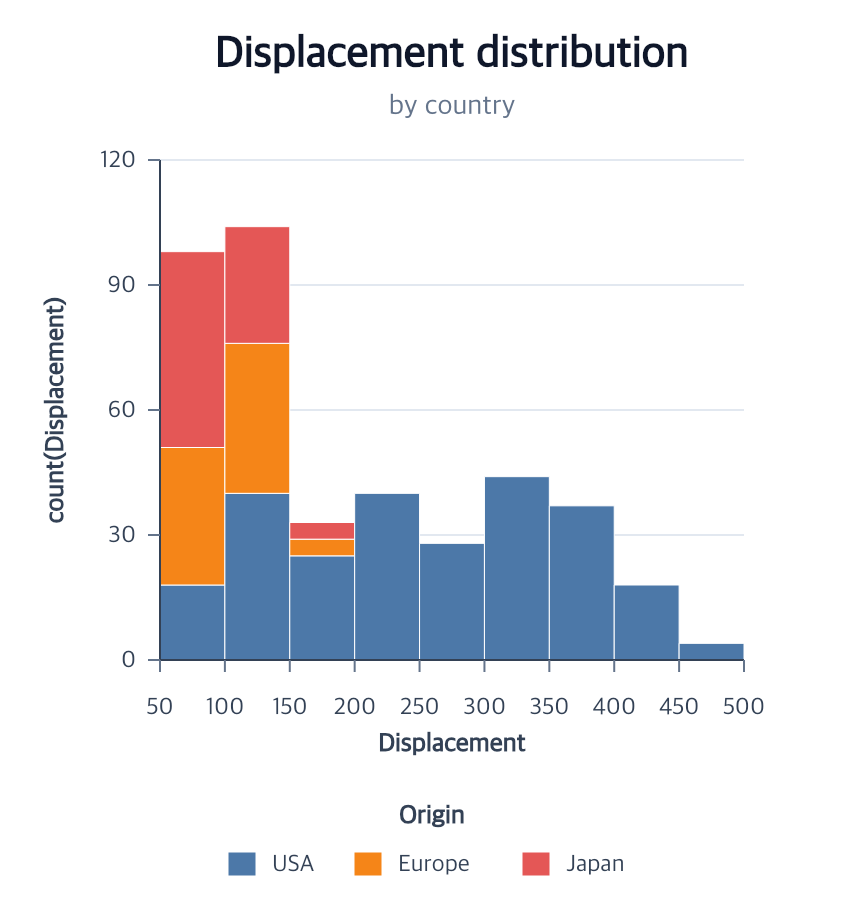
At a glance
| Action | Shortest call | Inference/defaults | Result |
|---|---|---|---|
createGuides |
createGuides() |
Applicable axes, horizontal grid, and legends | Wrapped guide child actions in deterministic order |
position encodingsAxes
position scalesGrid
appearance encodingsLegend
→
createGuides()Deterministic composition
createGuides(options?)
Creates the applicable Cartesian, Polar, or Parallel axes, Cartesian or Polar grid, and categorical legend supported by the current semantic encodings.
Contextual fragment. Use an ES module with the imports, data, and prepared resource state described in this section. Caller-provided receivers:
program. Resolve these names from setup in this fragment or section; alternatives branch from the same base.
program.createGuides();
Pass child options to customize each guide:
Contextual fragment. Use an ES module with the imports, data, and prepared resource state described in this section. Caller-provided receivers:
program. Resolve these names from setup in this fragment or section; alternatives branch from the same base.
program.createGuides({
  axes: {
    y: { ticksAndLabels: { count: 6 } }
  },
  grid: {
    horizontal: { color: "#e2e8f0" }
  },
  legend: {
    title: "Origin"
  }
});
| Option | Type | Default |
|---|---|---|
axes |
createAxes options or false |
automatic |
grid |
createGrid options or false |
automatic horizontal grid |
legend |
createLegend options or false |
automatic |
false explicitly skips that guide:
Contextual fragment. Use an ES module with the imports, data, and prepared resource state described in this section. Caller-provided receivers:
program. Resolve these names from setup in this fragment or section; alternatives branch from the same base.
program.createGuides({ legend: false });
Explicit axis directions
Omitting axes, or passing axes: {}, infers applicable axes. Once a direction
is named, only explicitly enabled directions are requested. In particular,
axes: { x: false } requests neither axis; retain y with axes: { x: false, y: {} }.
Skipping a guide does not remove a guide that already exists.
Contextual fragment. Use an ES module with the imports, data, and prepared resource state described in this section. Resolve these names from setup in this fragment or section; alternatives branch from the same base.
import { chart } from "ggaction";
const program = chart()
  .createCanvas({ width: 400, height: 300, margin: 60 })
  .createData({ values: [{ x: 1, y: 2 }, { x: 2, y: 4 }] })
  .createScatterPlot({
    x: "x", y: "y",
    guides: { axes: { x: false, y: {} }, grid: false, legend: false }
  });
Here, the y axis is visible and the x axis is absent. The two observations remain two points. The lifecycle label Aggregate create-only means that an action composes child actions; it does not mean that the action statistically aggregates rows.
Choose a concise authoring action
| Intent | Public action |
|---|---|
| Attach text to an existing mark’s items | createMarkLabels |
| Assign several channels to one mark atomically | encodeChannels |
| Create a point and its interval together | createIntervalPlot |
createGuides is an aggregate creation action. Revise or remove existing
guides through their owning axis, grid, and legend actions; there is no generic
editGuides action.
With automatic options, an existing axis, grid, or legend collection is kept as-is and only a missing applicable collection is created. This supports progressive authoring after a chart facade has already created its default axes and grid:
Contextual fragment. Use an ES module with the imports, data, and prepared resource state described in this section. Resolve these names from setup in this fragment or section; alternatives branch from the same base.
program
  .createScatterPlot({ x: "Displacement", y: "Acceleration" })
  .encodeColor({ field: "Origin" })
  .createRegression()
  .createGuides(); // keeps the axes and grid, then adds the legend
Passing an explicit object for a collection keeps that child action’s strict create contract. Use the corresponding edit action to revise an existing collection.
Axes are selected from x/y, theta/radius, or ordered Parallel dimensions. A horizontal grid is selected when a y encoding exists; vertical grid remains off unless requested. Polar grids are selected only for the encoded Polar channels: theta creates spokes and radius creates concentric circles. A legend is selected for line color/stroke-dash, bar color, area or arc color, compatible point color+shape encodings, or a standalone quantitative point-size encoding. Size adds a second quantitative block when a point-series legend also exists.
Parallel dimensions create one axis per stored field and no automatic grid. Their row-path color or stroke-dash encoding uses the ordinary categorical line legend.
Density areas can request both grids and forward the complete top-legend layout through the aggregate:
Contextual fragment. Use an ES module with the imports, data, and prepared resource state described in this section. Caller-provided receivers:
densityArea. Resolve these names from setup in this fragment or section; alternatives branch from the same base.
densityArea.createGuides({
  grid: { horizontal: {}, vertical: {} },
  legend: {
    position: "top",
    direction: "vertical",
    columns: 3,
    titlePosition: "left",
    offset: 8
  }
});
Axis titles use density provenance rather than generated output names. A
vertical density therefore infers the original field on x and Density on y;
horizontal density reverses those titles.
Layered regression scatterplots still create only one shared x axis, y axis, and horizontal grid. Their point color/shape and matching regression line share one composite Origin legend, followed by the five-symbol size legend.
For grouped bars, the shortest call creates an ordinal x axis at band centers, a quantitative y axis, a horizontal grid, and a right-side color legend:
Contextual fragment. Use an ES module with the imports, data, and prepared resource state described in this section. Caller-provided receivers:
groupedBars. Resolve these names from setup in this fragment or section; alternatives branch from the same base.
groupedBars.createGuides();
The same child options remain available. For example, this changes the ordinal labels while retaining inference for every other guide:
Contextual fragment. Use an ES module with the imports, data, and prepared resource state described in this section. Caller-provided receivers:
groupedBars. Resolve these names from setup in this fragment or section; alternatives branch from the same base.
groupedBars.createGuides({
  axes: {
    x: { ticksAndLabels: { labels: { fontSize: 11 } } }
  }
});
createGuides only selects and calls existing wrapped actions. Coordinate,
scale, target, field, and domain validation remains the responsibility of
createAxes, createGrid, and createLegend, so ambiguous charts still
require their explicit child options. If nothing is selected, the action
reports an error.
For a Polar-only chart, omission selects the axis and grid family for each stored Polar position encoding. A theta-only donut therefore creates a theta axis and spokes without inventing a radial guide; its arc color encoding can still infer the categorical legend. A theta/radius chart selects both families. Grid geometry is inserted behind marks while axes remain above marks, independent of the call occurring after mark creation.
The trace preserves the composition:
createGuides
├─ createAxes?
├─ createGrid?
└─ createLegend?
Chart titles are not guides. Create them separately with
createTitle. A title and guide reserved on the same edge must
both fit without overlap; neither action silently expands the Canvas margin.
Call createGrid, createAxes, or
createLegend directly when only one focused guide action is
desired.
Errors and limitations
An explicit child object selects that guide, false disables it, and omission
requests automatic applicability. The action fails when no supported guide can
be selected.
Related
Axes · Grids · Legends · Titles
createGuides also accepts facet parents: it creates applicable guides on the
retained source. Unchanged automatic guides preserve panels; new guides rederive them.
Datum-only anchors, such as a rug baseline, do not infer an axis. Independent
appearance channels can be requested together through legend.channels; sampled
opacity and stroke-width legends become separate blocks alongside color.
Documentation provenance
293 actions · sha256:e755591a2e5f5e2b494867583876e28020a478c5220b77bdc6ad469a6224891d