Published-release documentation · 281 actions; release compatibility · contract 5520b0fa9525
Switch encoding modes atomically
Switch two supported channels between field encodings and constants as one validated chart revision.
Prerequisites
Use the Getting Started browser module setup, install the full
ggaction entry, and provide <canvas id="chart"></canvas>. This complete example
includes its data and imports. These APIs require ggaction 0.0.15 or later;
check the documentation version for release compatibility.
Decision sequence: createScatterPlot creates the initial chart; the Advanced
encodeChannels action batches subsequent channel changes.
Complete program
import { chart, hconcat } from "ggaction";
import { render } from "ggaction";

export function createEncodingModesWorkflow() {
  const before = chart()
    .createCanvas({ width: 360, height: 280, margin: 60 })
    .createData({ values: [
      { x: 1, y: 4, category: "A", mass: 2 },
      { x: 3, y: 2, category: "B", mass: 8 }
    ] })
    .createScatterPlot({ id: "points", x: "x", y: "y", guides: false, point: { radius: 9, stroke: "#64748b", strokeWidth: 3 } })
    .encodeChannels({ target: "points", channels: {
      stroke: { field: "category" }, opacity: { field: "mass" }
    } });
  const constant = before.encodeChannels({ target: "points", channels: {
    stroke: { value: "#7c3aed" }, opacity: { value: 0.5 }
  } });
  const restored = constant.encodeChannels({ target: "points", channels: {
    stroke: { field: "category" }, opacity: { field: "mass" }
  } });
  return hconcat({ programs: [
    before.createTitle({ text: "Field encodings" }),
    constant.createTitle({ text: "Constant appearance" }),
    restored.createTitle({ text: "Field encodings restored" })
  ], gap: 16 });
}

const program = createEncodingModesWorkflow();
render(program, document.querySelector("#chart").getContext("2d"));
Expected result
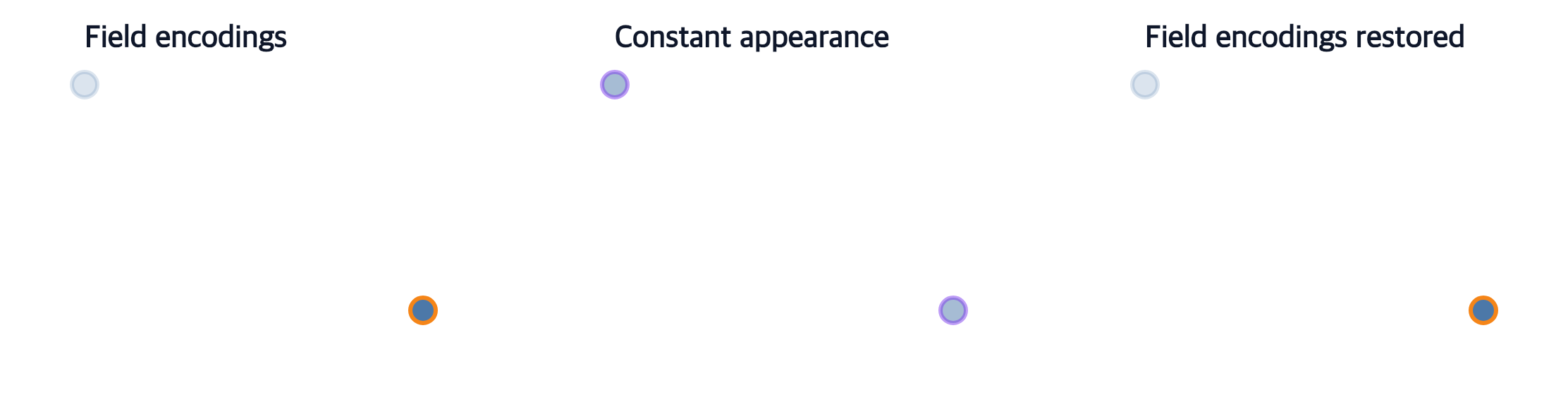
The first and third panels encode outline by category and opacity by mass. The middle panel uses one purple outline and opacity 0.5. All panels keep the same point positions and source rows.
Boundaries and failure behavior
This uses stroke and opacity, which both accept field and constant forms. encodeColor accepts a field; { value } is not a color-channel payload. Each channel keeps the contract of its focused action. Atomic assignment validates the final shared-scale state, rejects the entire operation on an invalid channel, and requires an explicit mark target. It is available from the full entry only.
Related
Authoring conventions · Data policies · Complete action reference