Published-release documentation · release compatibility
Text marks
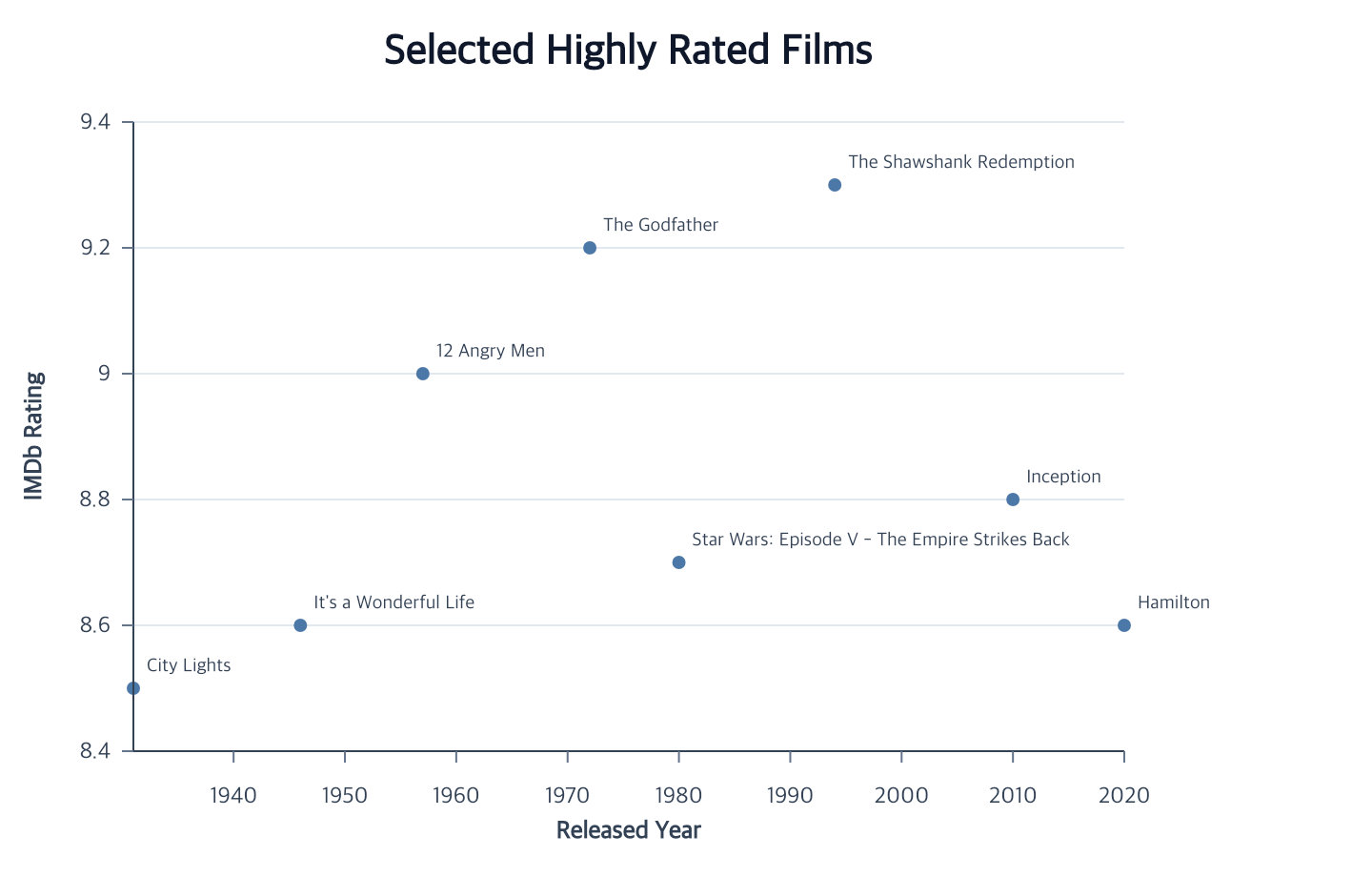
Text marks turn data values into visible labels. Add one after a compatible point, line, bar, rect, rule, or arc layer and ggaction persists that layer as the annotation source.
createAnnotation(options)
Create constant text at a final mark, data coordinate, or plot fraction:
Contextual fragment. Use an ES module with the imports, data, and prepared resource state described in this section. Caller-provided receivers:
points. Resolve these names from setup in this fragment or section; alternatives branch from the same base.
const dataNote = points.createAnnotation({
  text: "Peak · 9.0",
  x: 8,
  y: 9,
  dx: 8,
  dy: -16,
  fontWeight: 600
});

const plotNote = points.createAnnotation({
  id: "forecast",
  text: "Forecast",
  space: "plot",
  x: 0.75,
  y: 0.8
});

const centerNote = points.createAnnotation({ text: "Total", anchor: "plot-center" });
anchor: "plot-center" owns the plot midpoint and centered horizontal/vertical
alignment together. It follows plot bounds when the Canvas or margins change.
Do not combine it with x, y, space, source, align, or baseline.
Optional data, coordinate, text styling, and pixel offsets remain available.
For a mark anchor, omit x, y, and space. source selects an existing compatible
mark, or the current/unique mark is inferred. The constant text appears once per
final source item, including aggregate bars and arc sectors.
For a data anchor, provide both x and y and optionally source. The selected
complete Cartesian layer supplies its dataset, coordinate, x/y scales, field types,
and temporal units. Values participate in automatic domains. This binding is chosen
at creation and remains an independent Text layer, so later encodeX and encodeY
can move it.
For a plot anchor, set space: "plot" and pass x/y fractions in [0,1]. x=0 is
the plot’s left edge and y=0 its bottom edge. Supply or make inferable an existing
dataset; an empty dataset works. Plot anchors reject source and use named
<id>-x and <id>-y fraction scales. The default ID is "annotation".
text is required. All ordinary Text appearance options and format are accepted.
Omitting layout, or passing false, preserves the exact anchor. A layout object
enables collision placement and accepts layoutLabels options except target.
After creation, use the lower Text, position, scale, layout, and mark-removal actions.
createMarkLabels(options?)
See Attached Mark Labels for this contract and its examples.
editMarkLabelSelection(options)
See Attached Mark Labels for this contract and its examples.
editMarkLabelPlacement(options)
See Attached Mark Labels for this contract and its examples.
removeMarkLabels(options)
See Attached Mark Labels for this contract and its examples.
createTextMark(options?)
Contextual fragment. Use an ES module with the imports, data, and prepared resource state described in this section. Resolve these names from setup in this fragment or section; alternatives branch from the same base.
const annotated = points
  .createTextMark({
    fontSize: 10,
    fill: "#334155",
    dx: 7,
    dy: -6,
    align: "left",
    baseline: "bottom"
  })
  .encodeText({ field: "Series_Title" });
The first omitted ID is "text". When data is omitted, the current compatible
layer—or one unique compatible layer—supplies its dataset, position, and final
visual-item grain. This means aggregate bars receive one label per bar, rect
labels anchor at cell centers, and arc labels anchor at sector centers. Pass
data explicitly to assemble an independent text layer with encodeX and
encodeY.
Independent Text accepts either a field or a constant datum on each position.
When x, y, and text are all constants, it creates exactly one label even if the
selected dataset is empty or has many rows. If any of them uses a field, constants
are repeated at that field’s row grain. Datum positions use the same quantitative,
temporal, and nominal scale rules as other Cartesian marks and contribute to
automatic domains.
Use source to select a particular mark when a chart has several layers:
Contextual fragment. Use an ES module with the imports, data, and prepared resource state described in this section. Resource selectors used here:
source: "bars". Resolve these names from setup in this fragment or section; alternatives branch from the same base.
// Fragment: layeredChart contains a mark named "bars".
const labels = layeredChart
  .createTextMark({ id: "bar-labels", source: "bars", dy: -4, align: "center" })
  .encodeText({ field: "value" });
An explicit source wins over the current mark and dataset. Use either source
or data; supplying both is an error. The source must be an existing point,
line, bar, rect, rule, or arc, but its position encodings may still be incomplete.
Labels appear when the source becomes complete. They follow later source
position and scale changes, disappear when a required position is removed, and
return when it is restored. source is a creation option; editTextMark edits
appearance.
For an aggregate Bar or a measured Rose/Radial Bar, labeling the measure field
uses its final aggregate value, even when every contributing row has the same
value. For example, two values of 1 in one category produce a sum label of 2.
Category labels continue to show the category itself.
These source-owned labels follow the source’s scale domain. They never contribute independent domain values,
including after source field changes, scale rebinding, filtering, and resizing. Axis/grid inference uses the source’s
current bindings instead of inherited label aliases. Direct encodeX/Y on an attached Text layer is rejected;
edit the source positions or use editTextMark({ dx, dy }) for an offset. For independent positions, create Text
with explicit data. Independent Text still contributes its own scale values.
Creation options are id, data, source, text, fill, opacity, fontSize,
fontFamily, fontWeight, align, baseline, rotation, dx, and dy.
The text option is constant-content shorthand.
rotation accepts the existing finite numeric form, interpreted as radians, or
an explicit unit object: { value: 90, unit: "degrees" } and
{ value: Math.PI / 2, unit: "radians" } are equivalent. Structured values
must contain exactly value and unit; the unit is either "degrees" or
"radians". The public boundary normalizes both forms to radians, so later
Canvas, scale, source, and layout replay preserve one concrete meaning.
editTextMark, createMarkLabels, and createAnnotation use the same rule.
Font weights
fontWeight accepts a non-empty CSS weight string or a finite number. To keep
Canvas, SVG, PNG, and PDF output consistent, numeric values are rounded to the
nearest 100 and clamped to the backend-safe 100–900 range before rendering.
For example, 650 renders as 700. The authored value remains unchanged in the
program state. Titles, facet headers, legends, and Cartesian or Polar axis text
use this same renderer policy.
encodeText({ target?, field?, value?, content?, normalizeBy?, format? })
Provide exactly one of field, constant value, or semantic content.
A filtered dataset with no remaining rows can still bind a field retained in its
known schema. An explicitly declared empty source schema works the same way. No
placeholder labels are created; source revisions materialize the matching rows
and validate their actual content. Unknown fields and an unknown empty source
schema still reject field bindings.
format defaults to "auto". Numeric formats are ".0f"–".12f",
".0%"–".12%", and ".0e"–".12e". UTC date formats compose %Y, %m,
%d, and %b, such as "%Y-%m-%d". Time components are %H (24-hour hour),
%M (minute), %S (second), and %L (three-digit millisecond); for example,
"%H:%M:%S.%L" produces "09:05:02.001". All components use UTC; hours, minutes,
and seconds use two digits. %% emits a literal percent sign.
The same formats work for temporal axis and legend labels.
Calling encodeText again replaces the previous content assignment and
preserves the previous format unless you supply one. Precision is an integer
from 0 through 12; two-digit zero-padded forms such as ".01f" are also
accepted and mean the same as ".1f".
Contextual fragment. Use an ES module with the imports, data, and prepared resource state described in this section. Resolve these names from setup in this fragment or section; alternatives branch from the same base.
bars
  .createTextMark({ dy: -4, align: "center" })
  .encodeText({ field: "value", format: ".1f" });

events
  .createTextMark()
  .encodeText({ field: "date", format: "%b %Y" });
Use semantic content when the label should describe the source’s final items:
Contextual fragment. Use an ES module with the imports, data, and prepared resource state described in this section. Resolve these names from setup in this fragment or section; alternatives branch from the same base.
// Fragment: pie contains a completed Pie mark.
const percentages = pie
  .createTextMark({ align: "center", baseline: "middle" })
  .encodeText({ content: "share", format: ".1%" });

// Fragment: stackedBars contains a completed Bar mark.
const segmentValues = stackedBars
  .createTextMark({ align: "center", dy: -4 })
  .encodeText({ content: "value" });
content: "value" reads each Bar segment’s aggregate before stacking or
normalization, each histogram segment’s count, each Pie sector’s count or
weighted sum, or an Arc’s radial value. For two stacked values of 10 and 30,
it labels them 10 and 30. content: "category" reads the category of an
aggregate Bar or categorical Arc. For a histogram or other binned Bar it shows
the bin interval as start–end, regardless of stacking or axis reversal.
content: "share" divides these values by their total across the current
source’s final items. Use normalizeBy: "category" for percentages within
each Bar category or histogram bin. Arc shares use normalizeBy: "source",
the default. Filtering the source recalculates the denominator. Negative or
undefined values and non-positive denominators are errors; an empty final
item set produces no labels. Zero-height bars omitted from final items also
have no labels. With format: "auto", a share is a fraction; use a percent
token to display a percentage.
Semantic content requires an attached Bar or Arc. For Point, Rule, Rect,
ranged Bar, or an independent text layer, choose a field or constant
value explicitly. Histogram intervals and quantitative Arc theta have no
inferred category label. Source completion, position changes, and scale
edits replay the stored content alongside the label anchors. Add source-attached
labels to the unit template before faceting; supported facet replay retains
them in each child. Parent facet headers and titles use their own composition
actions. A parent composition is not a unit mark target. Independent text
layers have separate source/position requirements; attached-label support does
not imply every independent-text template is replayable.
Arc-source text is anchored halfway between each sector’s inner and outer radii at its angular midpoint. The anchor is derived from the materialized sector path, so Canvas, scale, padding, and inner-radius changes keep labels aligned. A field used for arc text must resolve to one value at the final sector grain.
Contextual fragment. Use an ES module with the imports, data, and prepared resource state described in this section. Resolve these names from setup in this fragment or section; alternatives branch from the same base.
const labeledDonut = donut
  .createTextMark({ align: "center", baseline: "middle" })
  .encodeText({ field: "percentageLabel" });
editTextMark(options)
Edit typography, opacity, alignment, baseline, rotation, or dx/dy without
changing the semantic anchor:
Contextual fragment. Use an ES module with the imports, data, and prepared resource state described in this section. Caller-provided receivers:
annotated. Resolve these names from setup in this fragment or section; alternatives branch from the same base.
const revised = annotated.editTextMark({
  fill: "#b91c1c",
  fontWeight: 600,
  dx: 10
});
At least one property is required. Canvas and scale edits rematerialize both the source geometry and attached labels.
layoutLabels(options?)
See Label Collision Layout for this contract and its examples.
removeLabelLayout(options?)
See Label Collision Layout for this contract and its examples.
Numeric pixel offsets
In Full, encodeDx and encodeDy assign a finite numeric field or constant to
independent Text glyph offsets. These are signed logical pixels after position
scaling; they do not create a scale or change axis domains.
Contextual fragment. Use an ES module with the imports, data, and prepared resource state described in this section. Resolve these names from setup in this fragment or section; alternatives branch from the same base.
import {chart} from 'ggaction';
const labels = chart()
  .createCanvas({width:500,height:300,margin:80})
  .createData({values:[
    {x:2,y:3,label:'Alpha',shift:12},
    {x:5,y:6,label:'Beta',shift:-9}
  ]})
  .createTextPlot({x:'x',y:'y',text:'label'})
  .encodeDx({field:'shift'})
  .encodeDy({value:-6});
Use exactly one of field or value. Numeric strings and non-finite numbers
are rejected. An encoded component overrides the corresponding constant
editTextMark offset; removeEncoding({channel:'dx'}) restores the stored
constant. Omitting dy preserves it. Field offsets create one glyph per eligible
row even with constant positions and content; typed empty field-bound data
creates none. The existing missing:'skip' policy omits the complete missing row.
For atomic assignment, call
labels.encodeChannels({target:'textPlot',channels:{dx:{field:'shift'},dy:{value:-6}}}).
Canvas, scale, data edits, facet children and saved-program restoration replay
the offsets. Attached source labels are excluded. Basic retains its existing
Text-family exclusion. Categorical encodeXOffset/encodeYOffset remain separate
subgroup-layout operations.
Related
Point marks · Bar marks · Rule marks · Encodings · Annotation recipe
Data-bound text accepts encodeColor with categorical or continuous scales and
an optional color legend. Use explicit data to create independent row-backed
text; color encoding and constant fill are mutually exclusive.
Attached labels instead accept inheritColor: "fill" or "stroke". The resolved
source item’s color follows filtering, aggregation, and scale edits without a
second legend. Explicit fill overrides inheritance; false disables it. The
default contrast policy for arc/rect labels remains unchanged. A missing source
appearance produces an error rather than an invented color.
Newline-delimited text remains one logical label. lineHeight sets positive
pixel spacing (default 1.2 * fontSize). blockAlign: "first" anchors the first
line using baseline; "middle" centers the complete block on the anchor.
Each line shares horizontal alignment. Blank internal lines consume spacing;
missing values and empty whole labels retain the existing omission policy.
Rotation, collision layout, and overflow bounds include every resolved line.
Numeric labels also accept "," for grouped integers and ",.0f" through ",.12f" for grouped fixed decimals. UTC formats accept %a for an English weekday abbreviation, such as %a %d → Mon 01. These formats use the shared axis, legend and text formatter.
Documentation provenance
293 actions · sha256:e755591a2e5f5e2b494867583876e28020a478c5220b77bdc6ad469a6224891d