Published-release documentation · release compatibility
Continuous Color Scales
Named palettes
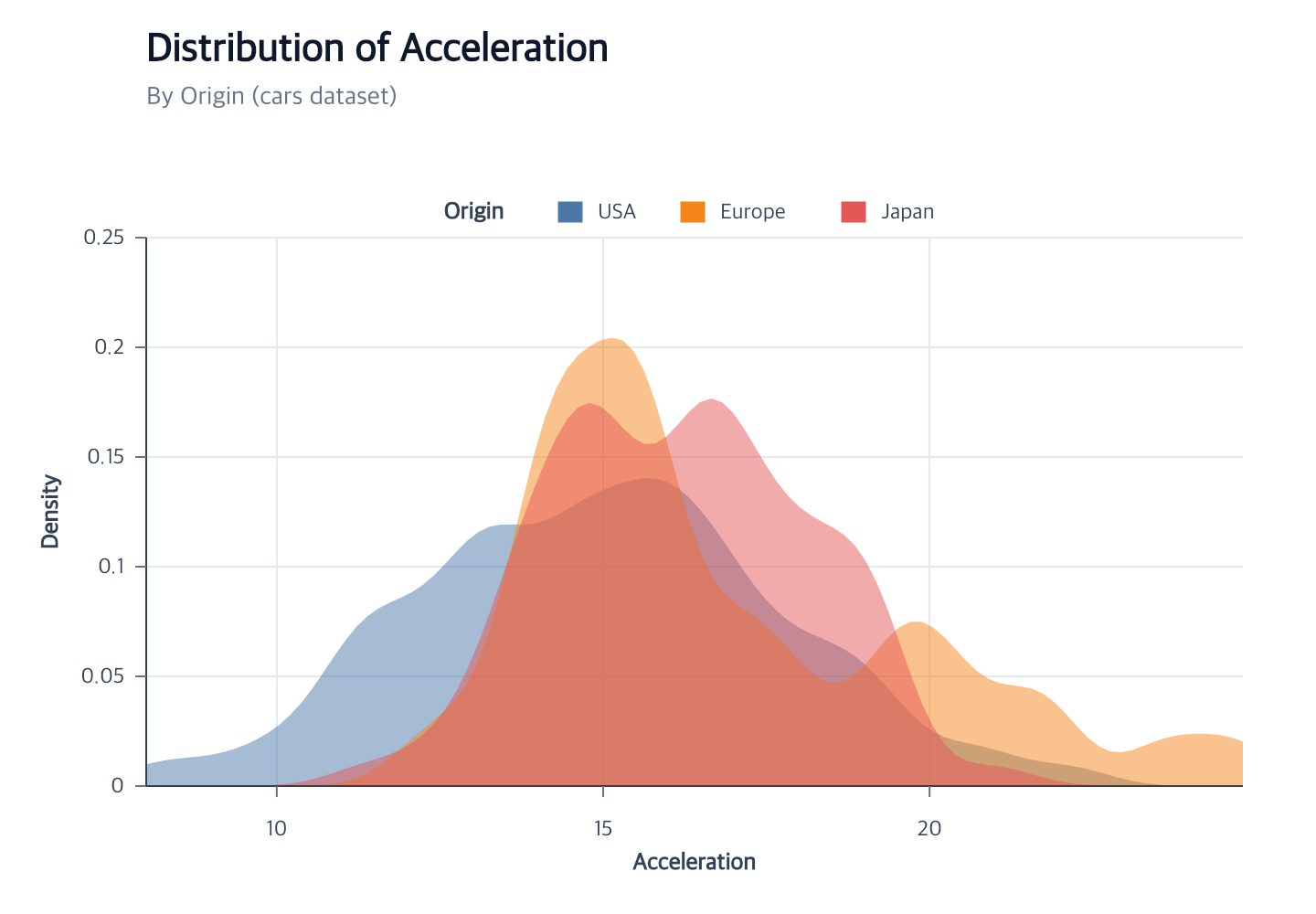
Use a name directly or an object with optional sampling controls:
Contextual fragment. Use an ES module with the imports, data, and prepared resource state described in this section. Caller-provided receivers:
program. Resolve these names from setup in this fragment or section; alternatives branch from the same base.
program.encodeColor({
  field: "Origin",
  scale: { palette: { name: "set2", count: 3 } }
});
Accepted names are fixed by the ggaction contract:
| Family | Names |
|---|---|
| Categorical | accent, category10, category20, category20b, category20c, observable10, dark2, paired, pastel1, pastel2, set1, set2, set3, tableau10, tableau20 |
| Sequential | blues, tealblues, teals, greens, browns, oranges, reds, purples, warmgreys, greys, viridis, magma, inferno, plasma, cividis, turbo, bluegreen, bluepurple, goldgreen, goldorange, goldred, greenblue, orangered, purplebluegreen, purpleblue, purplered, redpurple, yellowgreenblue, yellowgreen, yelloworangebrown, yelloworangered, darkblue, darkgold, darkgreen, darkmulti, darkred, lightgreyred, lightgreyteal, lightmulti, lightorange, lighttealblue |
| Diverging | blueorange, brownbluegreen, purplegreen, pinkyellowgreen, purpleorange, redblue, redgrey, redyellowblue, redyellowgreen, spectral |
| Cyclical | rainbow, sinebow |
count must be a positive integer no greater than 10,000. Categorical palettes use a prefix when the
count is shorter and cycle deterministically when it is longer. Other families
used for an ordinal mapping are sampled to count, or to the resolved domain
size when omitted. On a sequential scale, count must be at least 2 and sets
the number of concrete gradient stops; omission uses the default stop count.
extent is accepted only for non-categorical palettes and contains two distinct
values within [0, 1]; descending values reverse the sampling direction. Scale
reverse is applied afterward.
The semantic scale stores the palette descriptor. Materialized scales, marks,
legends, and renderers receive only concrete CSS colors. Explicit range and
palette cannot be supplied together.
Continuous color and field-driven stroke accept the same palette descriptor in
scale.palette and scale.range: { palette: { name: "turbo", count: 64 } }.
Both forms have the same JavaScript behavior and TypeScript declarations,
including the optional extent pair. Explicit color arrays still need at least
two stops. The same descriptors work in compatible chart facade color and
stroke options and in Full encodeChannels assignments.
Continuous point and aggregate-bar color
This section also applies to Rect color: one value per final cell. Keep this anchor for existing links. Independent field-driven stroke has its own channel and compatible continuous color scale; see Mark Style.
Quantitative or temporal point color uses fieldType: "quantitative" or
"temporal" and an internal sequential scale. Aggregate bars support
quantitative continuous color with one aggregate value per final rectangle.
The default palette is
viridis; an explicit palette may use count and extent, while an explicit
range needs at least two colors. count controls the stored gradient stops;
the scale still interpolates continuously between them. Explicit sequential
color ranges are also limited to 10,000 stops. interpolate accepts
rgb, hsl, hsl-long, lab,
hcl, hcl-long, cubehelix, or cubehelix-long. clamp and reverse
affect both points and a connected gradient legend.
Lab, HCL and HCL-long interpolation use D65 by default. Set
whitePoint: "d50" together with one of those interpolation modes to use
D50-adapted sRGB/XYZ matrices. An explicit white point with another interpolation
mode rejects, including "d65". editColorScale({ whitePoint: "auto" })
removes the explicit choice and restores D65. When changing interpolate,
supply whitePoint again to retain the selected convention; omission restores
D65. An incompatible explicit pair rejects. Marks, field-driven strokes, gradient legends and sampled
color legends use the same selected convention.
For HCL and HCL-long, an endpoint whose parsed RGB channels are exactly equal has zero chroma and no hue. A segment with one neutral endpoint retains the other endpoint’s hue; two neutral endpoints interpolate lightness with zero chroma. This applies to D50 and D65. Chromatic endpoints retain the ordinary short or long hue path, and final RGB byte rounding stays unchanged.
Cubehelix and cubehelix-long interpolation accept any finite numeric gamma,
including zero and negative values.
The default is 1; editColorScale({ gamma: "auto" }) restores that default.
Within each range segment, hue and saturation use the original position t,
while lightness uses t ** gamma. Gamma does not exponentiate the complete
color or alter hue progression. Other interpolation modes reject explicit
gamma, including 1. Zero gamma keeps the segment’s right-end lightness,
including at t = 0, while hue and saturation continue to change.
For negative gamma at zero segment position, constant lightness and neutral
saturation are retained. Remaining extended RGB channels are bounded to bytes:
NaN and negative infinity become 0, and positive infinity becomes 255. This is
only the zero-position boundary, not an invalid-data fallback.
Other nonfinite real powers or negative-gamma RGB overflow reject atomically;
clamping occurs before gamma. With multiple stops, each half-open segment uses
its own position and an exact interior stop belongs to the segment on its right.
Range endpoints retain the
ordinary 8-bit RGB normalization, and final channels use the same byte rounding
as other interpolation modes. When changing interpolate, supply gamma again
to retain it; omission restores 1. An explicitly incompatible pair rejects.
On an existing Cubehelix scale, program.editColorScale({ gamma: 0 }) fixes
lightness at the right endpoint; program.editColorScale({ gamma: -0.1 })
extrapolates it toward the beginning of each segment. The
complete color controls program also exports
createZeroGammaControls and createBelowZeroGammaControls as complete programs.
Contextual fragment. Use an ES module with the imports, data, and prepared resource state described in this section. Caller-provided receivers:
program. Resolve these names from setup in this fragment or section; alternatives branch from the same base.
program.encodeColor({
  field: "Acceleration",
  fieldType: "quantitative",
  scale: {
    palette: { name: "viridis", count: 5 },
    interpolate: "rgb"
  }
});
The sequential type is inferred inside encodeColor and is also available to
direct createScale and compatible atomic editScale transitions.
For aggregate bars, a color field equal to the measure field inherits its
aggregate. A different quantitative field requires an explicit aggregate.
The automatic domain is derived from those final aggregate values, not from
the unaggregated source rows.
Log and symmetric-log color
Quantitative color and stroke also accept scale: { type: "log", base: 10 }
or scale: { type: "symlog", constant: 0.01 }. The default base is 10; the
default symlog constant is 1. Log domains and values must be strictly positive
or strictly negative with matching signs. Symlog accepts negative values and
zero and uses sign(x) * log(1 + abs(x) / constant). The constant must be
positive; the log base must be positive and different from 1.
For example, a black-to-white log scale over [1, 100] assigns 10 the middle
gray. Its gradient legend places 1, 10, and 100 at equal distances. Color
interpolation, palette sampling, clamping, and reversal retain their usual
meaning. editColorScale and editStrokeScale update marks and gradient ticks
together. Temporal color remains sequential; numeric midpoint is available
only on sequential scales. Switching type clears incompatible transform options.
An unattached direct log/symlog color scale needs a color range, palette, or
interpolation option to distinguish it from a numeric position scale.
Signed power color
Quantitative color and stroke accept scale: { type: "pow", exponent: 3 }.
The exponent is positive and finite; omission defaults to 1. Values use
f(v) = sign(v) * abs(v) ** exponent, then interpolate between f(domain[0])
and f(domain[1]). Transforming the already normalized position is a different
mapping: for domain [8, 24.8], the raw endpoints are cubed before normalization.
Negative and zero-crossing domains retain their signs. Clamping and reversal
keep their usual meaning, while numeric midpoint is unsupported.
Gradient ticks and sampled color labels retain original data values, using
the same transformed positions as marks. Set exponent: 1 to reset the power
mapping; changing scale type clears the inherited exponent. Explicit exponents
on other color scale types reject. An unattached power color scale needs a
color range, palette or interpolation option to distinguish it from a position scale.
Explicit color midpoint
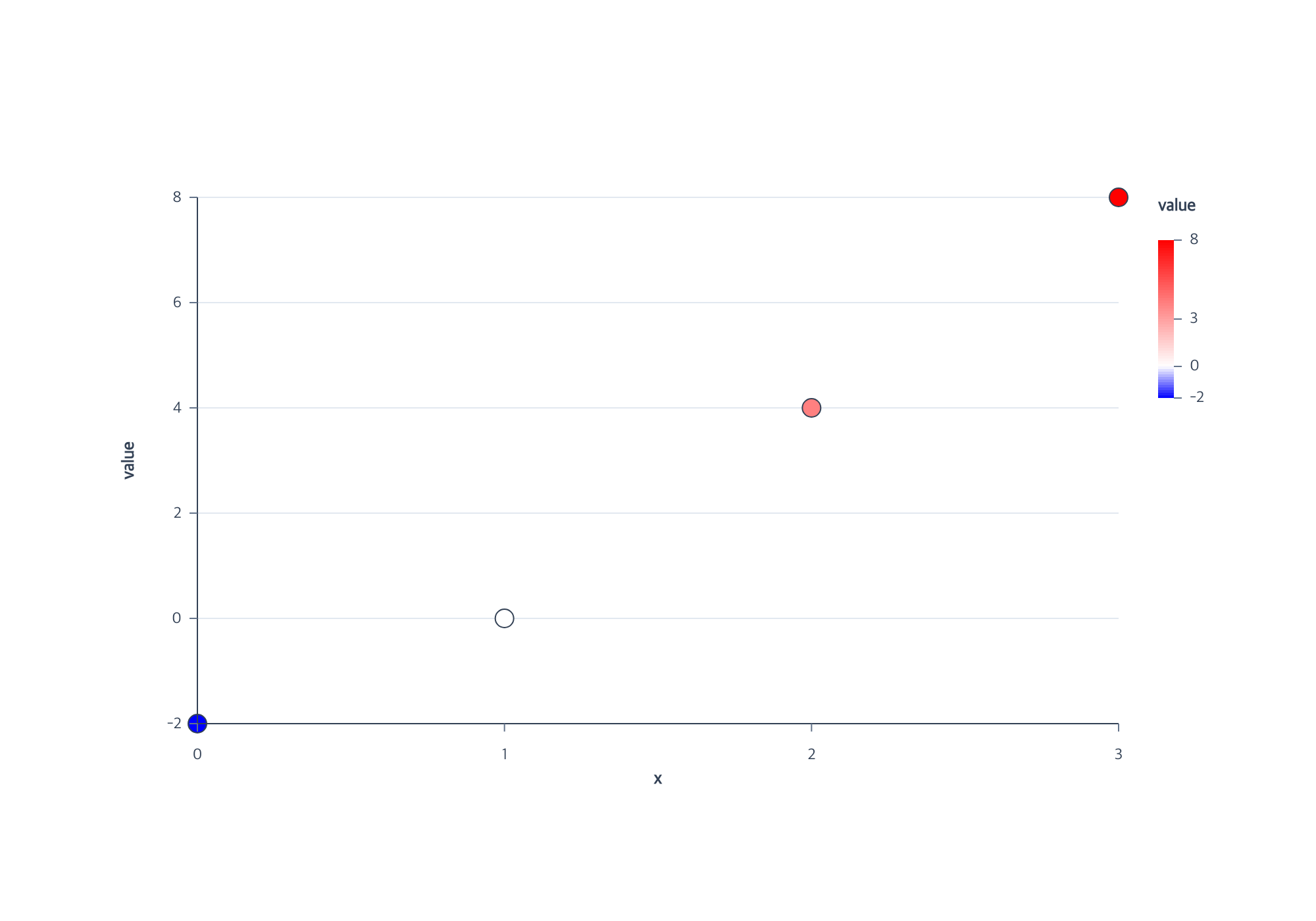
A quantitative sequential scale can use midpoint to assign the palette’s center
sample to a meaningful value. In this complete example, zero is white even though
the domain runs from -2 to 8:
Contextual fragment. Use an ES module with the imports, data, and prepared resource state described in this section. Resolve these names from setup in this fragment or section; alternatives branch from the same base.
import { chart } from "ggaction";
const layout = { width: 1000, height: 700, margin: 150 };
const rows = [-2, 0, 4, 8].map((value, x) => ({ x, value }));
const program = chart().createCanvas(layout)
  .createData({ id: "data", values: rows })
  .createScatterPlot({
    id: "m", x: "x", y: "value",
    point: { radius: 7, stroke: "#334155", strokeWidth: 1 },
    color: { field: "value", fieldType: "quantitative", scale: {
      id: "colors", type: "sequential", domain: [-2, 8],
      range: ["blue", "white", "red"], midpoint: 0
    } },
    guides: { legend: { count: 3 } }
  });
The executable example shown above is shared with the
render and browser checks. Values -2, 0, 4, and 8 receive blue, white, #ff8080,
and red. A palette with a different center sample uses that color instead.
The legend keeps value-linear positions: zero appears 20% of the way from -2
to 8. Its ticks include the midpoint once; count controls the base samples.
This example uses three base samples so the added zero label remains readable.
midpoint must be finite and strictly inside the resolved domain. Numeric
midpoints are supported only for quantitative sequential color, including Point,
aggregate Bar, and Rect. Temporal, positional, categorical, and discretized scales
do not accept a numeric midpoint. Automatic domains are checked when their
consumers resolve. clamp, reverse, and all supported interpolation methods
use the same mapping for marks and legends.
Use program.editScale({ id: "colors", midpoint: "auto" }) to remove the policy
and restore interpolation across the domain endpoints. Omitting midpoint in an
edit or encoding reassignment preserves it. Direct createScale accepts the
same option. Scale-family changes follow the color transition rules,
including atomic replacement of compatible legends on all four edges.
Lab white point comparison
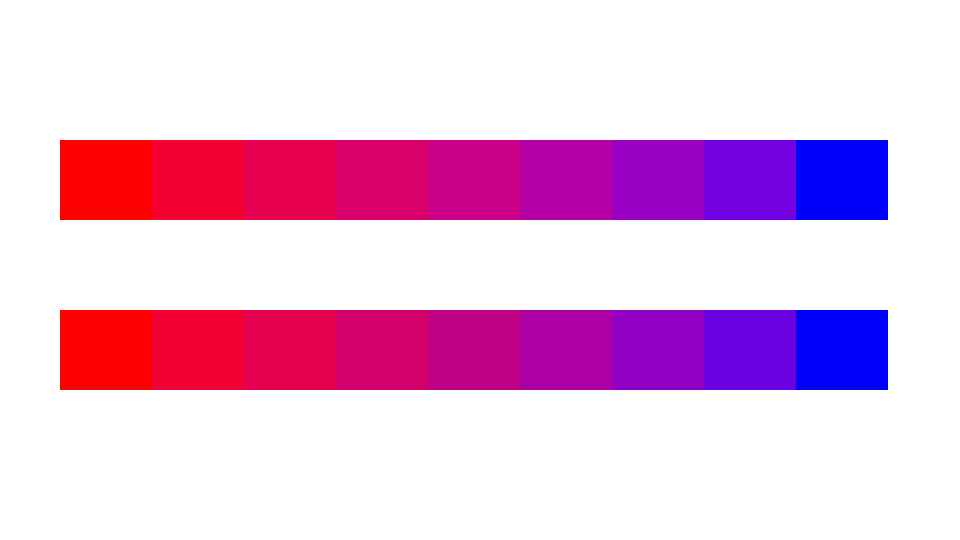
The first row uses the default D65 convention. The second starts with the same
Lab scale, then calls editColorScale({ target: "d50", whitePoint: "d50" }).
Both rows contain nine identical source values from 0 to 1, with the same red
and blue endpoints. Their intermediate colors reveal the selected white point.
The complete runnable program
creates the rectangles, assigns their color scales, then edits the second scale.
Color gamma and signed-power
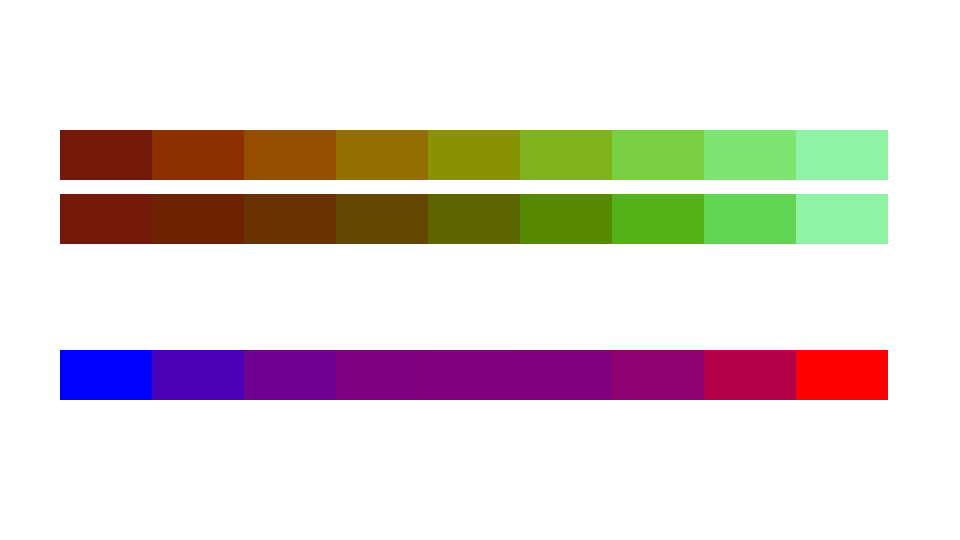
Read the three rows from top to bottom: default cubehelix gamma 1, the same
scale edited with editColorScale({ target: "gamma22", gamma: 2.2 }), and a
blue-to-red scale edited with
editColorScale({ target: "power", type: "pow", exponent: 3 }).
The cubehelix rows use the exact 8-bit endpoints #75190b and #90f2a4.
The last row retains values from -2 to 2; the cubic transform changes where those
values fall within the palette without changing the source values.
The complete runnable program
uses the same rectangle geometry for every row.
Related
Scale overview · Encodings · Troubleshooting
Documentation provenance
293 actions · sha256:e755591a2e5f5e2b494867583876e28020a478c5220b77bdc6ad469a6224891d