Published-release documentation · release compatibility
Bar Positions
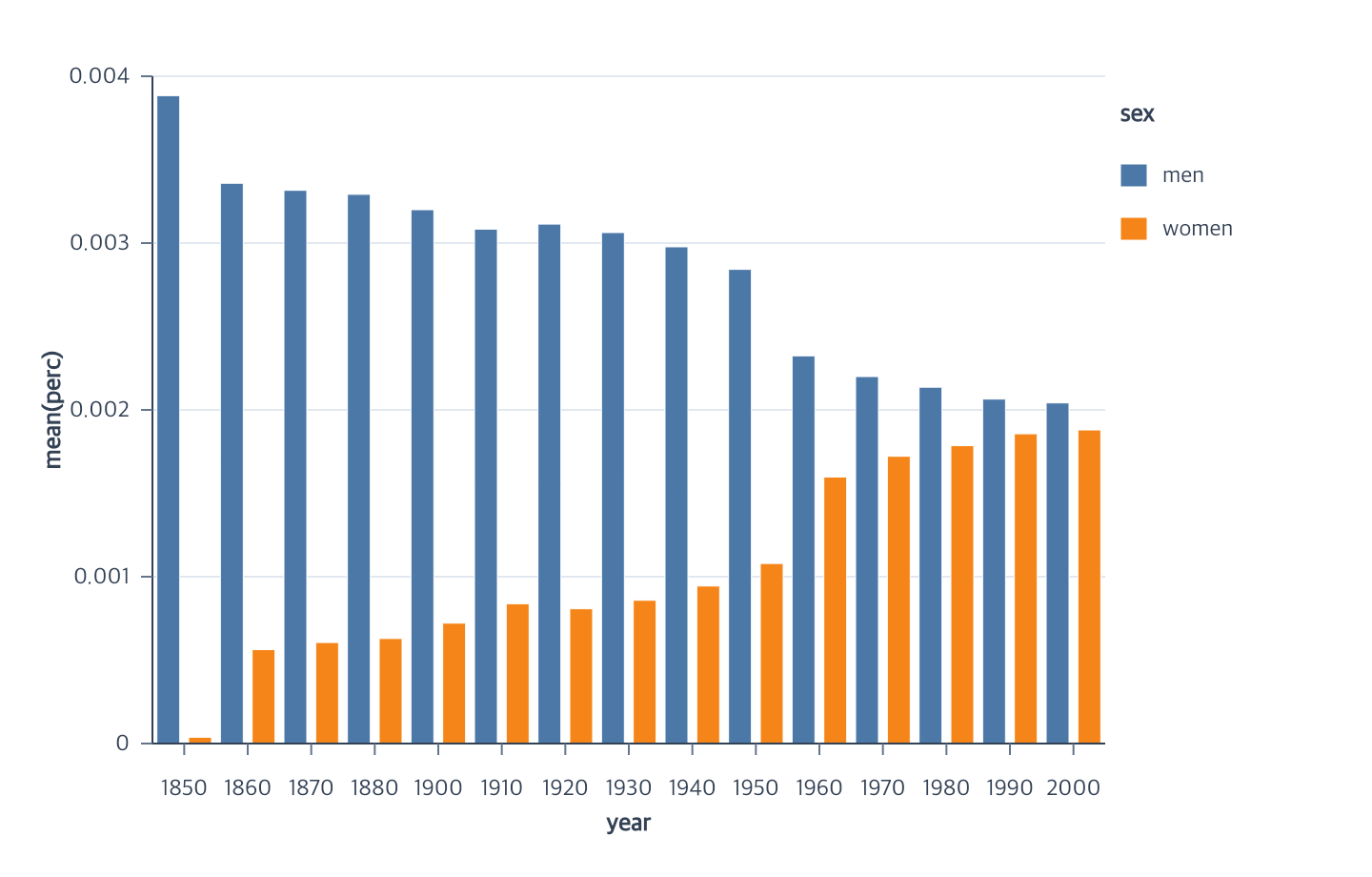
At a glance
| Action | Shortest call | Required state | Result |
|---|---|---|---|
ordinal encodeX |
encodeX({ field: "category", fieldType: "ordinal" }) |
bar mark | Ordered x bands |
aggregate encodeY |
encodeY({ field: "value" }) |
ordinal bar x | Aggregate/non-stacked y scale |
temporal encodeX |
encodeX({ field: "year", fieldType: "temporal" }) |
bar mark | Time-positioned vertical bars |
| horizontal pair | quantitative aggregate x + ordinal/temporal y | bar mark | Horizontal bars |
Ordinal bar encodeX(options)
| Option | Type | Default |
|---|---|---|
field |
non-empty string | required |
fieldType |
"ordinal" |
required |
target |
bar mark ID | current mark |
coordinate |
coordinate ID | layer coordinate, then "main" |
scale.id |
scale ID | "x" |
scale.type |
"band" |
"band" |
scale.domain |
"auto" or unique nominal values |
"auto" |
scale.range |
"auto" or two finite numbers |
"auto" |
Contextual fragment. Use an ES module with the imports, data, and prepared resource state described in this section. Caller-provided receivers:
program. Resolve these names from setup in this fragment or section; alternatives branch from the same base.
program.encodeX({ field: "year", fieldType: "ordinal" });
fieldType: "ordinal" describes ordered categories. Their positional scale is
band, which supplies positive width; scale.type: "ordinal" is a different
lookup-scale family and is rejected for this position channel. A point scale
supplies centers without bandwidth and cannot define bar widths.
Automatic domains preserve first-appearance order. Automatic ranges use the
horizontal plot bounds and resolve a shared step and bandwidth. This action
leaves the rect collection empty because aggregate y and layout are incomplete.
Use orderCategories after the position pair is
complete to assign an explicit, count-based, or aggregate-summary order without
changing source rows.
Aggregate ordinal bar encodeY(options)
| Option | Type | Default |
|---|---|---|
field |
non-empty string | required |
fieldType |
"quantitative", or "nominal" for count operations |
"quantitative" |
aggregate |
scalar name or parameterized aggregate object | "mean" |
stack |
null |
null |
target |
bar mark ID | current mark |
coordinate |
coordinate ID | layer coordinate, then "main" |
scale.id |
scale ID | "y" |
scale.type |
"linear" |
"linear" |
scale.domain |
"auto" or two finite numbers |
"auto" |
scale.range |
"auto" or two finite numbers |
"auto" |
scale.nice |
boolean | true |
scale.zero |
boolean | false |
Contextual fragment. Use an ES module with the imports, data, and prepared resource state described in this section. Caller-provided receivers:
program. Resolve these names from setup in this fragment or section; alternatives branch from the same base.
program.encodeY({
  field: "perc",
  aggregate: "mean",
  scale: { nice: true, zero: false }
});
The automatic domain uses aggregate summaries at the final available grouping
grain. Parameterized quantile and ordered first/last use the same contract
as temporal line y encodings. Group and overlay bars start at the semantic value
zero, so their automatic domain contains zero even when scale.zero is false.
An explicit domain for either layout must contain zero; otherwise the encoding
fails before creating extrapolated or clipped rectangles.
Once the category and measure encodings are complete, concrete rectangles use
an implicit 0.72 category-band width. Grouping recomputes them within directional offset
slots, and encodeBarWidth is an optional graphical override.
Positions and width can be authored in either order:
Contextual fragment. Use an ES module with the imports, data, and prepared resource state described in this section. Resolve these names from setup in this fragment or section; alternatives branch from the same base.
program
  .encodeBarWidth({ band: 0.5 })
  .encodeY({ field: "perc" })
  .encodeX({ field: "year", fieldType: "ordinal" });
Until the category is known, a measure without an explicit aggregate stores its
field and scale without choosing an aggregate or creating rectangles. Completing
the category applies the usual mean and null stack. Explicit aggregate, stack,
and scale choices survive. Histogram y may also precede binned x; matching fields
then resolve to count and zero stack. A saved bar width is incompatible with
histogram bins. Invalid fields, values, and widths fail immediately.
Temporal and horizontal bars
Bar orientation is inferred from the completed position pair; it is not stored as a separate mark option.
Contextual fragment. Use an ES module with the imports, data, and prepared resource state described in this section. Resolve these names from setup in this fragment or section; alternatives branch from the same base.
program
  .encodeX({ field: "year", fieldType: "temporal" })
  .encodeY({ field: "perc", aggregate: "mean" });

program
  .encodeX({ field: "perc", aggregate: "mean" })
  .encodeY({ field: "year", fieldType: "ordinal" });
Temporal input normalization happens only while resolving scales and geometry.
The dataset and semantic field remain unchanged. Numeric or string four-digit
years map to January 1 UTC; YYYY-MM-DD, YYYY/MM/DD, and finite timestamps
are also accepted.
Errors and limitations
Ordinal position does not accept nice or zero. Vertical grouped bars use
xOffset; horizontal grouped bars use yOffset. Horizontal stack, overlay,
fill, and diverging layouts use the quantitative x measure.
Related
Category ordering · Offsets · Series encodings · Constant appearance · Bar chart tutorial
Documentation provenance
293 actions · sha256:e755591a2e5f5e2b494867583876e28020a478c5220b77bdc6ad469a6224891d