Published-release documentation · release compatibility
Composite Legend Symbols
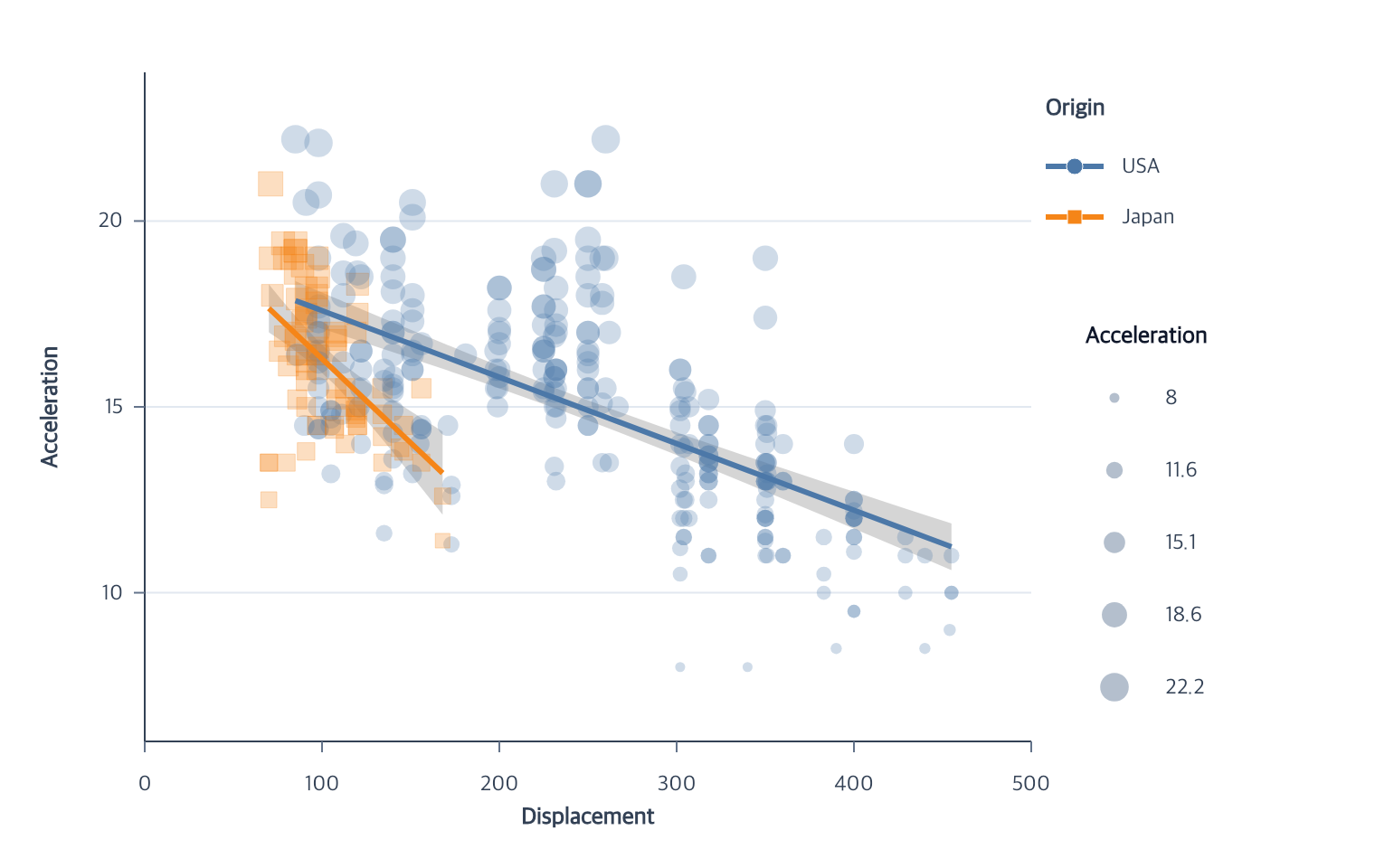
Layered symbols
Legend symbols are graphical recipes composed from line, point, and swatch layers. The default line shorthand remains supported:
Contextual fragment. Use an ES module with the imports, data, and prepared resource state described in this section. Caller-provided receivers:
lineProgram. Resolve these names from setup in this fragment or section; alternatives branch from the same base.
lineProgram.createLegend({
  symbol: { length: 32, lineWidth: 2 }
});
Histogram, grouped-bar, and grouped-area swatch shorthand supports width,
height, stroke, and strokeWidth.
Use editLegendSymbols({ symbol }) to replace an existing sample recipe,
including a rounded bar sample with a plain swatch. Setting symbol: "auto"
restores the sample inferred from the mark, including its rounded corners.
Use layers for a composite symbol:
Contextual fragment. Use an ES module with the imports, data, and prepared resource state described in this section. Caller-provided receivers:
lineProgram. Resolve these names from setup in this fragment or section; alternatives branch from the same base.
lineProgram.createLegend({
  symbol: {
    layers: [
      { type: "line", length: 32, lineWidth: 2 },
      { type: "point", shape: "circle", size: 4 }
    ]
  }
});
The same recipe works in top and bottom item grids:
Contextual fragment. Use an ES module with the imports, data, and prepared resource state described in this section. Caller-provided receivers:
lineProgram. Resolve these names from setup in this fragment or section; alternatives branch from the same base.
lineProgram.createLegend({
  position: "bottom",
  align: "right",
  direction: "horizontal",
  columns: 2,
  symbol: {
    layers: [
      { type: "line", length: 36, lineWidth: 3 },
      { type: "point", shape: "circle", size: 5 }
    ]
  }
});
Supported layers are:
Contextual fragment. Use an ES module with the imports, data, and prepared resource state described in this section. Resolve these names from setup in this fragment or section; alternatives branch from the same base.
{ type: "line", length?, lineWidth? }
{ type: "point", shape?: "circle", size?, fill?, stroke?, strokeWidth? }
{ type: "swatch", width?, height?, stroke?, strokeWidth? }
Every layer shares the same item anchors. A line and point therefore overlap
as one composite symbol. The union of their bounds determines label placement,
and layers retain their declared rendering order. Recipes are private
appearance configuration; the final graphicSpec contains only concrete line,
circle, and rect primitives.
Editing a recipe also preserves its declared drawing order, including a layer
reversal or adding a border in the same edit. symbol: "auto" restores the
recipe inferred from the selected channels and matching marks. An explicit
recipe is retained when an encoding is removed; an inferred recipe is resolved
again for the remaining channels.
Items and semantics
Items follow the resolved ordinal domain order. Color and dash appearance come from the matching resolved ranges. Combined line channels must encode the same field and have identical ordered domains.
A bar color legend stores guide.legend.color with its scale and title. A
combined line legend stores guide.legend.series with its channels, scales, and
title. Positions, fonts, symbols, and border appearance are graphical state.
A point legend combines color and shape only when they encode the same nominal
field and share an ordered domain. If a matching line layer uses that field and
color scale, its line is layered behind each typed circle/square symbol. A
separate guide.legend.size block samples five evenly spaced domain values by
default for continuous mappings and maps their areas through the resolved size
scale. Discrete size mappings instead show every interval and its assigned area;
they reject an explicit sample count.
Include "size" in an explicit channel array to create that block. Omitting
channels infers the available categorical color, shape, and quantitative size
channels, including color-plus-size and shape-plus-size without requiring all
three encodings.
Optional border
The default creates no background. Pass true for default border settings or an object with color, lineWidth, padding, and background.
Contextual fragment. Use an ES module with the imports, data, and prepared resource state described in this section. Caller-provided receivers:
program. Resolve these names from setup in this fragment or section; alternatives branch from the same base.
program.createLegend({
  border: {
    color: "#cbd5e1",
    lineWidth: 1,
    padding: 8,
    background: "white"
  }
});
The background is rendered before every symbol layer, label, and title.
Facade combinations
A facade legend belongs to that facade’s own mark. Scatter, Regression, Strip,
and Beeswarm can combine compatible point mappings. PolarScatter also supports
categorical size-shape; quantitative color-size requires Cartesian circle
points. Raincloud supports size-shape when its point component is enabled.
Facades without both compatible point channels accept combine: "separate".
A legend on another mark cannot supply the missing channels.
A bottom title belongs to a continuous gradient legend. Categorical-only facade legends retain top and left titles.
Related
Legend overview · Categorical legends · Series encodings
Documentation provenance
293 actions · sha256:e755591a2e5f5e2b494867583876e28020a478c5220b77bdc6ad469a6224891d