Published-release documentation · release compatibility
Continuous Legends
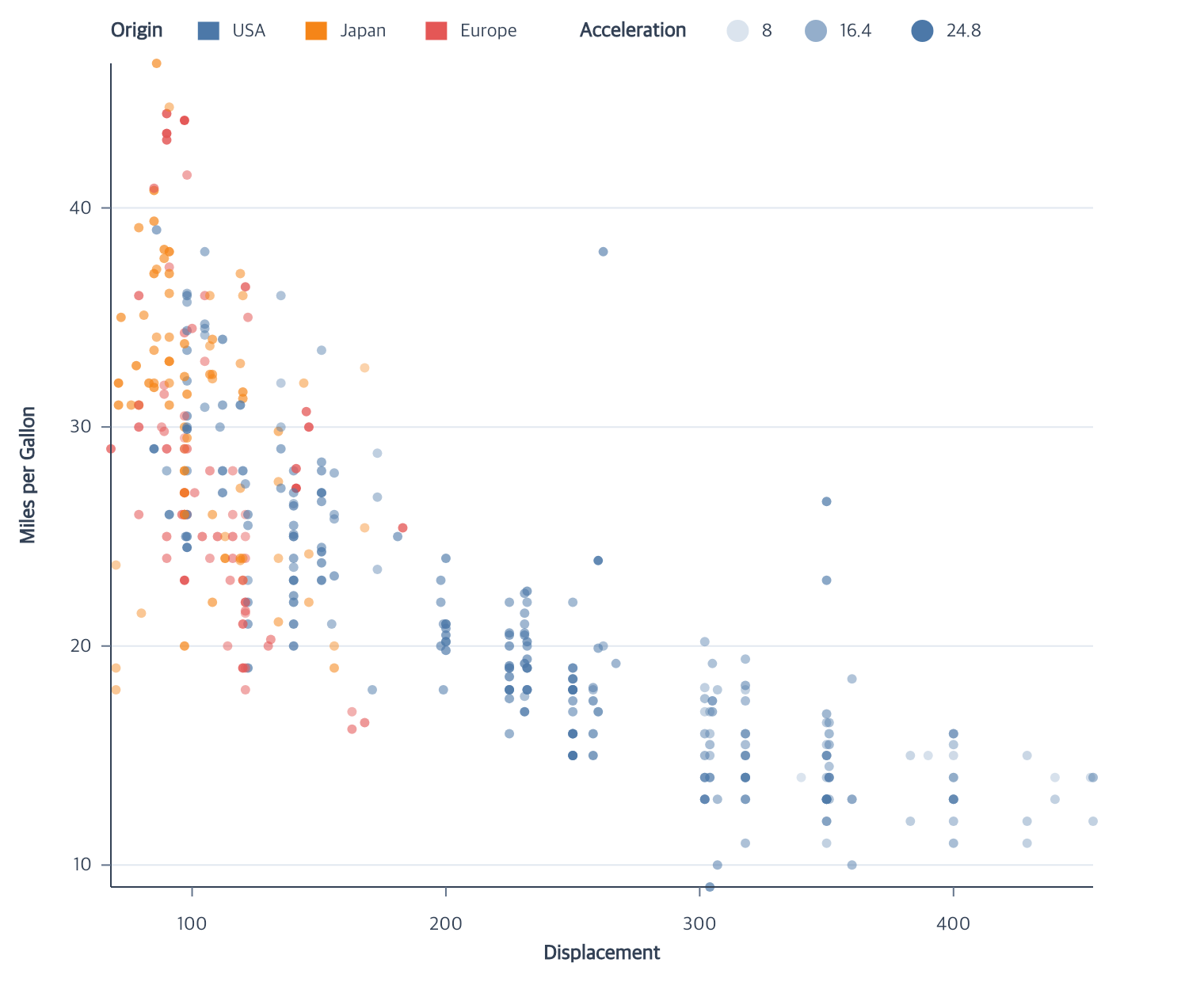
Match the channel and sample recipe
Rule opacity is a supported encoding but does not currently have an opacity legend.
A legend consumes an encoding scale. Its display sample need not have the same mark type as the plotted consumer: an opacity legend uses point samples even for a Line. Stroke-width legends use lines. A gradient is not a collection of glyph samples.
| Family | Consumer and scale | Samples | Display recipe | Composition and edges |
|---|---|---|---|---|
| Continuous color | Point, aggregate Bar, Rect, Text, Tick; existing continuous color scale | Gradient ticks and symbols accept count or exact values |
Default gradient rectangle; representation: "symbols" uses colored points |
Separate block; four edges and four plot corners |
| Stroke gradient | Supported stroke marks; sequential quantitative/temporal stroke | Tick count or exact values |
Gradient rectangle; rejects symbol |
Separate stroke block; four edges and four plot corners |
| Color/stroke interval | Compatible quantize, quantile, threshold consumer | Every interval | Filled or outlined swatches, respectively | Ordered interval block; four edges and four plot corners |
| Opacity | Point, Line; quantitative linear opacity | count or explicit ascending values |
One point recipe; type omitted or "point" |
Separate block; four edges and four plot corners |
| Size | Point; continuous numeric size or discrete area scale | Continuous count/values; every discrete interval |
Area-scaled point symbol | Separate block; four edges and four plot corners |
| Stroke width | Line, Rule; quantitative width | count or explicit ascending values |
Line sample with scaled width | Separate block; four edges and four plot corners |
The canonical compatibility tables list exact consumers; the legend editor owns combining and selecting blocks. Equal visible labels do not make independent channels a valid categorical composite. For all families, requested margins must contain labels, symbols, titles, and borders.
Corner gradients and sampled-opacity blocks use vertical content. A corner
anchors the complete occupied group inside the plot, including borders and
strokes. Use blockLayout and at
to arrange independent blocks together or choose a plot-relative free anchor.
Continuous color, stroke, and opacity
A supported Point, aggregate Bar, Rect, or Tick color encoding with a quantitative or temporal field produces a
continuous gradient. Right/left positions orient it vertically; top/bottom
orient it horizontally. The implementation writes 60 adjacent concrete rects,
tick lines, and text to graphicSpec; renderers do not interpolate colors.
Contextual fragment. Use an ES module with the imports, data, and prepared resource state described in this section. Caller-provided receivers:
program. Resolve these names from setup in this fragment or section; alternatives branch from the same base.
program.createLegend({
  channels: ["color"],
  count: 5,
  gradient: { length: 120, thickness: 12, opacity: 0.7 }
});
gradient.opacity is a finite number from 0 to 1, defaulting to 1.
It fades only the color or stroke ramp body, including its strip outlines;
titles, ticks, labels, borders, marks, and layout stay unchanged. Zero keeps the
ramp’s geometry and space. Mark opacity is independent and is never inferred
into this option. Ramp opacity applies once and does not rewrite mapped colors.
The existing continuous-color vocabulary is unchanged.
Use editLegend({ gradient: { opacity: 0.4 } }) or
editLegendSymbols({ gradient: { opacity: 0.4 } }) to revise it. Omitted fields
retain their stored values. representation: "symbols" rejects gradient;
switching back to a gradient resets its dimensions and opacity to their creation
defaults unless the switching call supplies them. Existing saved ramps without
opacity remain fully opaque.
A Point or Line field-driven quantitative opacity encoding produces representative point
samples in ascending domain order. Reversing the opacity range changes symbol
appearance without reversing labels. Its neutral default symbol is a circle
with radius 7 and fill #4c78a8; pass one { type: "point", ... } recipe to
override it. type is optional and only accepts "point"; radius must be
positive. fill, stroke, and non-negative strokeWidth are also supported.
The same recipe works with editLegend, editLegendSymbols, and
createGuides({ legend: ... }), including TypeScript.
Contextual fragment. Use an ES module with the imports, data, and prepared resource state described in this section. Caller-provided receivers:
program. Resolve these names from setup in this fragment or section; alternatives branch from the same base.
program.createLegend({ channels: ["opacity"], position: "left" });
A quantitative or temporal stroke encoding creates a separate stroke gradient
with the same mapping, tick, formatting, edge, and lifecycle rules. Quantize,
quantile, and threshold stroke scales create a stroke interval legend. Its
symbols keep the mark’s fill and draw the mapped color as the outline. An
explicit mark strokeWidth: 0 remains zero.
Contextual fragment. Use an ES module with the imports, data, and prepared resource state described in this section. Resolve these names from setup in this fragment or section; alternatives branch from the same base.
program
  .encodeStroke({ field: "risk", fieldType: "quantitative" })
  .createLegend({ channels: ["stroke"] });
For a top or bottom sampled-opacity legend, titlePosition: "left" places the
title, every sample circle, and its numeric label on one reading line. The
inline defaults use 8 logical pixels from a circle to its label and 20 pixels
before the next sample. labels.offset and itemGap override those distances.
All sample spacing includes half the stroke width around the circle. Label
offset measures the visible edge-to-edge gap; its non-inline default is 12.
Without rowPadding, vertical sampled and interval legends default to itemGap: 18. At either side,
itemGap is a minimum center pitch and grows to fit the largest
sample or a conservative label line height of fontSize * 1.2. This allowance
does not guarantee the exact height of every font. A visible title keeps at
least 12 pixels before the first item.
Top/bottom legends with a top title use equal center spacing of at least 56
pixels and twice itemGap, enlarged when needed to keep itemGap between
neighbouring sample or label bounds. Inline legends keep itemGap between
complete sample-label pairs. Large fonts and strokes require sufficient Canvas
space; overflow is an error.
Sampled and interval families also accept opt-in rowPadding for per-row
occupied edge gaps, independently of titlePadding for the title-to-body gap.
Both are non-negative finite logical pixels and support "auto" reset in whole
or focused layout edits. Gradient strips accept only titlePadding; explicitly
reset a stored rowPadding before a symbols-to-gradient or scale-family
transition. See content spacing.
Contextual fragment. Use an ES module with the imports, data, and prepared resource state described in this section. Caller-provided receivers:
program. Resolve these names from setup in this fragment or section; alternatives branch from the same base.
program.createLegend({
  channels: ["opacity"],
  position: "top",
  titlePosition: "left",
  count: 3
});
Gradient legends reject categorical-only symbol, columns, and itemGap. Opacity legends reject columns, direction, and gradient.
Side-positioned opacity legends require titlePosition: "top".
For a single top or bottom legend, align uses the complete visible outer
bounds, including endpoint labels, symbol strokes and any border. offset is
the gap between the plot and the nearest outer legend edge. This rule also
applies to interval, size and stroke-width legends. Both forms require enough
requested Canvas margin and never resize the Canvas.
Side gradient and opacity legends accept only align: "center". When moving
a non-centered horizontal legend to a side, set align: "center" in the same
edit. Title styles accept color and typography; offset belongs to labels.
Gradient direction: "horizontal" | "vertical" is independent of position.
Omission at creation retains the position-derived default; an omitted edit
preserves explicit intent. Gradient-only edit direction: "auto" restores the
default. Length follows the ramp direction and thickness is perpendicular.
Horizontal values run left to right with labels below; vertical values run
bottom to top with labels on the left at a left anchor and on the right otherwise.
Scale reverse and transformed-scale sampling retain their existing behavior.
Gradient titles accept titlePosition: "top" | "bottom" in creation and editing,
including editLegendLayout; "left" is unsupported. A bottom title clears the
complete strip, tick and label bounds by 12 pixels. Its default anchor is the
strip center for a horizontal ramp and the strip left for a vertical ramp;
titleStyle.align still applies. Explicit line breaks and blank lines are retained.
Hidden titles occupy no space. All visible content must fit the requested Canvas.
Gradient orientation intent remains inactive while color uses representation:
"symbols"; symbol direction is separate. Returning to a gradient restores its
orientation. Changing to a different scale family cannot silently discard an
explicit gradient direction; reset it with "auto" or remove and recreate the legend.
Choose exact gradient ticks
Unreleased candidate: exact gradient tick arrays extend the existing
values option; released versions retain their previous count behavior.
For a prepared continuous color or stroke scale with domain [35, 85], this
contextual fragment labels only 40, 60, and 80:
Contextual fragment. Use an ES module with the imports, data, and prepared resource state described in this section. Caller-provided receivers:
program. Resolve these names from setup in this fragment or section; alternatives branch from the same base.
program.createLegend({ values: [40, 60, 80], gradient: { length: 125 } });
The values occupy their numeric positions along the ramp, including for log, power, square-root, and symlog scales. This changes ticks and labels; the ramp, encoded marks, and scale domain retain their mapping. For this example:
| Value | Fraction of the domain | Distance from the top of a vertical ramp |
|---|---|---|
| 40 | 0.1 | 112.5 |
| 60 | 0.5 | 62.5 |
| 80 | 0.9 | 12.5 |
Values must contain 1–100 finite, strictly increasing numbers inside the
scale domain. Do not combine an exact array with count. A single value is
valid. Explicit arrays do not acquire extra midpoint or endpoint ticks.
Creation uses omission for automatic ticks. Editors preserve omitted values;
editLegend({ values: "auto" }) restores the remembered automatic count, and
editLegend({ values: "auto", count: 3 }) resets and changes that count together.
A count edit alone cannot replace exact values.
Use editLegend({ channel: "stroke", values: [40, 60, 80] }) to select one
existing stroke block when a target has multiple blocks. editLegendBlock
continues to edit samples only for sampled families. Exact ticks survive
Canvas, theme, data, scale, persistence, and shared-facet replay. An edit that
would put a stored value outside its domain fails atomically. Reset exact
values before a scale-family transition that would discard them.
Show a continuous color scale as symbols
representation: "symbols" displays sample colors as points while preserving
the continuous color mapping used by marks. Omit it to keep the existing
gradient. The option supports the existing sequential, log, and symlog color
scales, including the existing sequential midpoint mapping. It does not add a
new scale type or change a continuous scale into categories.
Contextual fragment. Use an ES module with the imports, data, and prepared resource state described in this section. Resolve these names from setup in this fragment or section; alternatives branch from the same base.
import { chart } from "ggaction";

const program = chart()
  .createCanvas({ width: 600, height: 400, margin: 100 })
  .createData({ values: [
    { x: 1, y: 2, amount: 1 },
    { x: 2, y: 1, amount: 9 }
  ] })
  .createPointMark({ id: "points" })
  .encodeX({ field: "x" })
  .encodeY({ field: "y" })
  .encodeColor({ field: "amount", fieldType: "quantitative" })
  .createLegend({
    representation: "symbols",
    values: [2, 4, 6, 8],
    position: "top-left"
  })
  .editLegendSymbols({ symbol: { type: "point", radius: 5 } });
With no exact values, symbols uses five samples by default; count chooses
the automatic count. Exact samples must be finite, strictly ascending, and
inside the effective domain. values: "auto" in an editor returns to the
remembered automatic count and keeps the symbols representation.
The default point radius is 7 logical pixels. Fill and the default stroke use
the mapped sample color; the default stroke width is 1. Use the point recipe’s
radius, stroke, and strokeWidth to edit its appearance. A fixed fill, line,
swatch, or layered recipe is rejected because this representation explains the
sampled color scale. Item direction, columns, and itemGap remain separate
from whole-group blockLayout. Side and corner items default to vertical,
with a minimum pitch of 18 that grows for larger painted content. Horizontal
items default to a gap of 20.
Use editLegend({ representation: "gradient" }) to return to a gradient.
Common titles, fonts, border, position, and whole-target group placement remain;
symbol-only settings are cleared, exact values are retained, and gradient dimensions
return to 120 by 12. Do not supply gradient dimensions in a symbols call.
On the reverse switch, omitted values retain exact samples when present, or use
the remembered automatic count. No hidden snapshot of the previous representation is kept.
In an editor, omitted channels preserves the current content set. Explicit
channels still replaces the target’s final content set; it is not a selector.
The selected set must contain continuous color when representation is given.
Other retained legend blocks keep their own content and style. To edit one
color block’s samples, text, or symbol in a multi-block target, use
editLegendBlock({ target: "points", channel: "color", ... }). An ambiguous
target must be named. Categorical, interval, and stroke-only legends reject
representation.
Canvas, scale, data, composition, and persistence changes preserve the selected representation. If an exact sample becomes invalid for the new domain, the edit fails without changing the previous program. Basic supports creation; use the full entry point for the editing flow above.
Their requested sample count is limited to the inclusive range 2–10,000.
Continuous size, opacity, stroke-width, color-symbol, and color/stroke-gradient
legends can instead show exact numeric values. Pass a finite, strictly increasing array with 1–100 values.
The array is used as written: ggaction does not sort or deduplicate it. Every
value must lie inside the effective scale domain, and log scales require
positive values. count and values cannot appear in the same call.
Contextual fragment. Use an ES module with the imports, data, and prepared resource state described in this section. Caller-provided receivers:
program. Resolve these names from setup in this fragment or section; alternatives branch from the same base.
program.createLegend({
  channels: ["opacity"],
  values: [0, 0.25, 0.5, 1]
});
Each supplied value goes through the channel’s actual scale mapper. Reversing
the scale therefore reverses the symbol appearance while the label order stays
ascending. A mapped opacity, area, or width of zero keeps its label and layout
slot. Exact values do not change the scale domain or the encoded marks.
Discrete size legends continue to show every interval. Gradient color and
stroke legends use exact values when supplied, and otherwise retain their
existing automatic count behavior.
Continuous legend labels accept the same explicit value formats as axes and
Text: .0f–.12f, .0%–.12%, .0e–.12e, or a compatible UTC pattern
using %Y, %m, %d, %b, and %%. Set the token in labels.format on
creation or editing, including editLegendLabels({ format: ".2e" }). Numeric
formats require a quantitative scale and UTC formats require a temporal scale.
The default "auto" keeps the family’s tick-aware label selection. Explicit
formats are exact, so nearby samples may intentionally display the same text.
Categorical legends keep their identity labels and accept "auto" only.
For a quantize, quantile, or threshold point-color or supported stroke scale, the same call
creates ordered swatches and concrete interval labels. Interval
legends support four edges and four plot corners with layout: "edge". Side legends use a
single vertical column, center alignment and a top title. At top/bottom, use
align, direction, columns and titlePosition to arrange the item grid.
titlePosition: "left" places the title beside the grid. The same controls
are editable through editLegend and editLegendLayout. Symbol size, label
style, spacing and borders remain editable. Swatch layout includes its full
stroke width in both dimensions. The default labels.offset: 8 is the gap
after the painted swatch edge. Large samples and text expand rows and keep
12 pixels below a visible top title; insufficient Canvas space is an error.
Contextual fragment. Use an ES module with the imports, data, and prepared resource state described in this section. Caller-provided receivers:
program. Resolve these names from setup in this fragment or section; alternatives branch from the same base.
program.createLegend({
  channels: ["color"],
  position: "right",
  direction: "vertical",
  symbol: { width: 14, height: 12 }
});
Use createLegend({ title: false }) to hide an inferred title from creation,
including in nested guides.legend options. The title is excluded before layout
validation, so a long unused field name does not require extra margin.
Hidden titles do not contribute to occupied bounds or borders. For horizontal inline opacity legends, hiding the title also removes its width and gap. The stored title remains available for later restoration; restoring a title that does not fit the Canvas fails without changing the earlier program.
Related
Legend overview · Scale options · Editing legends
Numeric labels also accept "," for grouped integers and ",.0f" through ",.12f" for grouped fixed decimals. UTC formats accept %a for an English weekday abbreviation, such as %a %d → Mon 01. These formats use the shared axis, legend and text formatter.
Documentation provenance
293 actions · sha256:e755591a2e5f5e2b494867583876e28020a478c5220b77bdc6ad469a6224891d