Published-release documentation · 281 actions; release compatibility · contract 5520b0fa9525
Category Ordering
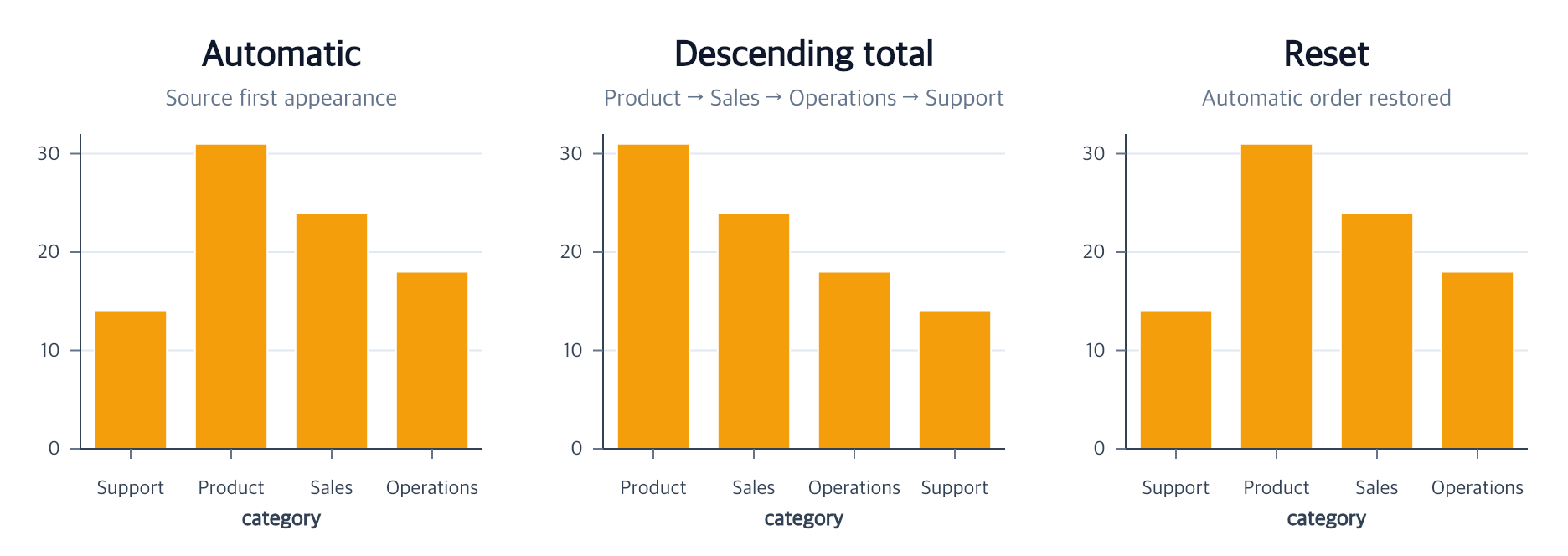
Use orderCategories when a nominal or ordinal x/y/theta position should follow an
explicit list or a data-derived order. The assignment changes the resolved
position domain, mark geometry, axis labels, and final selection-item order
together. It never reorders source rows.
orderCategories(options)
Contextual fragment. Use an ES module with the imports, data, and prepared resource state described in this section. Caller-provided receivers:
program. Resource selectors used here:target: "bars". Resolve these names from setup in this fragment or section; alternatives branch from the same base.
const ordered = program.orderCategories({
  target: "bars",
  channel: "x",
  by: { field: "value", aggregate: "sum" },
  direction: "descending"
});
target defaults to the current compatible mark, then the unique compatible
mark. channel is required and accepts categorical Cartesian "x"/"y" and Polar "theta" on Arc, Point, or Line marks.
Choose exactly one ordering mode:
| Mode | Value | Result |
|---|---|---|
| Explicit | values: readonly (string | number | boolean)[] |
Listed categories first; omitted observed categories appended in first-appearance order |
| Category | by: "category" |
Numeric, boolean, or code-point lexical category order |
| Frequency | by: "count" |
Row count per category |
| Summary | by: { field, aggregate } |
sum, mean, min, or max of a finite quantitative field per category |
Computed modes accept direction: "ascending" | "descending"; the default is
"ascending". Ties preserve the categories’ source first-appearance order.
Category sorting requires one consistent primitive type. An explicit list must
be non-empty and unique, and every listed value must occur in the target data.
The normalized ordering intent is stored on the target encoding. This means a
later facet replay can apply one shared order or recompute an independent order
from each cell’s data. Marks that share the ordered scale must read the same
field from the same dataset. The semantic scale domain must remain "auto";
an explicit scale domain and a category-order assignment are two competing
authorities and cannot be combined.
removeCategoryOrder({ target?, channel })
Contextual fragment. Use an ES module with the imports, data, and prepared resource state described in this section. Caller-provided receivers:
ordered. Resource selectors used here:target: "bars". Resolve these names from setup in this fragment or section; alternatives branch from the same base.
const automatic = ordered.removeCategoryOrder({
  target: "bars",
  channel: "x"
});
Removal deletes the stored order assignment and restores the automatic first-appearance domain. The mark and existing connected axis are updated in place; the dataset, semantic scale definition, mark ID, and guide identity are preserved. Removing a missing assignment is an error.
Polar categories and legend order
On an existing weighted Pie, these calls put category C first without changing
its weight or color (fragment; pie must already encode categories A, B, and C):
Contextual fragment. Use an ES module with the imports, data, and prepared resource state described in this section. Caller-provided receivers:
pie. Resolve these names from setup in this fragment or section; alternatives branch from the same base.
const ordered = pie.orderCategories({ channel: "theta", values: ["C", "A"] });
const linked = ordered.editLegend({ order: { channel: "theta" } });
const resetLegend = linked.editLegend({ order: "scale" });
The first call leaves the legend in its appearance-scale order. The second links the legend to the target’s theta domain. Resetting the legend leaves sector positions unchanged. Ordering theta does not assign path vertex or drawing order.
Related
Bar positions · Position scales · Facets · Selection and highlighting