Published-release documentation · release compatibility
Data and Mark Filtering
filterData({ id, source?, field, oneOf | noneOf | predicate | range, nulls? })
Create a named derived dataset without replacing or mutating its source.
Contextual fragment. Use an ES module with the imports, data, and prepared resource state described in this section. Resolve these names from setup in this fragment or section; alternatives branch from the same base.
const selected = chart()
  .createData({ id: "cars", values: cars })
  .filterData({
    id: "selectedCars",
    field: "Origin",
    oneOf: ["Japan", "USA"]
  });
| Option | Type | Required |
|---|---|---|
id |
dataset ID | yes |
source |
existing dataset ID | no; defaults to current dataset |
field |
non-empty string | yes |
oneOf |
non-empty scalar array | one filter mode required |
noneOf |
non-empty scalar array | one filter mode required |
predicate |
{ op, value } |
one filter mode required |
range |
{ min?, max?, minInclusive?, maxInclusive? } |
one filter mode required |
nulls |
"include" or "exclude" |
"exclude" |
The derived dataset stores its source ID, filter transform, and immutable
materialized values. Exactly one of oneOf, noneOf, predicate, or range
is required.
Rows retain source order, the source remains unchanged, and the new dataset
becomes current data for the next mark.
Comparison operators are "eq", "neq", "lt", "lte", "gt", and
"gte". Equality is strict and never coerces values. Ordered comparisons
require both values to be finite numbers or both to be strings; incompatible or
missing field values are omitted. String order is lexicographic.
Contextual fragment. Use an ES module with the imports, data, and prepared resource state described in this section. Resolve these names from setup in this fragment or section; alternatives branch from the same base.
const powerfulCars = chart()
  .createData({ id: "cars", values: cars })
  .filterData({
    id: "powerfulCars",
    field: "Horsepower",
    predicate: { op: "gte", value: 150 }
  });
noneOf is the complement of oneOf for non-null values. nulls independently
controls rows whose selected field is null or undefined; it does not make
ordered comparisons coerce missing values.
A range can have only a lower bound, only an upper bound, or both. Present
endpoints must have compatible ordered types, and min cannot exceed max.
minInclusive and maxInclusive each default to true. The compatibility
property inclusive sets both endpoints together, but cannot be combined with
either endpoint-specific property. An empty result is valid.
Contextual fragment. Use an ES module with the imports, data, and prepared resource state described in this section. Caller-provided receivers:
program. Resource selectors used here:source: "cars". Resolve these names from setup in this fragment or section; alternatives branch from the same base.
program.filterData({
  id: "midDisplacementCars",
  source: "cars",
  field: "Displacement",
  range: { min: 100, max: 300, minInclusive: false, maxInclusive: true }
});
editFilteredData accepts the same modes. Supplying a new mode replaces the
old one atomically. A partial range edit preserves an omitted endpoint and its
existing inclusivity; min: false or max: false removes that endpoint.
filterMarks({ target?, mode?, ...selector })
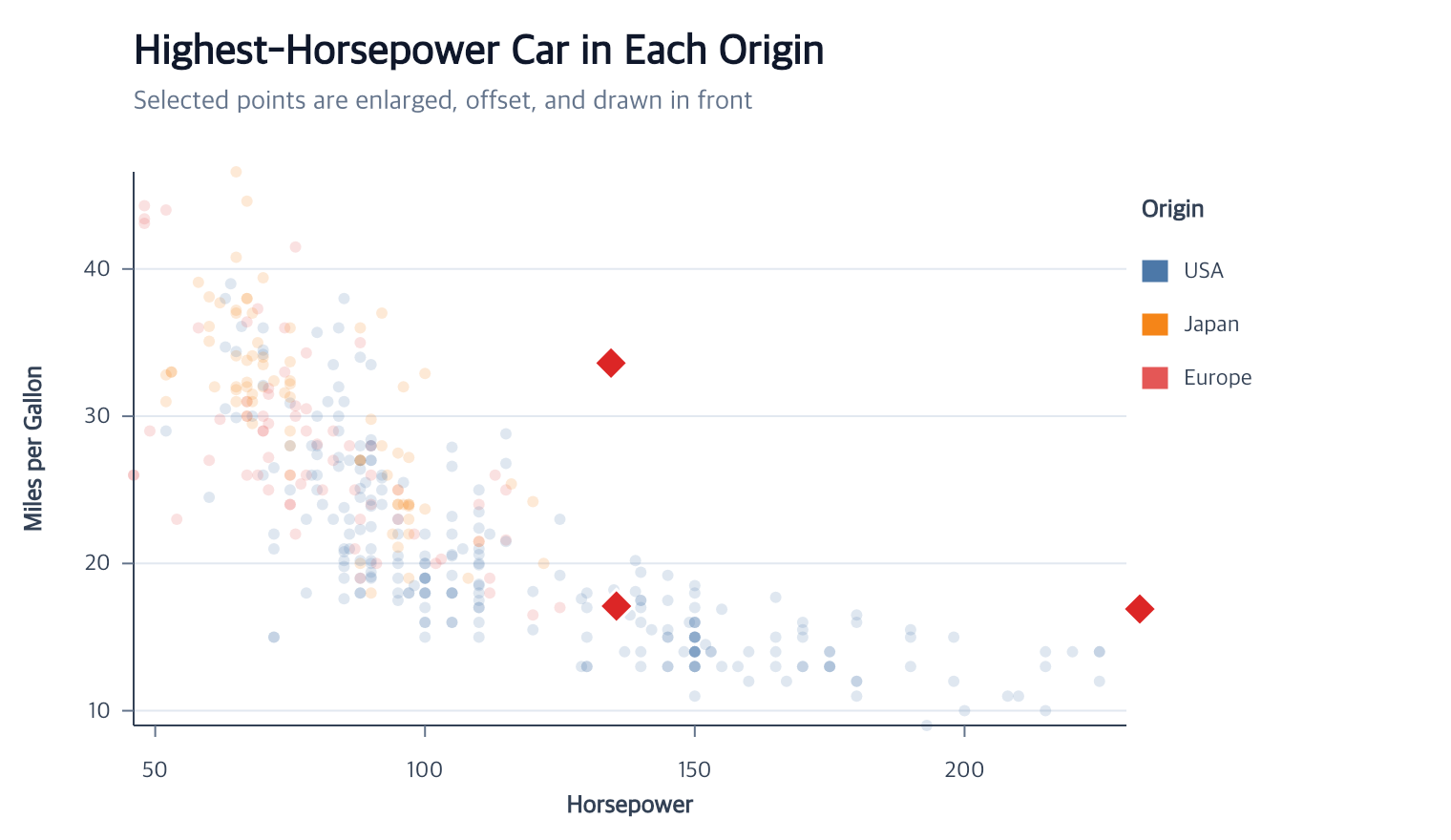
Filter existing final mark items without changing the source dataset.
filterMarks uses the same selector grammar as selectMarks, infers the current
mark when possible, creates a namespaced immutable dataset such as
pointsFilteredData, rebinds only that mark, and rematerializes its scales,
graphics, and connected guides.
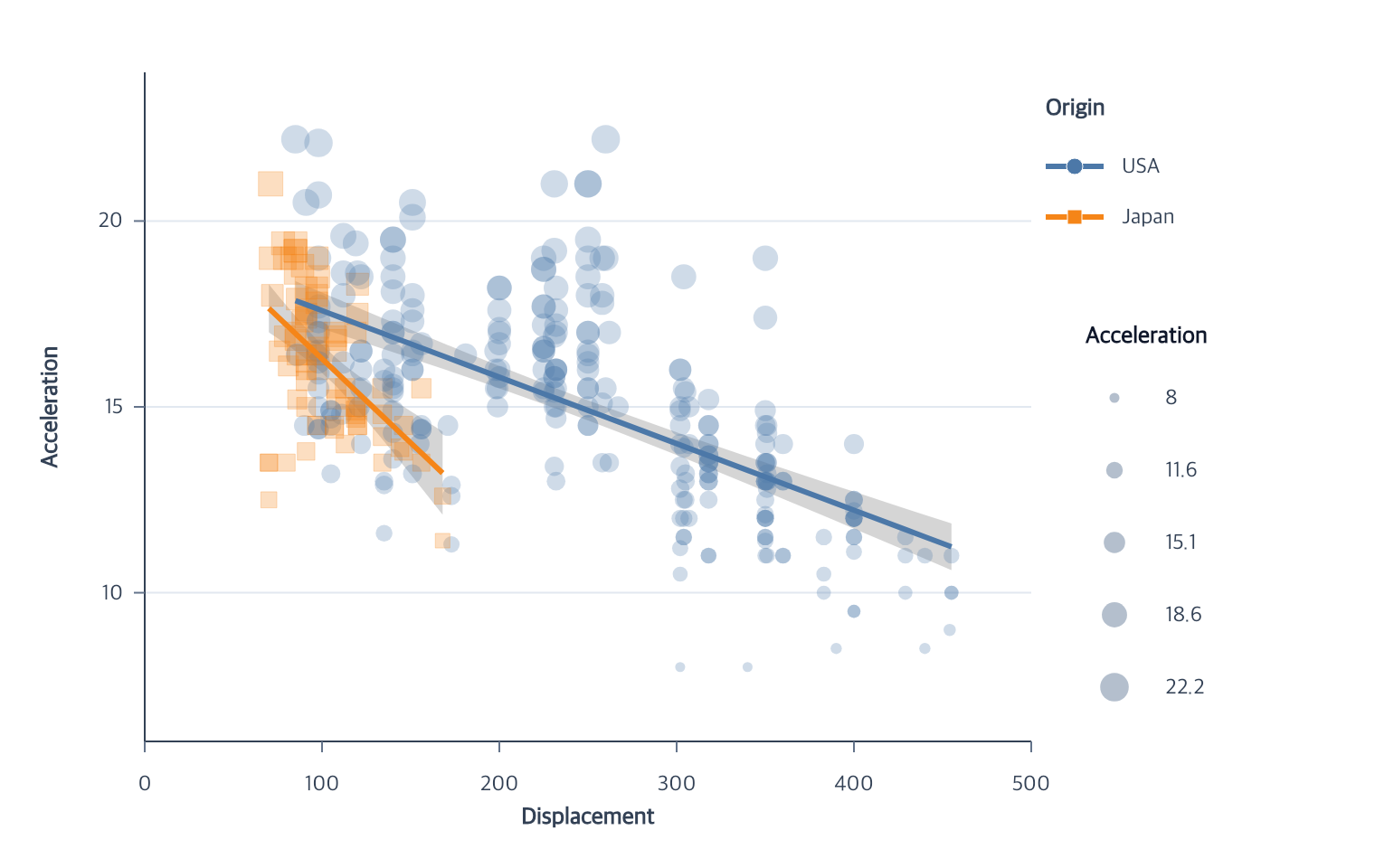
Executable complete. Import chart from ggaction and provide Cars rows with finite Displacement and Acceleration.
const filtered = chart()
  .createCanvas()
  .createData({ id: "cars", values: cars })
  .createPointMark({ id: "points" })
  .encodeX({ field: "Displacement" })
  .encodeY({ field: "Acceleration" })
  .filterMarks({
    field: "Origin",
    op: "oneOf",
    values: ["Japan", "USA"]
  });
Choose exactly one selector value source: field for a data value unique at
the item grain, channel for a pre-scale semantic value, or property for a
concrete graphical value. Operators are eq | neq | gt | gte | lt | lte,
oneOf, range, and ranked min | max with optional count, groupBy, and
ties. The default grain: "item" means a point, final bar rectangle,
line/area series path, arc sector, or rule. Stacked bars additionally support
grain: "stack".
Contextual fragment. Use an ES module with the imports, data, and prepared resource state described in this section. Caller-provided receivers:
program. Resource selectors used here:target: "bars". Resolve these names from setup in this fragment or section; alternatives branch from the same base.
program.filterMarks({
  target: "bars",
  grain: "stack",
  channel: "y2",
  op: "max"
});
The first filter records the mark’s canonical source and a normalized selector recipe. Repeating the same selector is idempotent. A different repeated filter must state whether it replaces the recipe or composes with its current result.
Contextual fragment. Use an ES module with the imports, data, and prepared resource state described in this section. Caller-provided receivers:
filtered. Resource selectors used here:target: "points". Resolve these names from setup in this fragment or section; alternatives branch from the same base.
const narrower = filtered.filterMarks({
  target: "points",
  mode: "compose",
  field: "Horsepower",
  op: "gte",
  value: 100
});

const japanOnly = narrower.filterMarks({
  target: "points",
  mode: "replace",
  field: "Origin",
  op: "eq",
  value: "Japan"
});
replace starts again from the canonical source. compose evaluates the
ordered recipe one selector at a time at final-item grain. If another derived
dataset references an earlier filtered result, that immutable snapshot remains
available and the active mark advances to the next namespaced revision ID.
The original dataset and earlier program remain unchanged. Apply the filter before creating a derived statistical layer when that statistic should use the filtered rows; existing independent layers are not silently rebound. Histograms retain their pre-filter bin boundaries while active, and line/area filters retain complete series. An empty match is a valid empty view: the preceding scale domains and connected guide meaning stay fixed while mark items, source labels, and stale highlight graphics are cleared.
Filtering a Box plot owner retains complete selected categories. Its median,
whiskers, caps, and outliers follow the selected boxes, including empty views,
composed filters, and restoration through removeMarkFilter.
removeMarkFilter({ target? } = {})
Remove the active final-item filter and rebind the mark to its canonical source.
The action restores the prior Histogram bin policy, rematerializes the mark,
scales, and guides, and releases the filtered dataset when no downstream dataset
still references that snapshot. Omit target for the current or unique active
filter.
Contextual fragment. Use an ES module with the imports, data, and prepared resource state described in this section. Caller-provided receivers:
japanOnly. Resource selectors used here:target: "points". Resolve these names from setup in this fragment or section; alternatives branch from the same base.
const restored = japanOnly.removeMarkFilter({ target: "points" });
Related
Data overview · Chart API · Action reference
Documentation provenance
293 actions · sha256:e755591a2e5f5e2b494867583876e28020a478c5220b77bdc6ad469a6224891d