Published-release documentation · release compatibility
Rect Marks
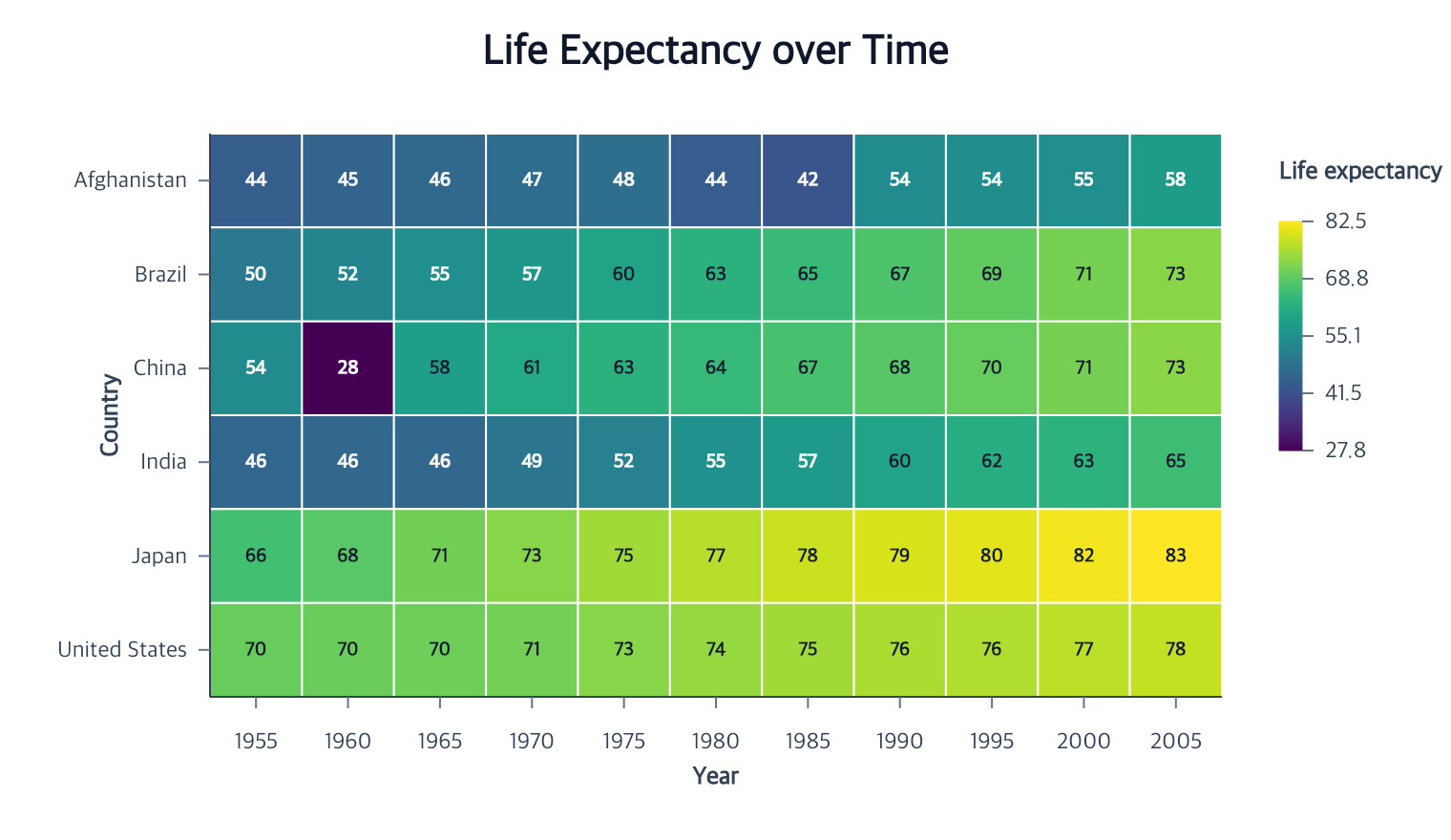
Rect marks represent independent two-dimensional cells. They are distinct from bars: rects do not infer aggregation, a zero baseline, stacking, or bar width.
createRectMark({ id?, data?, missing?, fill?, opacity?, stroke?, strokeWidth?, cornerRadius?, cornerRadiusTopLeft?, cornerRadiusTopRight?, cornerRadiusBottomRight?, cornerRadiusBottomLeft?, lineCap?, lineJoin?, miterLimit? } = {})
This heading shows common options. For the full callable contract and all branches, see createRectMark and the exact declarations.
Contextual fragment. Use an ES module with the imports, data, and prepared resource state described in this section. Resolve these names from setup in this fragment or section; alternatives branch from the same base.
const program = chart()
  .createCanvas({ width: 640, height: 400, margin: 60 })
  .createData({ values: rows })
  .createRectMark()
  .encodeX({ field: "year", fieldType: "ordinal" })
  .encodeY({ field: "country", fieldType: "nominal" })
  .encodeColor({
    field: "life_expect",
    fieldType: "quantitative",
    scale: { type: "sequential", palette: "viridis" }
  });
The first omitted ID is "rect", and data defaults to the current dataset.
Two discrete x/y encodings create one full-band cell for each complete observed
row. Missing category combinations are not synthesized.
Ranged rects use complete continuous endpoint pairs:
Contextual fragment. Use an ES module with the imports, data, and prepared resource state described in this section. Resolve these names from setup in this fragment or section; alternatives branch from the same base.
program
  .encodeX({ field: "xStart" })
  .encodeX2({ field: "xEnd", fieldType: "quantitative" })
  .encodeY({ field: "yStart" })
  .encodeY2({ field: "yEnd", fieldType: "quantitative" });
A continuous x/x2 pair on its own spans the plot height; a y/y2 pair
on its own spans the plot width. Use this for interval shading:
Contextual fragment. Use an ES module with the imports, data, and prepared resource state described in this section. Resource selectors used here:
data: "data". Resolve these names from setup in this fragment or section; alternatives branch from the same base.
import { chart } from "ggaction";

const interval = chart()
  .createCanvas({ width: 480, height: 320, margin: 40 })
  .createData({ values: [] })
  .createRectMark({ data: "data", fill: "#93c5fd", opacity: 0.5, stroke: false })
  .encodeX({ datum: 2, scale: { domain: [0, 10] } })
  .encodeX2({ datum: 6 });
Full authors can assign the same numeric interval atomically with
encodeXRange({ lower: { datum: 2 }, upper: { datum: 6 }, scale: { domain: [0, 10] } }).
The range wrapper accepts field
names or finite numeric datum objects and leaves source data unchanged.
Each position accepts exactly one field or datum. When every position and
color is constant, the result is one rectangle even with an empty or multirow
dataset. A field binding makes the rectangle row-based again; constants broadcast
only to complete rows. All-missing fields need another scale consumer or an
explicit domain, because no automatic domain can be inferred from no values.
Primary numeric constants infer quantitative type; categorical constants infer
nominal type. Time constants require fieldType: "temporal". Secondary Rect
positions inherit the primary field type and scale; use temporalUnit with an
explicit temporal type for numeric years or epoch-millisecond timestamps. Rect intervals
support quantitative or temporal endpoints; categorical Rects still require
both band positions.
Omitting the orthogonal axis gives a full plot span. A partly specified orthogonal pair remains incomplete until its second endpoint is set. Plot spans follow Canvas margins and resizing; data endpoints follow scale edits, including reversed, logarithmic, and temporal scales. Constants contribute to automatic scale domains just like field values; use an explicit domain to fix the extent.
Until one supported topology is complete, semantic intent is retained and the
rect collection stays empty. Missing endpoint or color values omit only their
row. encodeColor accepts categorical and continuous color scales.
editRectMark({ target?, fill?, opacity?, stroke?, strokeWidth?, cornerRadius?, cornerRadiusTopLeft?, cornerRadiusTopRight?, cornerRadiusBottomRight?, cornerRadiusBottomLeft?, lineCap?, lineJoin?, miterLimit? })
This heading shows common options. For the full callable contract and all branches, see editRectMark and the exact declarations.
Contextual fragment. Use an ES module with the imports, data, and prepared resource state described in this section. Caller-provided receivers:
program. Resolve these names from setup in this fragment or section; alternatives branch from the same base.
const outlined = program.editRectMark({
  opacity: 0.9,
  stroke: "#f8fafc",
  strokeWidth: 1.5
});
The target is inferred when exactly one rect is eligible. Constant fill
cannot be combined with a field-driven color encoding. Use stroke: false to
remove the outline; a simultaneous strokeWidth is invalid.
cornerRadius is a non-negative logical-pixel value. Each completed cell or
range clamps it to half its smaller side; setting it to 0 returns to square
rectangles. lineCap, lineJoin, and miterLimit follow the shared
Mark Style
contract and remain requested state across rematerialization.
Cell labels and selection
Calling createTextMark() after a complete rect attaches to its final cells,
including full plot spans. Labels anchor at cell centers, and an omitted text fill resolves to
light or dark text for a realized six-digit hex cell color. Other fill syntaxes
retain the normal text default, and an explicit text fill always
wins. selectMarks, filterMarks, and highlightMarks operate on final
observed cells at item grain.
Constant-only rectangles have one selection item whose members are the entire
dataset. Only fields common to all members can supply a field label. Use explicit
constant text when the rectangle describes the interval itself. filterMarks
retains member rows and requires at least one matching final item; use
removeMark to remove a whole constant rectangle layer.
For temporal positions or colors, channel selectors compare normalized epoch
milliseconds, including fields stored as ISO strings or calendar years. field
selectors continue to compare the original source values.
Independent corners
cornerRadiusTopLeft, cornerRadiusTopRight, cornerRadiusBottomRight, and
cornerRadiusBottomLeft override cornerRadius for their visual corners.
Each value is a finite non-negative logical-pixel radius, clamped independently
to half the smaller item side. An explicit zero keeps that corner square.
Omitted corners use the global radius or zero. Edits retain unspecified
overrides, so resetting the global radius alone does not clear them.
Related
Position encodings · Series and color encodings · Text marks
Documentation provenance
293 actions · sha256:e755591a2e5f5e2b494867583876e28020a478c5220b77bdc6ad469a6224891d