Published-release documentation · 281 actions; release compatibility · contract 5520b0fa9525
Label Collision Layout
Family overview · Exact action lookup
layoutLabels(options?)
Use explicit offsets for intentional placement, or assign collision-aware placement after the text encoding is complete:
Contextual fragment. Use an ES module with the imports, data, and prepared resource state described in this section. Caller-provided receivers:
annotated. Resolve these names from setup in this fragment or section; alternatives branch from the same base.
const arranged = annotated.layoutLabels({
  axis: "both",
  padding: 3,
  maxDisplacement: 48,
  bounds: "plot",
  leader: {
    stroke: "#94a3b8",
    strokeWidth: 0.8,
    opacity: 0.9
  }
});
target resolves the current complete text mark, then one unique complete text
mark. Defaults are axis: "both", padding: 3, maxDisplacement: 48,
bounds: "plot", and leader: false. Use axis: "x" or "y" to constrain
movement, or bounds: "canvas" to use the complete Canvas rectangle.
The action visits labels in stable materialized order and keeps an existing
position when it already fits. If the requested distance cannot eliminate all
overlap or overflow, the program retains a deterministic best effort and stores
overlap or bounds warnings in the label-layout resolution summary. It never
expands margins, reduces font size, or searches for an unrelated nearby mark.
For extreme maxDisplacement values, candidate generation remains bounded: it
searches the local lattice, adds deterministic distant samples, and does not
search farther than 1,000,000 logical pixels.
Calling layoutLabels() again replaces the complete policy and recomputes from
semantic base text rather than accumulating offsets. Text, data, scale, source
mark, and Canvas changes replay that same policy.
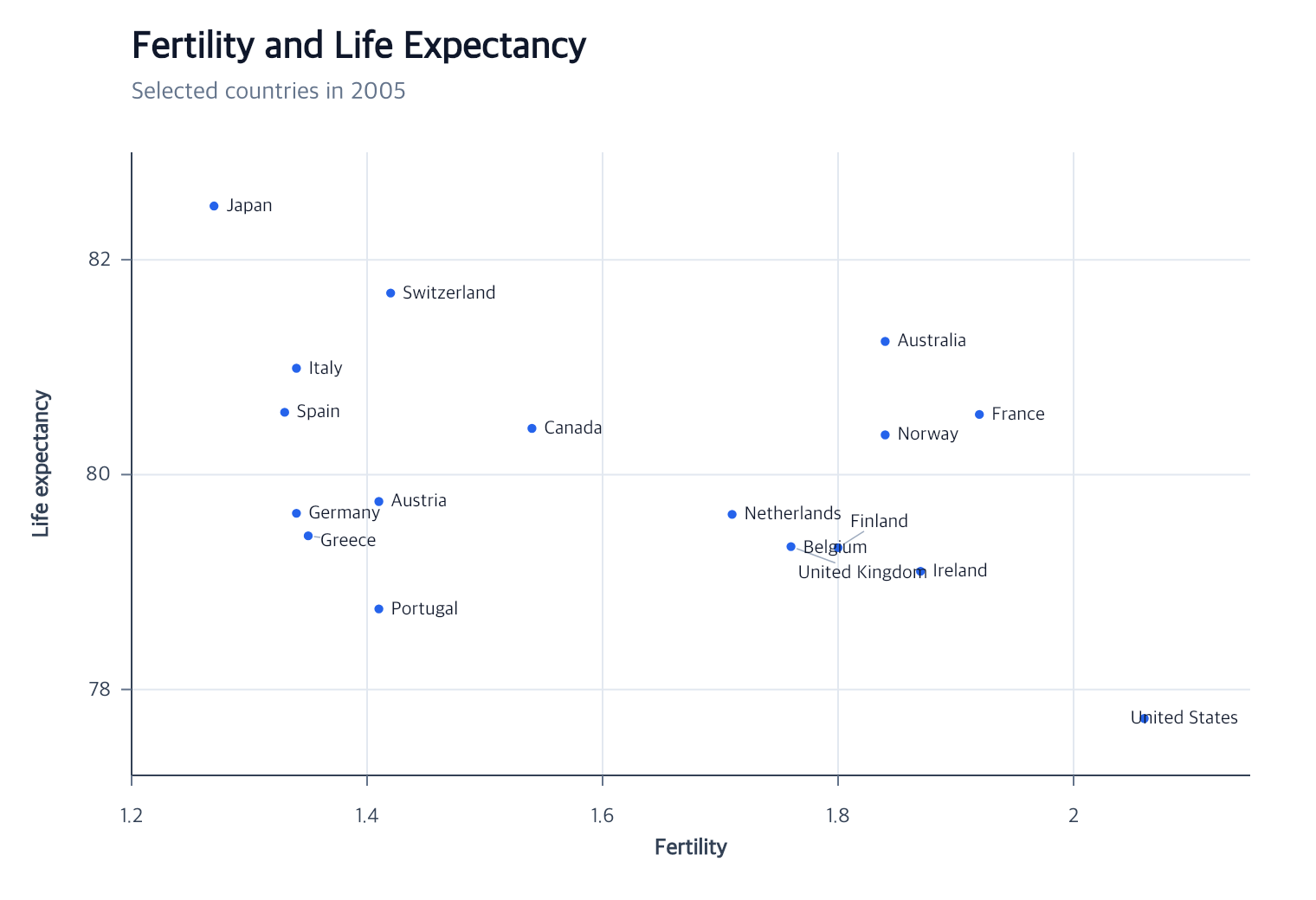
See the complete Gapminder country-label program for a point-attached label layer with leaders.
removeLabelLayout(options?)
Contextual fragment. Use an ES module with the imports, data, and prepared resource state described in this section. Caller-provided receivers:
arranged. Resolve these names from setup in this fragment or section; alternatives branch from the same base.
const originalPlacement = arranged.removeLabelLayout();
The action removes the policy and any leader collection, then restores the current semantic base text positions. It does not remove the text mark or its source relation.