Published-release documentation · release compatibility
Color Encoding
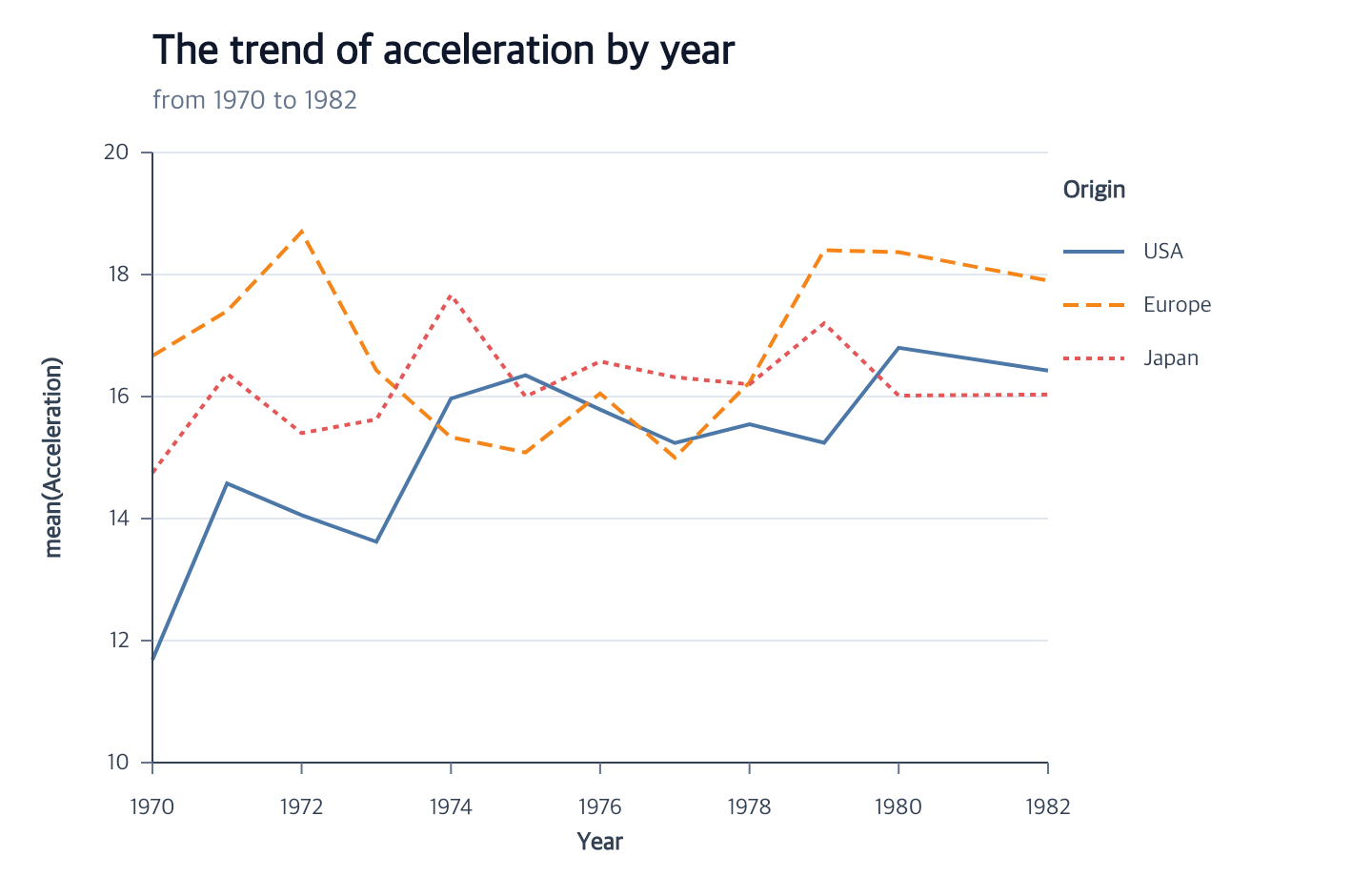
encodeColor(options)
Map a nominal or ordinal field to point fills, line-series strokes, area fills,
bar fills, rect fills, or arc-sector fills. Ordinal fields may contain ordered numeric categories such as
engine cylinder counts. Quantitative or temporal point and rect fields use continuous color
scales; point fields also support discretized color. Aggregate bars additionally support one aggregate quantitative
color value per final rectangle. Line and categorical bar materializers may use
the field for grouping when no explicit group is present. With encodeGroup,
Line and ordinary overlay Area color is an independent field with one raw value
per series. Raw Area supports an independent group field or tuple. Color must be constant within each group;
layout: "center" can infer the initial group from color when no group is present.
| Mode | Supported marks | Field types | Important options |
|---|---|---|---|
| Categorical | point, line, area, bar, rect, arc, text | point/line/area/bar/rect/arc/text: nominal, ordinal | bar/area layout; arc overlay; palette and ordinal scale; explicit-domain row-owned Cartesian line color supports unknown paint |
| Continuous | point, aggregate bar, rect, text, area, tick | point/rect/text/tick: quantitative, temporal; aggregate bar/area: quantitative | sequential scale; aggregate required for a different bar measure; area requires one finite value per existing series; tick paints its centered segment and rejects simultaneous stroke |
| Discretized continuous | point, aggregate bar, rect, text, area, tick | point/aggregate bar/rect/text/area/tick: quantitative | quantize, quantile, or threshold scale; area requires one finite value per existing series; tick maps colors per row |
| Option | Type | Default |
|---|---|---|
field |
non-empty string | required |
target |
point, line, area, bar, rect, or arc mark ID | current mark |
fieldType |
"nominal", "ordinal", "quantitative", or "temporal" |
"nominal" |
aggregate |
aggregate operation; quantitative aggregate bars only | matching measure aggregate |
layout |
"stack", "fill", "group", "overlay", "diverging", or "center" |
mark policy |
palette |
palette name or { name, count?, extent? }; shorthand for scale.palette |
omitted |
scale.id |
scale ID | "color" |
scale.type |
"ordinal" |
"ordinal" |
scale.domain |
"auto" or category array |
"auto" |
scale.range |
"auto", color array, or palette descriptor |
"auto" |
scale.palette |
palette name or { name, count?, extent? } |
omitted |
Contextual fragment. Use an ES module with the imports, data, and prepared resource state described in this section. Caller-provided receivers:
program. Resolve these names from setup in this fragment or section; alternatives branch from the same base.
program.encodeColor({
  field: "Origin",
  scale: { palette: "tableau10" }
});
Top-level palette is a shorthand for scale.palette, and scale.palette is the
concise form of scale.range: { palette: "tableau10" }. Provide only one of these
forms. Automatic domains preserve first-appearance order.
An overlaid bar’s quantitative measure scale can also position a rule, point, or line bound to another quantitative field. A shared automatic domain includes the final bar aggregates and the direct values; explicit domains still need to contain the bar’s zero baseline. Other series layout compatibility checks remain unchanged.
Use fieldType: "ordinal" when the values are ordered categories rather than
continuous magnitudes. They still receive discrete palette colors and legend
entries:
Contextual fragment. Use an ES module with the imports, data, and prepared resource state described in this section. Caller-provided receivers:
program. Resolve these names from setup in this fragment or section; alternatives branch from the same base.
program.encodeColor({
  field: "Cylinders",
  fieldType: "ordinal",
  scale: { palette: "reds" }
});
Calling encodeColor again for the same target replaces the categorical field.
Without scale.id, the current color scale is reused and its domain, marks,
and existing legend are recomputed. An explicit new ID retains the previous
named scale. Inferred legend titles follow the new field; explicit titles and
legend appearance remain unchanged.
Named palettes use a frozen 68-name vocabulary. Categorical palettes keep their
native order; count selects or deterministically cycles colors. Continuous,
diverging, and cyclical palettes used for ordinal mappings are sampled to the
domain size unless count is supplied. On a sequential scale, count must be
at least 2 and controls the concrete gradient-stop count. Non-categorical
palettes also accept an optional two-value extent within [0, 1].
Contextual fragment. Use an ES module with the imports, data, and prepared resource state described in this section. Caller-provided receivers:
program. Resolve these names from setup in this fragment or section; alternatives branch from the same base.
program.encodeColor({
  field: "Origin",
  scale: { palette: { name: "set2", count: 3 } }
});
See continuous color scales for the complete vocabulary.
For an ordinal-category mean bar, layout: "group" is the default. It keeps
placement in layoutSeries, invokes encodeXOffset for vertical bars or
encodeYOffset for horizontal bars, and recomputes the measure domain from
zero and one mean per category/color cell. Negative and positive bars therefore
extend in opposite directions from the same zero baseline. Color and offset
scales are fully resolved, and concrete rects use the implicit 0.72 band width immediately.
Contextual fragment. Use an ES module with the imports, data, and prepared resource state described in this section. Caller-provided receivers:
groupedBars. Resolve these names from setup in this fragment or section; alternatives branch from the same base.
groupedBars.encodeColor({
  field: "sex",
  layout: "group",
  scale: { palette: "tableau10" }
});
Calling grouped color again with a new categorical field atomically updates color and the directional offset to one matching first-appearance domain. Existing legends are rematerialized; inferred titles follow the field while explicit titles and styles remain unchanged.
On a complete histogram, encodeColor rematerializes each non-empty bin as
zero-stacked category rects. Stack and fill order follow source first appearance of each series,
independently of the color domain. The y scale continues to use each bin’s total count, and an explicit
domain must contain every observed category.
Contextual fragment. Use an ES module with the imports, data, and prepared resource state described in this section. Caller-provided receivers:
histogram. Resolve these names from setup in this fragment or section; alternatives branch from the same base.
histogram.encodeColor({
  field: "Origin",
  layout: "stack",
  scale: {
    domain: ["USA", "Europe", "Japan"],
    palette: "tableau10"
  }
});
Histogram color defaults to stack. fill normalizes every non-negative bin
partition to one and uses [0, 1] as the automatic y domain. group places
series side by side within each bin, overlay draws them in series order
without changing opacity, and diverging accumulates positive and negative
values independently around zero. Ordinal aggregate bars support the same five
values; their group and overlay layouts use zero as each rectangle’s start
endpoint and reject explicit measure domains that exclude zero. Call
encodeBarWidth after color only when the implicit 0.72 width is not desired.
Contextual fragment. Use an ES module with the imports, data, and prepared resource state described in this section. Caller-provided receivers:
histogram. Resolve these names from setup in this fragment or section; alternatives branch from the same base.
histogram.encodeColor({ field: "Origin", layout: "fill" });
On an area mark, author grouping directly or through
encodeDensity({ groupBy }), then encode that same field:
Contextual fragment. Use an ES module with the imports, data, and prepared resource state described in this section. Caller-provided receivers:
densityArea. Resolve these names from setup in this fragment or section; alternatives branch from the same base.
densityArea.encodeColor({
  field: "Origin",
  layout: "overlay",
  scale: { palette: "tableau10" }
});
Area layouts support stack, fill, overlay, diverging, and center; group is
bar-only. Each existing path receives the resolved color for its group. Path order,
color domain order, and legend order have separate roles;
Canvas and shared-scale changes rematerialize every affected area fill.
Change placement with layoutSeries({mode}) or an explicit color layout option. The last explicit
request wins. A color edit that omits layout preserves placement. Removing color retains group and
layout; group-to-stack transitions remove active offsets and only unused automatic offset scales.
Center-stacked areas
layout: "center" is the area-only shorthand for matching grouping, color, and
layoutSeries({ mode: "center" }) in one atomic call:
Contextual fragment. Use an ES module with the imports, data, and prepared resource state described in this section. Resource selectors used here:
target: "occupations". Resolve these names from setup in this fragment or section; alternatives branch from the same base.
const stream = chart()
  .createCanvas({ width: 690, height: 420 })
  .createData({ values: rows })
  .createAreaMark({ id: "occupations", opacity: 1 })
  .encodeX({ target: "occupations", field: "year" })
  .encodeY({ target: "occupations", field: "count" })
  .encodeColor({
    target: "occupations",
    field: "job",
    layout: "center"
  })
  .createGuides();
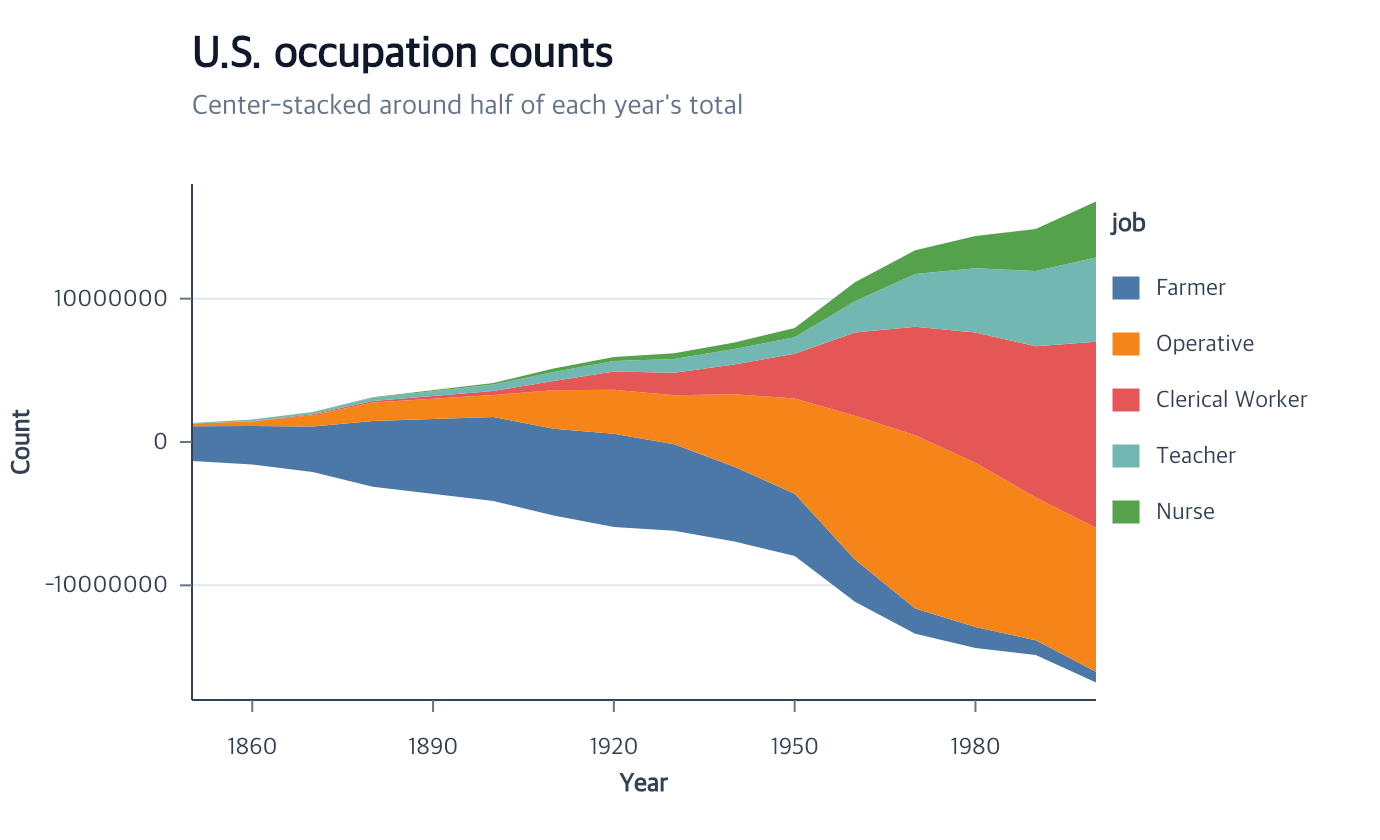
Every category must contribute exactly one finite non-negative value at every
quantitative or temporal x position. First appearance determines stable series
order. At each position, the total partition spans [-total / 2, total / 2];
each series keeps its original thickness. Missing positions, duplicate
group/x rows, negative values, two-field ribbons, and centered bars are rejected
before semantic state changes. An explicit y domain must contain every resolved
lower and upper bound. Wiggle baselines and automatic imputation are not part
of this mode.
Continuous aggregate-bar color
For an aggregate bar, continuous color is computed at the same final category
grain as the rectangle. When the color field matches the quantitative measure,
omitting aggregate inherits that measure aggregate:
Contextual fragment. Use an ES module with the imports, data, and prepared resource state described in this section. Resolve these names from setup in this fragment or section; alternatives branch from the same base.
bars
  .encodeY({ field: "population", aggregate: "sum", stack: null })
  .encodeColor({
    field: "population",
    fieldType: "quantitative",
    scale: { type: "sequential", palette: "viridis" }
  });
If color uses a different field, its aggregate is required because multiple source rows cannot be chosen arbitrarily for one final rectangle:
Contextual fragment. Use an ES module with the imports, data, and prepared resource state described in this section. Caller-provided receivers:
bars. Resolve these names from setup in this fragment or section; alternatives branch from the same base.
bars.encodeColor({
  field: "lifeExpectancy",
  fieldType: "quantitative",
  aggregate: "mean",
  scale: { type: "sequential", palette: "viridis" }
});
The resolved color domain contains the per-rectangle aggregate values.
createLegend({ channels: ["color"] }) creates a gradient legend, and
editScale({ id: "color", reverse: true }) rematerializes both bar fills and
the gradient without changing geometry. Continuous bar color rejects
layout; histogram and ranged-bar continuous color are
not part of this contract.
Continuous line color.
Parallel-coordinate lines map quantitative or temporal color once per source
row. Cartesian and Polar lines use one value per existing series: define the
series with encodeGroup when needed. Continuous color does not split a path
into a separate series for each numeric value, and varying values within one
series are rejected. A continuous color creates a gradient legend; quantitative
discretized scales create interval legends. Point-only unknown fallbacks remain
unsupported for lines.
Continuous area color
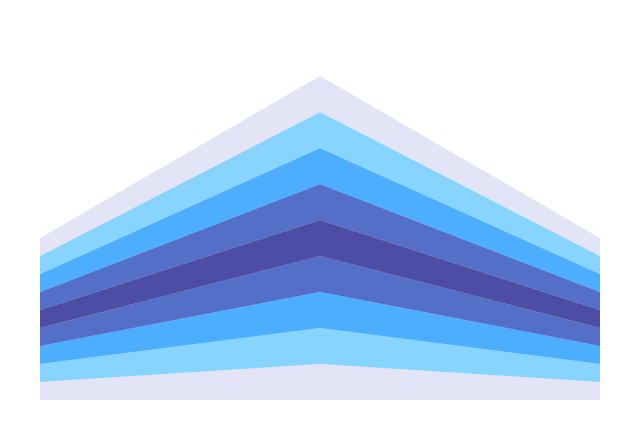
A complete Area can use encodeColor({ field, fieldType: "quantitative", scale })
with an existing continuous or discretized color scale. Create the complete area,
then declare encodeGroup when it contains several series. Every existing series
must have exactly one finite numeric color value, including all missing-break
subpaths. Without grouping, the entire area is one series. Color never creates
extra series, changes their order, interpolates between vertices, or changes layout.
Use layoutSeries independently for stack, fill, center, overlay, or diverging placement.
The same scale drives the area fills and createLegend({ channels: ["color"] }).
Gradient legends, sampled color symbols, and discretized intervals retain their
existing contracts. Automatic color domains use one value per series; path length
does not weight quantile samples. Scale, data, coordinate and Canvas edits update
the real consumers together. Existing constant or gradient fills return when the
color encoding is removed, and independent outlines and opacity remain unchanged.
Area rejects temporal color, color aggregation, and point-only scale.unknown.
createAreaPlot.color remains categorical; refine numeric color with encodeColor
after the complete plot exists. A density-derived Area can use numeric color only
when its own derived dataset contains a finite constant value per existing series;
raw input fields discarded by density estimation cannot be referenced. Basic does
not expose Area authoring; use the Full facade for Area charts.
Color numeric ticks
Unreleased candidate. Quantitative or temporal Tick color paints the whole segment and uses a filled color ramp. Stroke retains its outlined ramp. Geometry and opacity stay independent.
Contextual fragment. Use an ES module with the imports, data, and prepared resource state described in this section. Resolve these names from setup in this fragment or section; alternatives branch from the same base.
import { chart } from "ggaction";

const numericTicks = chart()
  .createCanvas({ width: 600, height: 360, margin: { left: 50, right: 150, top: 50, bottom: 50 } })
  .createData({ values: [
    { amount: 40, region: "North" },
    { amount: 60, region: "South" },
    { amount: 80, region: "North" }
  ] })
  .createRugPlot({ x: { field: "amount", scale: { domain: [35, 85] } }, edge: "bottom", guides: false })
  .editTickMark({ length: 20, strokeWidth: 1 })
  .encodeY({ field: "region", fieldType: "nominal", scale: { id: "regions" } })
  .encodeColor({ field: "amount", fieldType: "quantitative", scale: { domain: [35, 85] } })
  .createLegend({ values: [40, 60, 80] });
The regions scale replaces the numeric edge anchor. Target inference uses
the current or unique Tick; name ambiguous targets. Both positions complete
the mark. Quantitative ticks also support quantize/quantile/threshold; missing
values retain error/skip.
A Tick accepts one color or stroke field. Remove its encoding before switching channels or editing a constant stroke. Color removal restores default stroke. Categorical color, aggregate, layout and point-only unknown remain unsupported. Basic has no Tick/Rug authoring.
Related
Series overview · Scale options · Legends
Documentation provenance
293 actions · sha256:e755591a2e5f5e2b494867583876e28020a478c5220b77bdc6ad469a6224891d