Published-release documentation · 281 actions; release compatibility · contract 5520b0fa9525
Summaries, Bins, and Data Shaping
Family overview · Exact action lookup
createSummaryData({ id, source?, groupBy?, aggregates, members?, weight? })
Create reusable aggregate rows without tying the calculation to a chart type:
Contextual fragment. Use an ES module with the imports, data, and prepared resource state described in this section. Caller-provided receivers:
program. Resource selectors used here:source: "sales". Resolve these names from setup in this fragment or section; alternatives branch from the same base.
const totals = program.createSummaryData({
  id: "regionalTotals",
  source: "sales",
  groupBy: "region",
  aggregates: [
    { op: "sum", field: "sales", as: "total" },
    { op: "count", as: "records" }
  ],
  members: "sourceRows"
});
Groups follow first source appearance. aggregates accepts the shared
AggregateOperation vocabulary, including quantile and ordered first/last
objects. count counts rows and omits field; every other operation requires
one. Output aliases, group fields, and the optional members alias must be
distinct. The result contains concrete values and can be used immediately by
marks or bindMarkData.
An ungrouped empty input produces one aggregate row, so a row count is 0.
A grouped empty input produces no observed groups. The action does not synthesize
unobserved categorical combinations.
Set weight to { field, kind: "frequency" | "reliability" } for weighted
count, sum, mean, variance, standard deviation, standard error, median, q1/q3,
or quantile. Frequency weights act like virtual repeated rows without allocating
them; reliability weights use effective sample size for sample statistics. The
action validates every requested value and weight before grouping. Zero-weight
rows remain in the source but are omitted from statistical membership.
createBinData({ id, source?, field, ...binOptions })
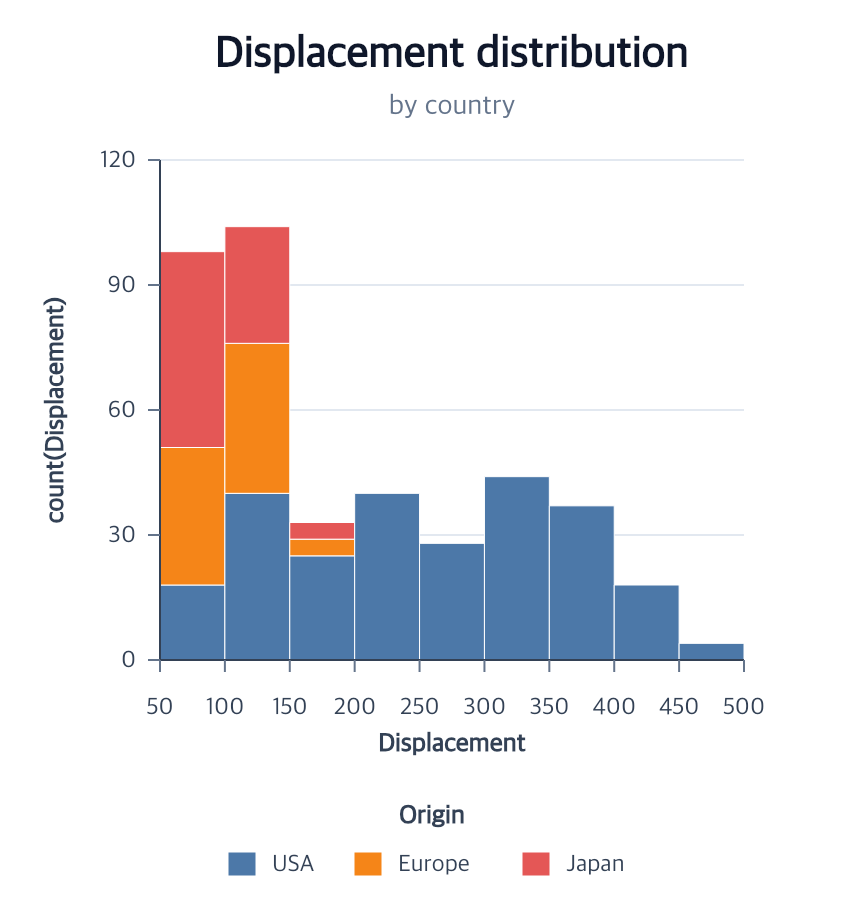
Materialize one-dimensional bin bounds and counts for reuse by ranged marks, labels, or several charts:
Contextual fragment. Use an ES module with the imports, data, and prepared resource state described in this section. Caller-provided receivers:
program. Resource selectors used here:source: "people". Resolve these names from setup in this fragment or section; alternatives branch from the same base.
const bins = program.createBinData({
  id: "ageBins",
  source: "people",
  field: "age",
  boundaries: [0, 18, 35, 65, 100],
  members: true,
  as: { lower: "age0", upper: "age1", count: "people", members: "rows" }
});
Choose one of maxBins, step, or boundaries. The defaults are
maxBins: 10, extent: "auto", nice: true, zero: false, and
includeEmpty: true. Bins include their lower endpoint and exclude the upper
endpoint, except that the final bin includes its upper endpoint. Explicit
extent or boundaries must contain every source value.
The normalized transform stores resolved boundaries, so consumers share the
same bin decisions. Set includeEmpty: false to omit zero-count bins and
members: true to retain each bin’s original source rows.
weight: { field, kind } changes each count to weighted mass. Automatic extent
and members use positive-weight rows, while zero-weight rows are still validated.
Frequency weights require non-negative safe integers; reliability weights require
non-negative finite numbers.
createFoldData({ id, source?, fields, as? })
Turn selected fields in a wide dataset into reusable key/value rows:
Contextual fragment. Use an ES module with the imports, data, and prepared resource state described in this section. Caller-provided receivers:
program. Resource selectors used here:source: "fruitWide". Resolve these names from setup in this fragment or section; alternatives branch from the same base.
const long = program.createFoldData({
  id: "fruitLong",
  source: "fruitWide",
  fields: ["apples", "pears"],
  as: { key: "fruit", value: "amount" }
});
Output follows source row order and then the exact fields order. Every row
retains all source cells and adds the selected field name and value, so its
grain is source row × selected field. The default output names are key and
value.
Selected fields must contain one common primitive type: finite numbers, strings, or booleans. Missing cells and mixed types are rejected. Output names must be distinct and cannot overwrite a source field. The action accepts at most 64 selected fields and materializes at most 10,000 rows.
createStackData({ id, source?, category, group, value, mode?, as? })
Materialize stack geometry once and reuse it across ranged marks and labels:
Contextual fragment. Use an ES module with the imports, data, and prepared resource state described in this section. Caller-provided receivers:
program. Resource selectors used here:source: "sales". Resolve these names from setup in this fragment or section; alternatives branch from the same base.
const stacked = program.createStackData({
  id: "stackedSales",
  source: "sales",
  category: "quarter",
  group: "region",
  value: "sales",
  mode: "fill"
});
stack, fill, center, and diverging call the same shared stack math used
by Bar and Area series layout. Category and group order follow first source
appearance. Every category/group pair must have at most one row; missing cells
are not synthesized. Output preserves each source row and adds lower/upper
endpoints, the raw value, and its absolute-magnitude share in the category.
The default fields are <value>_start, <value>_end, <value>_value, and
<value>_share; use as to rename all four roles. Stack, fill, and center
require non-negative values. Diverging accumulates positive and negative values
separately from zero. Zero cells remain as zero-thickness rows with share 0.