Published-release documentation · release compatibility
Histogram Positions
At a glance
| Action | Shortest call | Required state | Result |
|---|---|---|---|
encodeHistogram |
encodeHistogram({ field: "value" }) |
bar mark | Atomic binned x and count/stack y |
binned encodeX |
encodeX({ field: "value", bin: {} }) |
bar mark | Bins and x scale |
count encodeY |
encodeY() |
binned bar x | Count y scale and concrete rects |
Prefer the atomic action for ordinary chart authoring:
Contextual fragment. Use an ES module with the imports, data, and prepared resource state described in this section. Caller-provided receivers:
program. Resolve these names from setup in this fragment or section; alternatives branch from the same base.
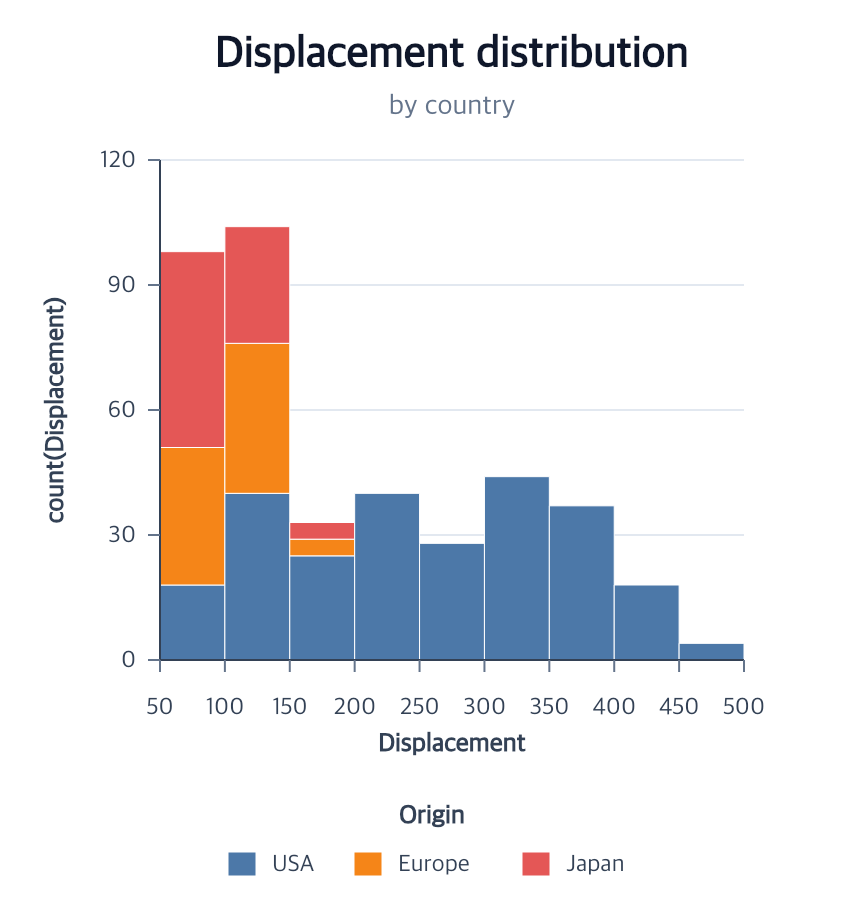
program.encodeHistogram({ field: "Displacement", maxBins: 10 });
It calls the wrapped x and y actions below without duplicating their inference or validation.
Pass a statistical weight when rows represent repeated observations or have unequal reliability:
Contextual fragment. Use an ES module with the imports, data, and prepared resource state described in this section. Caller-provided receivers:
program. Resolve these names from setup in this fragment or section; alternatives branch from the same base.
program.encodeHistogram({
  field: "Displacement",
  weight: { field: "frequency", kind: "frequency" }
});
The weighted mass drives bin heights, stacks, the y scale, value/share labels,
and selection membership. Zero-weight rows are validated but do not extend the
automatic x domain or become members. kind: "reliability" accepts any finite
non-negative weight; kind: "frequency" requires safe integers.
Binned bar encodeX(options)
| Option | Type | Default |
|---|---|---|
field |
non-empty string | required |
target |
bar mark ID | current mark |
fieldType |
"quantitative" |
"quantitative" |
coordinate |
coordinate ID | layer coordinate, then "main" |
bin.maxBins |
positive integer | 10 |
bin.step |
positive finite number | mutually exclusive |
bin.boundaries |
2–10,001 increasing finite numbers | mutually exclusive |
scale.id |
scale ID | "x" |
scale.type |
"linear" |
"linear" |
scale.domain |
"auto" or two ascending finite numbers |
"auto" |
scale.range |
"auto" or two finite numbers |
"auto" |
scale.nice |
boolean | true |
scale.zero |
boolean | false |
weight |
{ field, kind: "frequency" | "reliability" } |
unweighted |
Automatic nice bins use 1, 2, 3, 5 × 10ⁿ steps and never exceed maxBins.
Exact-step bins use zero as their grid anchor and expand an automatic domain
to step multiples. Explicit boundaries support irregular interval widths and
own the x-domain endpoints. All intervals are half-open except the final
interval, which includes its upper endpoint.
Every policy is limited to 10,000 generated bins.
The rect collection remains empty until y is encoded.
Count/stack bar encodeY(options?)
| Option | Type | Default |
|---|---|---|
field |
binned x field | inferred from x |
target |
bar mark ID | current mark |
aggregate |
"count" |
"count" |
stack |
"zero", "normalize", or null |
"zero" |
scale.id |
scale ID | "y" |
scale.type |
"linear" |
"linear" |
scale.domain |
"auto" or two finite numbers |
"auto" |
scale.range |
"auto" or two finite numbers |
"auto" |
scale.nice |
boolean | true |
scale.zero |
boolean | true |
The automatic y domain uses total bin counts for zero stack, individual series
counts for unstacked layouts, and [0, 1] for normalize. The action materializes
one concrete rectangle per non-empty bin; a later color encoding can split each
bin according to its layout.
Bins with a separate measure
For a binned bar whose height is a measure rather than a count, supply a quantitative Y field and its aggregate. Each rectangle spans the complete bin interval; numeric bin centers do not become fixed-width bars. Empty bins leave empty intervals. Mean, median, sum, min, max and the other native aggregate operations use the same per-bin, per-series samples as the measure domain and mark labels. Non-count bins do not accept statistical weights.
Contextual fragment. Use an ES module with the imports, data, and prepared resource state described in this section. Resolve these names from setup in this fragment or section; alternatives branch from the same base.
import { chart } from "ggaction";

const binned = chart()
  .createCanvas({ width: 600, height: 450, margin: 90 })
  .createData({ values: [
    { X: 1, Y: 2, Group: "A" }, { X: 2, Y: 6, Group: "A" },
    { X: 1, Y: 10, Group: "B" }, { X: 8, Y: 5, Group: "A" }
  ] })
  .createBarPlot({
    x: { field: "X", bin: { boundaries: [0, 5, 10] } },
    y: { field: "Y", aggregate: "mean" },
    color: { field: "Group", layout: "overlay" },
    guides: false
  });
const stacked = binned.layoutSeries({ mode: "stack" });
const normalized = binned.layoutSeries({ mode: "fill" });
const dodged = binned.layoutSeries({ mode: "group" });
Non-count bins default to overlay. Stack adds the group aggregates; fill divides each aggregate by their sum within the bin. Stacked group means therefore do not represent the pooled mean. Dodge subdivides each bin by series; the other layouts retain its full width.
Errors and limitations
Count Y fields must match the binned x field; explicit non-count measures may differ. maxBins, binStep, and
binBoundaries are mutually exclusive. Step-aligned explicit domains must
contain the data and use zero-anchored step multiples. Explicit boundaries
must contain the complete data extent; a separate domain must match their
first and last values. Empty intervals remain meaningful but do not create
zero-height rectangles. Grouped histograms require categorical color with
layout: "group"; the color action creates the matching xOffset companion.
Related
Series encodings · Scale options · Histogram tutorial
Documentation provenance
293 actions · sha256:e755591a2e5f5e2b494867583876e28020a478c5220b77bdc6ad469a6224891d